How to use BFM-900L 33
BFM-900L
FETAL MONITOR
(
Ver 1.1
)
32 How to use BFM-900L
5.8 Volume Control
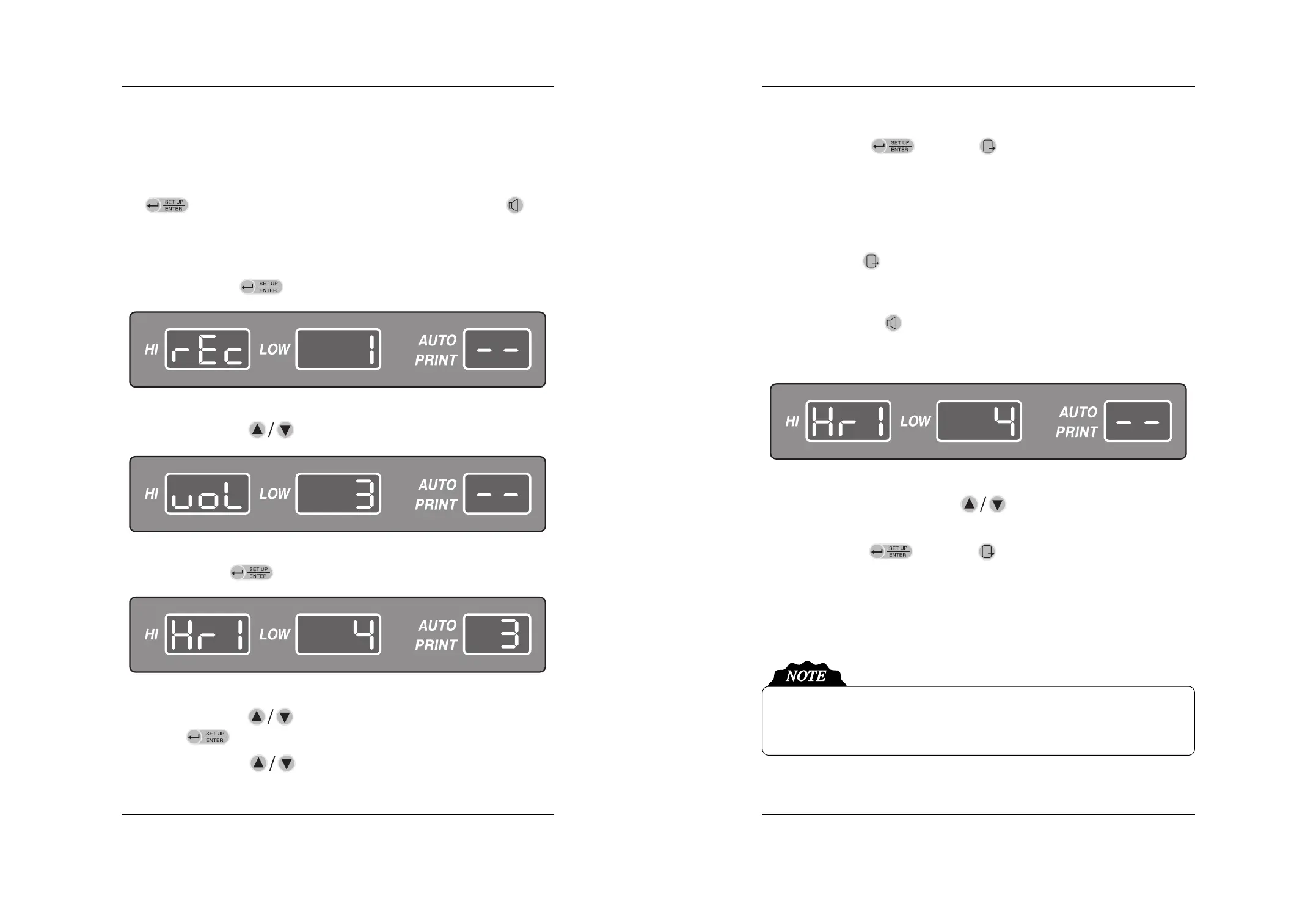
The volume can be adjusted in 8 levels and there are two ways to control it. One is to use the SETUP
key( ) and control it from the menu, and the other is to use the volume key( ). The
volume of Doppler I and II can be adjusted.
■Volume Change in the Menu
(1) Press the SETUP key( ) to move the menu setting mode.
(2) Press the Up/Down key( ) to move the volume menu.
(3) Press the Enter key( ) to enter the volume control area.
(4) Press the Up/Down key( ) for changing the volume HR1 or HR2 and then press the
Enter key( ). The volume level will be twinkled in the “LOW” area.
(5) Press the Up/Down key( ) to control the volume during twinkling.
The Volume of Key Sound, Alarm Sound and Information Sound cannot be adjusted. If the
alarm sound happens, you can turn off the sound to use SILENCE key. If the information
sound happens, you can turn off the sound to use Exit key.
(6) Press the Enter key( ) or Exit key( ) at the desired level and the volume control
operation is complete. If you press the Enter key, the desired level will be saved and move to
menu (3). If you press the Exit key, the volume level will be returned to previous level and
move to menu (2).
(7) You can change the volume level of DOP1 and DOP2 with process (2) ~ (6).
(8) Press the Exit key( ) and move to the basic screen after all setting.
■Using the Volume Key
(1) Press the Volume key( ) to move to menu setting mode. The initial setting is to control
DOP 1. If you press the Volume key once more, DOP 2 will be controlled. DOP 1 and DOP 2
are will be changed by the Volume key.
(2) Adjust the volume to use Up/Down key( ) after choosing DOP 1 or DOP 2. DOP 1
or DOP 2 can be adjusted to repeat process (1) and (2).
(3) Press the Enter key( ) or Exit key( ) at the desired level and the volume control
operation is complete. If you press the Enter key, the desired level will be saved. If you press
the Exit key, the volume level will be returned to previous level.


 To Next Page