Handheld Pulse Oximeter
19
Environment Setting of Equipment
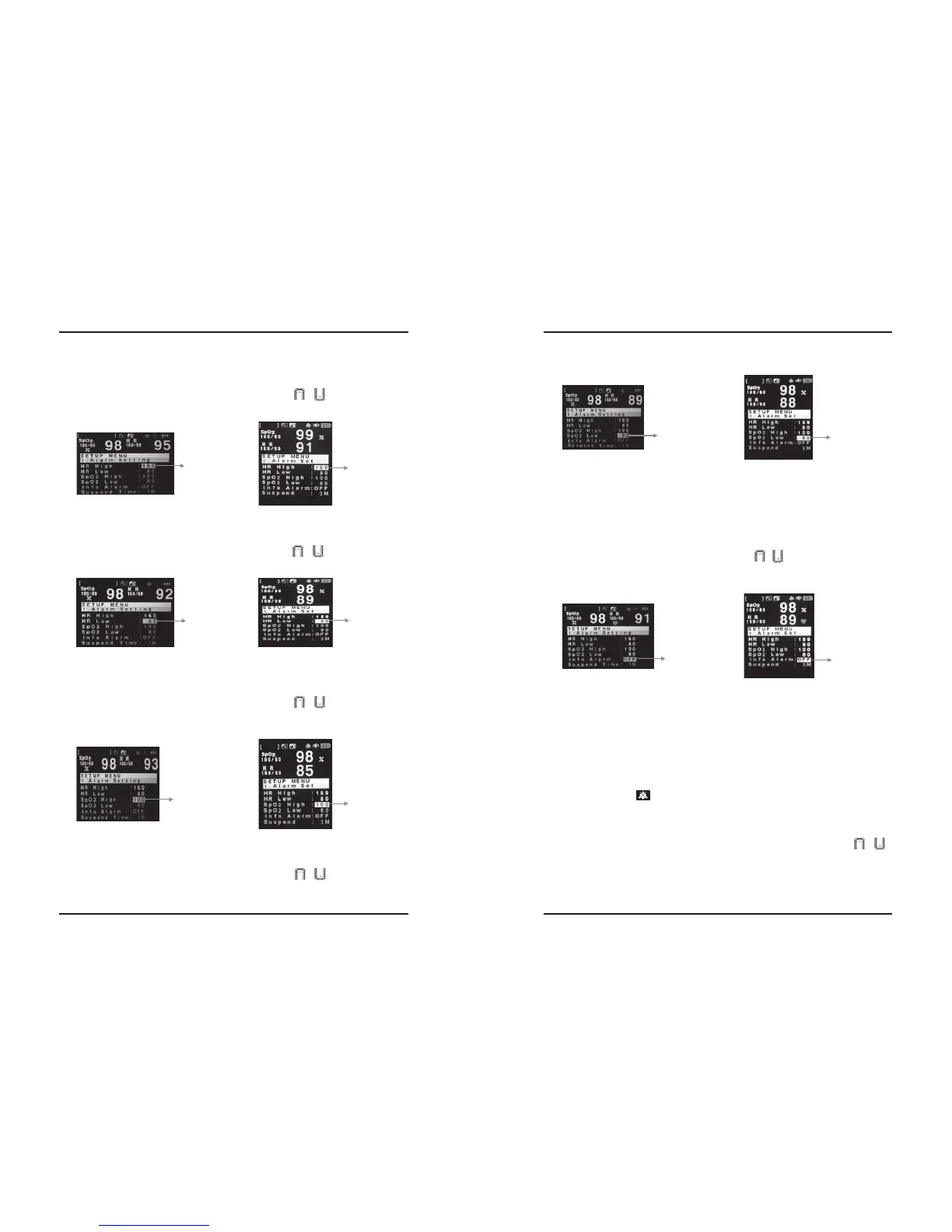
◆High Pulse Rate Alarm Limit Adjust Mode
After selecting “HR high” (the digits in right side of the colon is reversed) on the alarm setting
screen, you can change the value as you want by UP/DOWN ( / ) button and then press
ENTER button. Now, you can adjust the high pulse rate alarm limit like this.
◆Low Pulse Rate Alarm adjust Mode
After selecting “HR Low” (the digits in right side of the colon is reversed) on the alarm setting
screen, you can change the value as you want by UP/DOWN ( / ) button And then press
ENTER button. Now, you can adjust the low pulse rate alarm limit like this.
◆High SpO
2 Alarm Limits Adjust Mode
After selecting “SpO
2 High” (the digits in right side of the colon is reversed) on the alarm setting
screen, you can change the value as you want by UP/DOWN ( / ) button and then press
ENTER button.
Now, You can adjust the high oxygen saturation alarm limit like this.
◆Low SpO
2 Alarm Limits Adjust Mode
After selecting “SPO
2 Low” (the digits in right side of the colon is reversed) on the alarm setting
screen, you can change the value as you want by UP/DOWN ( / ) button and then press
ENTER button.
Environment Setting of Equipment
20
PalmCare plus
Now, you can adjust the low oxygen saturation alarm limit like this.
◆Information Alarm ON/OFF
Information Alarm is a kind of sound alarm ringing when a probe has slipped off or when a probe
connector is pulled off from the Palmcare plus.
At this time, this is an item to decide wether this information alarm will activate (setting on) or will
not (setting off).
After selecting “Info Alarm” (the on/off in right side of the colon is reversed) on the alarm setting
screen, you can select on/off as you want by UP/DOWN ( / ) button and then press ENTER
button.
Now, you can adjust how to turn on or off the information alarm like this.
◆Alarm Suspend Time value setting
Alarm suspend time value means not to make any alarm sound during the set time.
In other words, the user can make not to activate the alarm sound for a while. The time can be
adjusted as 1MIN/2MIN/3MIN/OFF
If the event caused the alarm will not be terminated during the set time, the alarm sound will
activate again.
※The alarm will not ring if you set the Suspend Time as OFF, even though the alarm occurs
※As this shape icon ( ) s displayed on the LCD of the initial screen during Suspend time, you
can find out that the current alarm is suspended state.
■After selecting Suspend Time (the value in right side of the colon is reversed) on the alarm
setting screen, you can adjust suspending time as you want by UP/DOWN button ( / )
and then press ESC button to return to the initial screen of the environment setting.
HR Plafonnement
HR Plafonnement
SpO2 Set the
Lowest limit
SpO2 Set the
Lowest limit
Info Alam Setting
Info Alam Setting
Set the Lowest limit
Set the Lowest limit
SpO2 Plafonnoement
SpO2 Plafonnoement


 To Next Page