Handheld Pulse Oximeter
23
Environment Setting of Equipment
Step2) You can use UP/DOWN ( / ) button for the item moving, and ENTER ( ) button
for your choice.
Step3) You can return automatically to the SETUP screen if you choose the mode by ENTER button.
And if you want to cancel the selection and return to the SETUP screen, you can go back to
the SETUP screen with ESC ( ) button.
5.4 Sound Setting (Sound High/Low/Off)
The sound ON/OFF set up is used for the Heart Beating Sound (Peak Sound), buttons sound which
can be heard on pressing the buttons and turning on/off the sound.
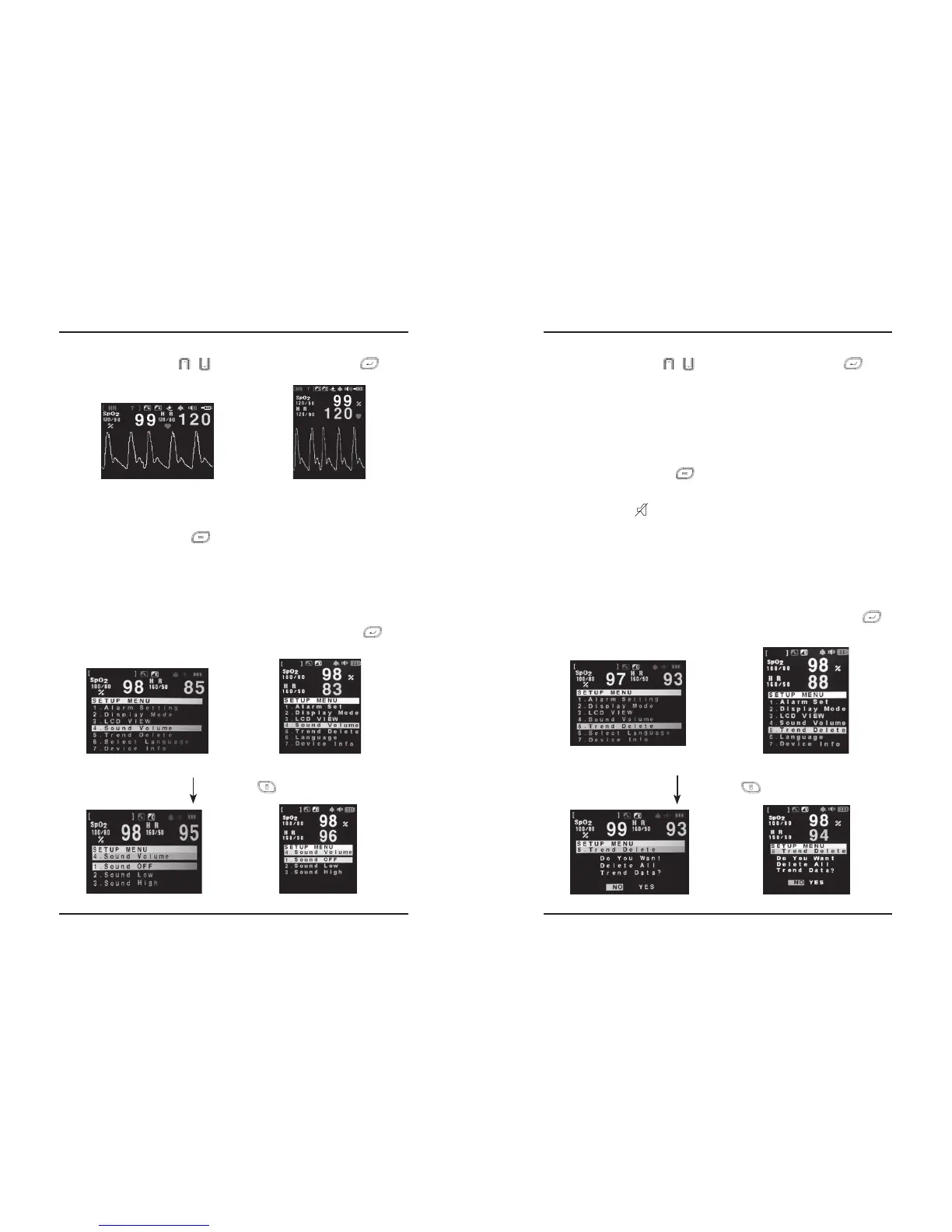
Step1) You can enter to the High/Low/Off setting mode if you press ENTER button ( ), after
making a reverse the item “4.Sound Volume” on the environment setting (SETUP) screen.
Step2) You can use UP/DOWN ( / ) button for the item moving, and ENTER ( ) button
for your choice.
i. “1.Sound Off” : Volume Off
ii. “2.Sound Low” : Low volume
iii. “3.Sound High” : High volume
Step3) You can return automatically to the SETUP screen if you choose the mode by ENTER button.
And if you want to cancel the selection and return to the SETUP screen, you can go back to
the SETUP screen with ESC ( ) button.
※The initial Sound Mode of PalmCare plus is set as on..
※As this shape icon is displayed on the LCD of the initial screen, if you set the sound off,
you can find out that the current sound is OFF state.
5.6 Delete the TREND
This item is used to delete all of the trend data which is saved in the internal memory of Palmcare
plus.
Step1) You can enter to the TREND DELETE setting mode if you press ENTER button ( ),
after making a reverse the item “5.TREND DELET” on the environment setting (SETUP)
screen.
Environment Setting of Equipment
24
PalmCare plus
Press MENU ( ) Button.
Making a reverse the item “4.Sound Volume” by UP/DOWN button.
①Horizontal ②Vertical
Press MENU ( ) Button.
Making a reverse the item “5.TREND DELETE” by pressing UP/DOWN button.


 To Next Page