BIOQUELL PROTEQ USER MANUAL -EN
TD092-O&M-001
Page 23 of 58
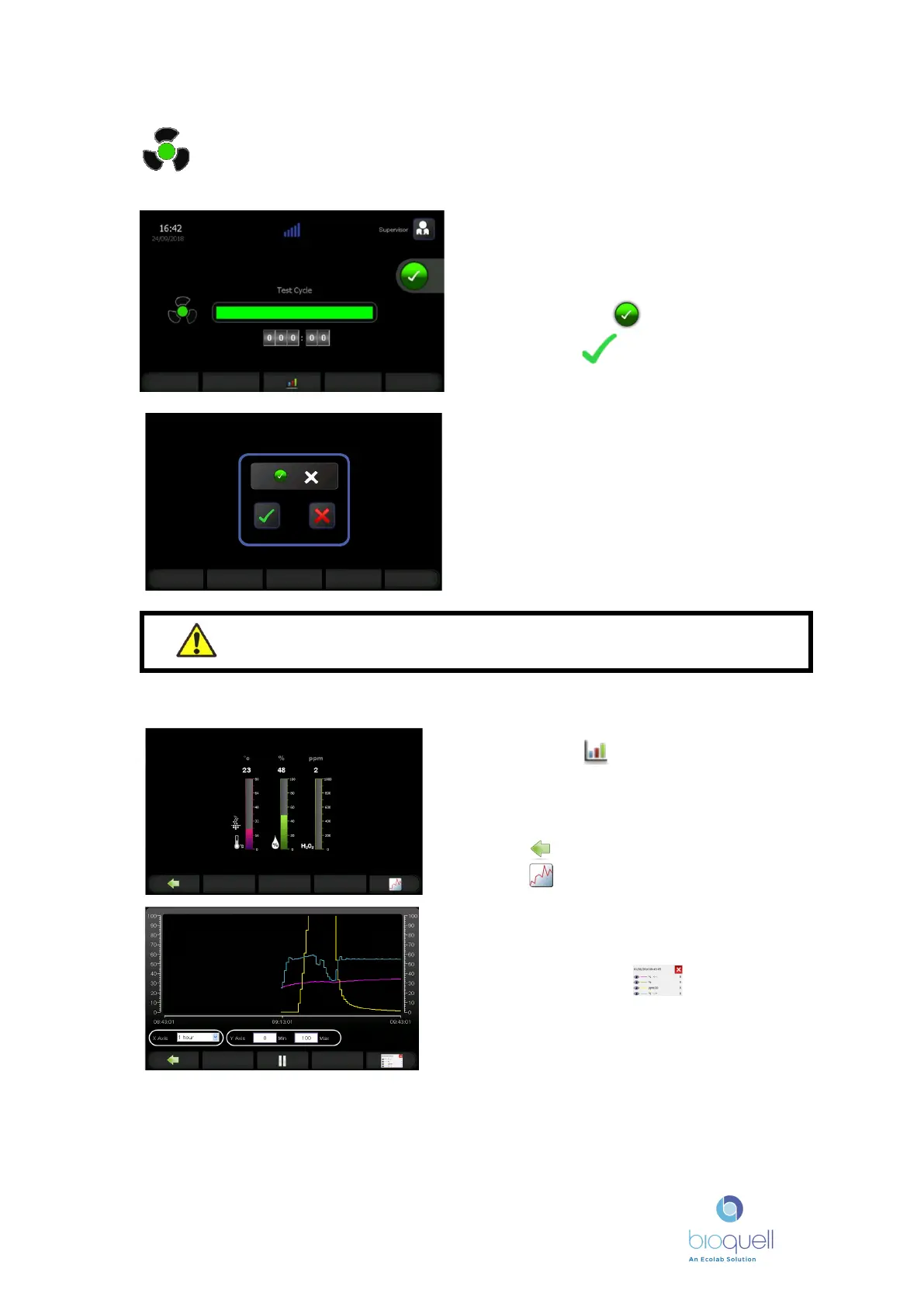
Aeration stage completed Flashing green
8.2 Viewing Cycle Variables (Sensor units only)
Check that the enclosure is at 1ppm or
below using an independent low level
hydrogen peroxide sensor, before
confirming that the cycle is to be stopped
by pressing the button, then confirm
by pressing
The parameter details can be viewed by
pressing the button. These give:
• Enclosure temperature
• Enclosure relative humidity
• Hydrogen peroxide concentration
Press to return to the cycle stage screen
Press to view graphical trend
WARNING – Do not enter an enclosure until the hydrogen peroxide
level has been checked with a low level sensor and is at a safe level
The graphical view is in real time. The axes
can be altered using the input fields at the
bottom.
When pressing the icon, a gold line
and a data window appear.
If no one is logged on, this screen will not
appear. See 8.1 on how to log on. The
name of the person logged on will appear
on the printed record.


 To Next Page