BIOQUELL PROTEQ USER MANUAL -EN
TD092-O&M-001
Page 31 of 58
Note: ‘NO USER’ is not selectable.
11.4.2 Changing Access Level
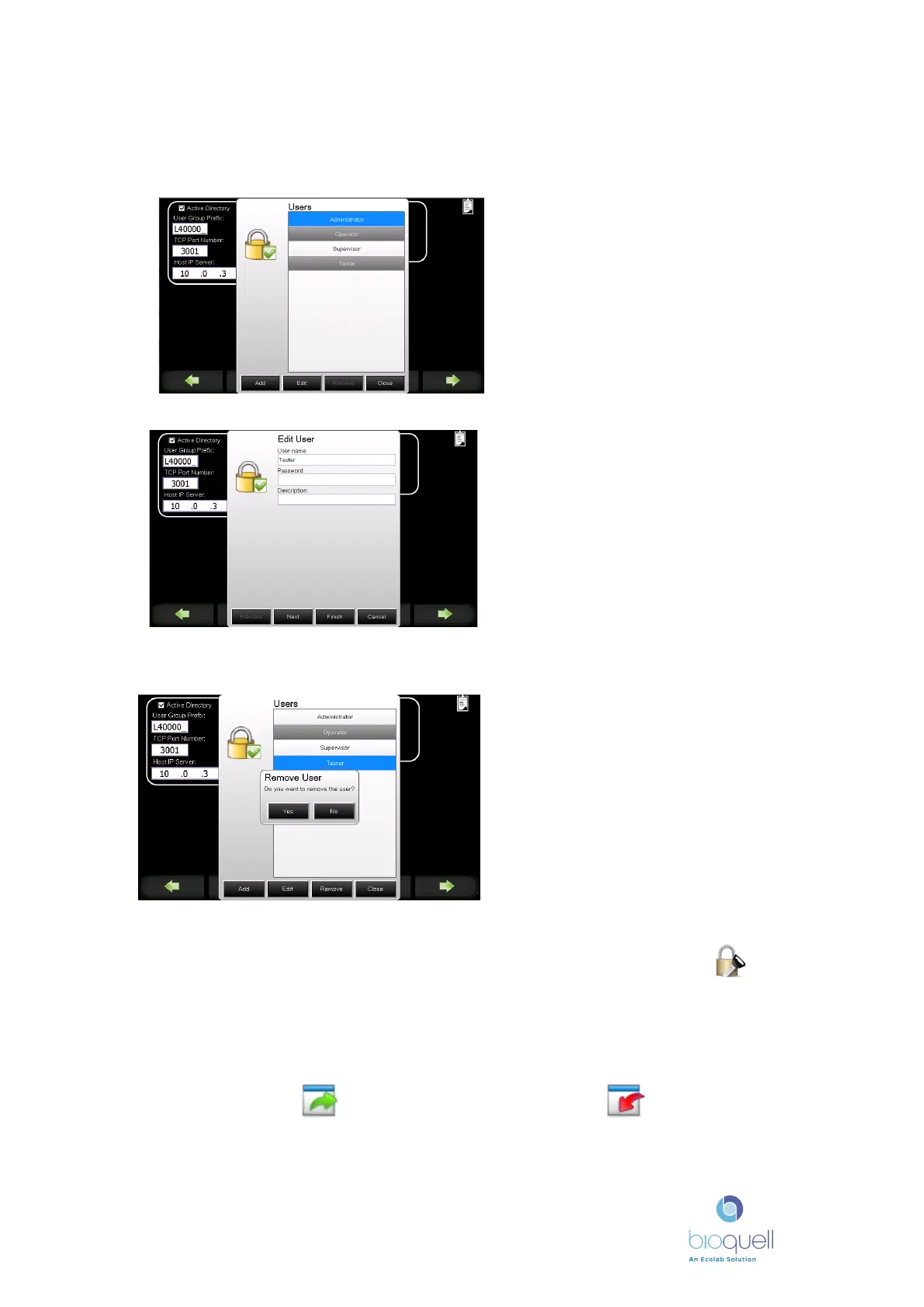
Select the person’s name for
which access level is to be
changed.
Select ‘Edit’.
Enter the user’s details.
Select ‘Next’.
Select access level to which the
user is to be assigned.
Then select ‘Finish’.
11.4.3 Deleting Users
Select the name of the user to be
removed.
Select ‘Remove’.
A prompt box appears. Select
‘YES’ to remove the user or ‘NO’
to return to the previous screen.
11.4.4 Changing Password
A local user can change their password when logging on by pressing the
icon.
11.4.5 Backing-up User and password data
User set logons and passwords set up on the panel can be backed-up to the hard
disk by pressing the icon, and can be retrieved using icon. The
information is encrypted and is accessible for backing-up on the network using
FTP, refer to Bioquell for further information.


 To Next Page