BIOQUELL PROTEQ USER MANUAL -EN
TD092-O&M-001
Page 47 of 58
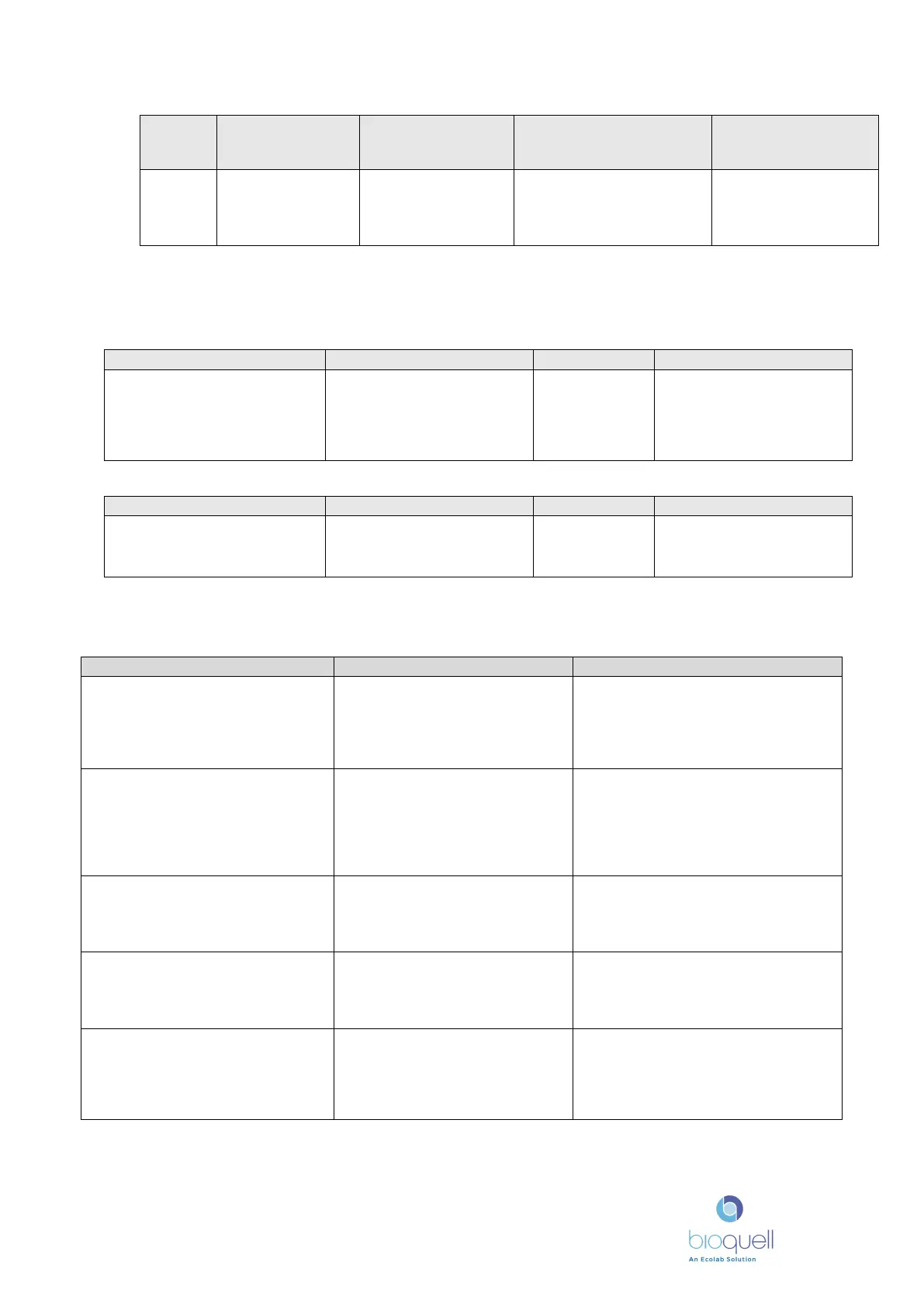
No.
Description
78
Remote interface
communication
timeout
up to communicate
with the Unit has lost
communication.
Will stop cycle prior to
gassing stage, otherwise will
go into emergency aeration.
Check cables to the
remote system and
contact service provider
* These alarms are only applicable to the ProteQ Multi-Generator Controller
Warnings
programmed minimum H
2
O
2
ppm level not achieved.
printed only at
end of Dwell,
also at end of
cycle (deviation
Inform supervisor.
Check concentration of H
2
O
2
and conditions in which it
has been stored.
The Administration screen icon
(pen) flashes, and the service
date field in the administration
overdue
Arrange a service visit by
the Bioquell Service provider
15.3 Fault Finding
No power to the screen or base unit
• Check power is switched on at
the lectern/base unit
• Check the building’s power
supply to the lectern/base unit
If power to the lectern/base unit is OK
Contact Bioquell Service Provider
• Check printer has correct paper
• Check paper feed
• Check green light on printer is
lit
Replace paper roll if necessary. The
green light will flash.
Press paper advance key on printer.
Check paper has the correct side up.
Contact Bioquell service provider.
accordance with User Manual
• Re-set password by
administrator
Contact person with Administrator
rights
Contact Bioquell Service Provider
2
2
concentration level reads high
and will not reduce
hydrocarbon based cleaning
agents have been used on the
ProteQ base unit or items in
Contact Bioquell Service Provider.
• Check H
2
O
2
is not expired
• Ensure enough H
2
O
2
in bottle
for cycle chosen
If checks OK Contact Bioquell Service
Provider


 To Next Page