Project Type
Instructions
Date: February 12 2021
Customer: Thermor Ltd
Job Number: TH6151
Item Number: BD353
Designer: Alex Vranjesevic
Revision: C
Artwork is not to be amended or scaled. If any changes
are required please send through Thermor oce with
instructions, and we will amend here and resend artwork
through. PLEASE RETURN WITH SIGNATURE
Contact: Graphic’s Department
graphics@thermor-ins.com
Colour Breakdown
Reason For Project:
New Item:
New Branding:
Design Update:
N/A: X
UPC (For Reference Only)
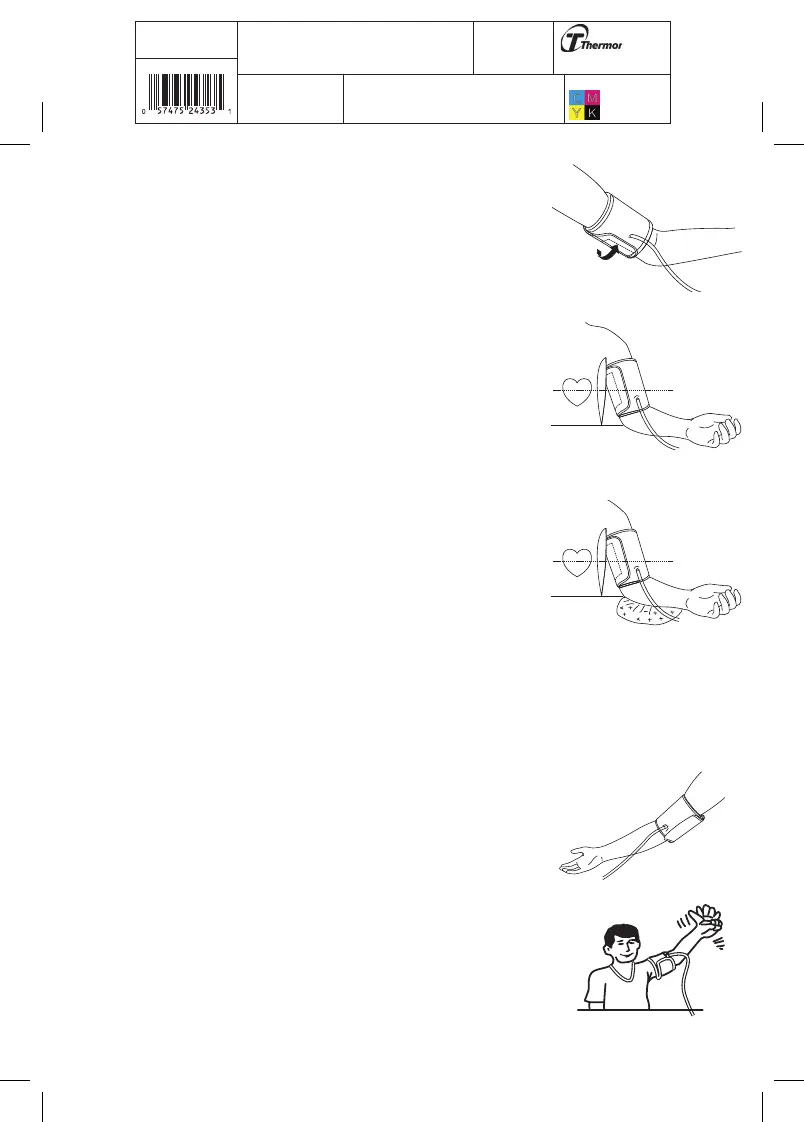
d) The cuff should fit snugly around the arm, but not too
tight. You should be able to fit two fingers under the cuff.
If the cuff is the wrong size, the deivce will not measure
your blood pressure accurately. Contact the store, or BIOS
Medical for other sized cuffs.
e) Place the arm on the table (palm facing upwards) so that
the cuff is at the same level as the heart. Make sure there
is no kink in the hose.
f) You can adjust the level of your arm by putting a cushion
under your arm. Ideally the cuff should be at heart level.
g) Remain seated in a comfortable room temperature for at least 5 minutes, then start the
measurement.
h) For those who cannot put the cuff on the left arm, put it
on the right arm as shown.
i) Consecutive measurements will cause blood
accumulation in the lower arm which will affect the
measuring results. To improve reading accuracy, raise
the arm being measured, squeeze and relax your
hand several times, then take another measurement.
Another option is to take the cuff off and wait at least
5 minutes before repeating measurement.
d)
e)
f)
h)
i)















 To Next Page