Project Type
Instructions
Date: February 12 2021
Customer: Thermor Ltd
Job Number: TH6151
Item Number: BD353
Designer: Alex Vranjesevic
Revision: C
Artwork is not to be amended or scaled. If any changes
are required please send through Thermor oce with
instructions, and we will amend here and resend artwork
through. PLEASE RETURN WITH SIGNATURE
Contact: Graphic’s Department
graphics@thermor-ins.com
Colour Breakdown
Reason For Project:
New Item:
New Branding:
Design Update:
N/A: X
UPC (For Reference Only)
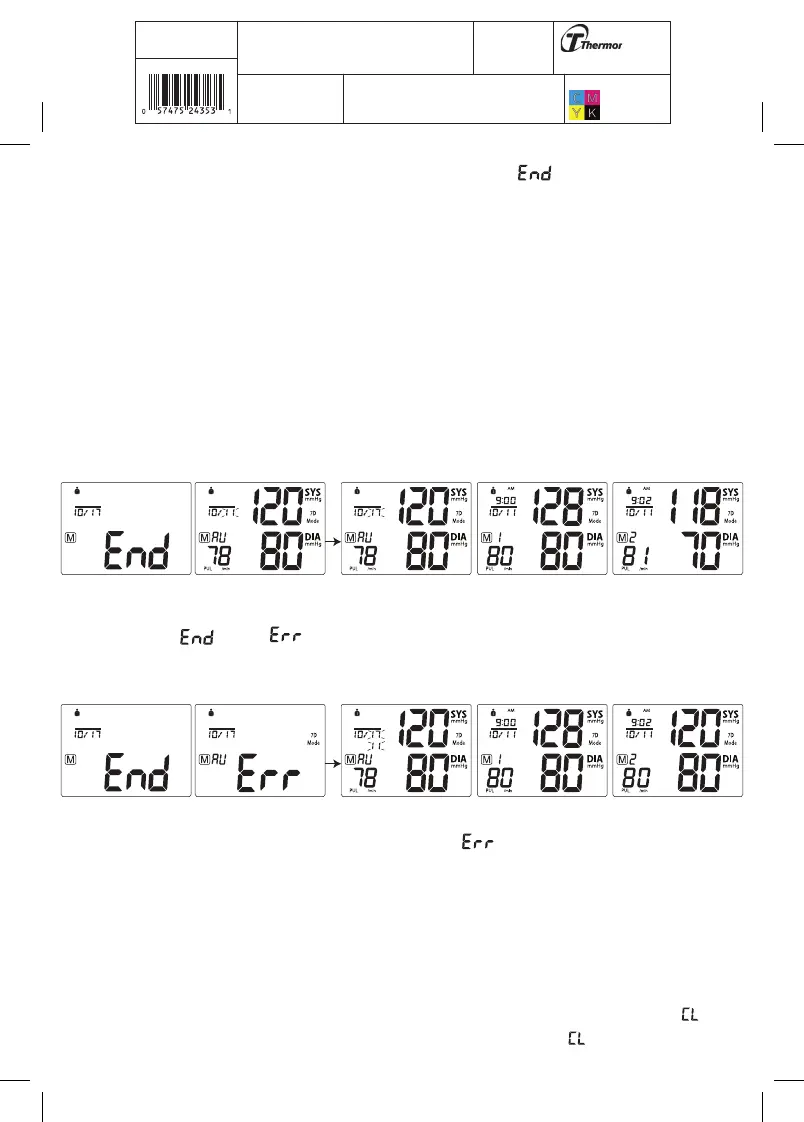
A. If the Protocol was done correctly, the monitor will display “ ”, meaning all
28 measurements have been saved in the memory, and then display the Average
Measurement as per the Protocol software. In the Average Measurement screen the date
will display the second day the Protocol measurements were started and then change to
the 7th day the Protocol measurements ended.
For example: If the first day of measurements are started on October 10th and ends 7 days
later on October 17th, the date will appear as 10M11D then change to 10M17D and back
and forth . 10M11D will display instead of 10M10D because the Protocol disregards the
first day of measurements and averages the last 6 days of measurements, see section 3.4
for more explanation.
Press the MEM button to display the subsequent measurements.
B. If the Protocol was done incorrectly or if any measurements were missed, the monitor
will display “ ” then “ ” then the average measurement and then display the
subsequent measurements.
Reasons why the Protocol Software is displaying :
- Not enough measurements have been saved in memory. For the Protocol Software to work correctly
there needs to be 28 measurements saved in memory, 4 measurements taken for 7 days.
3.10 Clear Measurements From Memory
If you are sure that you want to permanently remove all stored memories, first choose the
mode you want to delete the memory from, then press the SET button 14 times until “ ”
appears when the power is off. Press the START/ STOP button until “ ” flashes 3 times to















 To Next Page