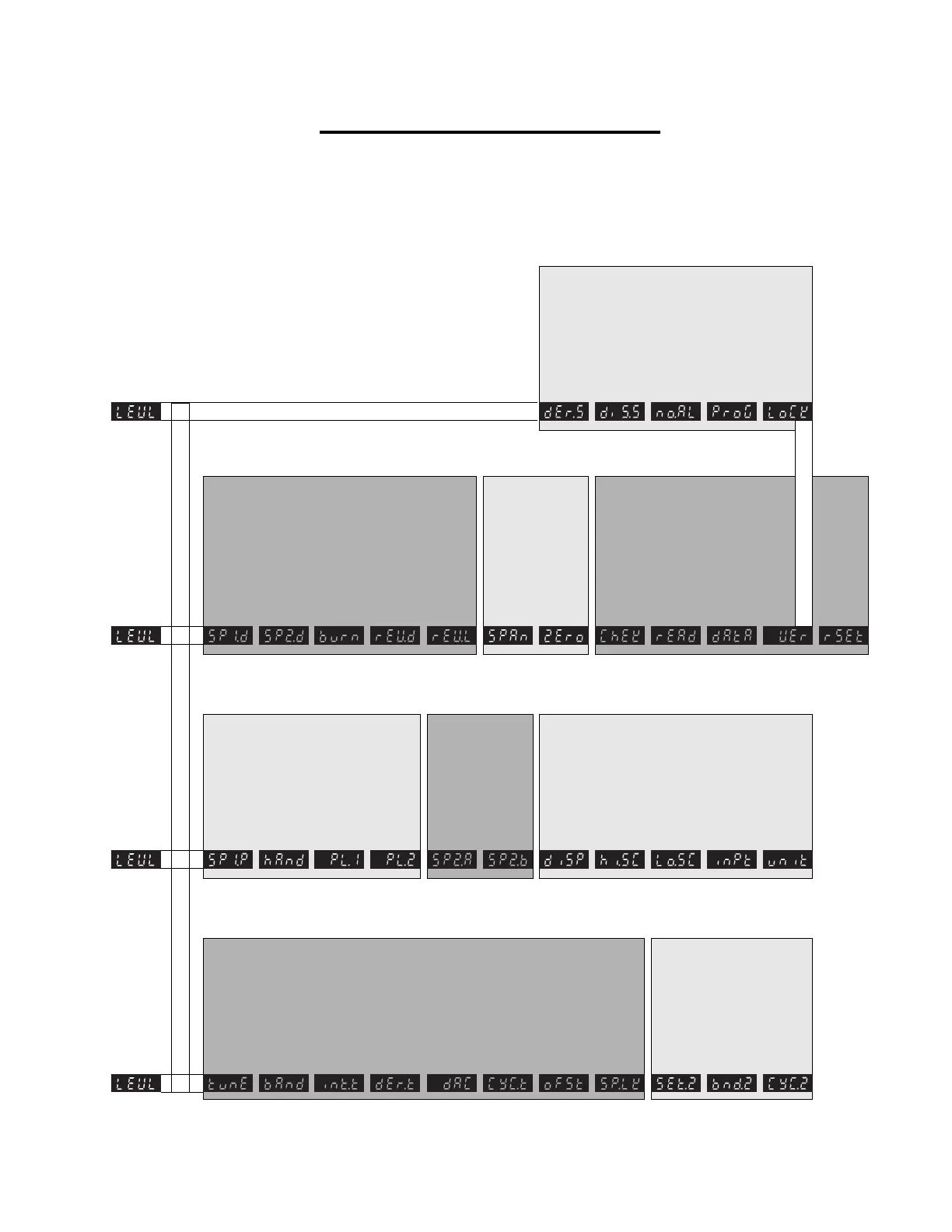
Select Autotune or Park
Proportional Band / Gain
or dead band width
Integral time / Reset
(Automatic offset)
Derivative time / Rate
Derivative approach
control
Proportional cycle-time
or ON/OFF
Offset / Manual reset
Lock main setpoint SP1
Adjust alarm SP2
setpoint
Select SP2 Dead
Band Width or
Proportional band
Select SP2 ON/OFF
or Cycle-time
Read control SP1
output power %
SP1 manual power
control %
Set SP1 power limit %
Set SP2 power limit %
Subsidiary alarm SP2
mode: latch/sequence
Main alarm SP2
mode: strategy.
Select display resolution
(decimal point)
Set scale maximum
Set scale minimum
Select sensor input
Read SP1 control
output device
Read SP2 alarm
output device
Burn-out protection
Select output modes:
Direct/Reverse
Select SP1/SP2
L.E.D. modes
Sensor span adjust
Sensor zero adjust
Select control
accuracy monitor
Read monitor results
Read Autotune
tuning data
Functions reset
Derivative sensitivity
Display sensitivity
Disable alarm
annunciator
Disable program
auto-exit
Security lock
Software version
2
1
4
3
Ú
Ú
×
Ø
×
PROGRAM ENTRY POINT
Program Functions Menu
Select units of
measurement
PROGRAM MODE FUNCTIONS MENU is arranged on 4 levels. Entry into menu is
bottom of level 1. Exit menu from any point. Level 4 is hidden for security;
there's one way in. Menu items are loosely grouped together according to
similar functions. Some functions are defaults
(hard or soft). Some are read only. Some are only
active depending on other function settings. Some
are used only in rare instances. Chances are
you'll have to become intimately familiar with only
a few of the important ones.
10
Proox model 360
version 1.0


 To Next Page