Tuning
Tuning matches control parameters of Proox 360 to gas dynamics of
host chamber to achieve effective control.
TUNING
Different oxygen control jobs in
different chambers require specific
control parameters. Tuning means
setting those control parameters that
result in acceptable control.
Which parameters to set, and
how to set them, depends on the job.
Is oscillation acceptable? If so how
much? Is overshoot permissable?
Undershoot? How much? For how
long? Is the load fixed or variable?
Does setpoint change? Must recov-
ery be fast?
Capability exists to handle prac-
tically any oxygen control job. How-
ever, the more complex and demand-
ing the job, the more involved tuning
becomes.
Tune only what's necessary to
accomplish the job. Any additional
control parameters probably won't
help, and might hurt. Excessive tun-
ing can reduce control stability.
Most oxygen control jobs are
simple. Thus tuning is easy. Only a
few parameters need to be set. Ad-
vanced control capabilities are avail-
able, but use them only if you need to.
Just watch the control process
and see how each control parameter
affects it. This is the only definitive
way. Usually it's the easiest too.
Tuning takes time. It takes gas.
It means sitting and watching the
control process, sometimes over and
over. There is no shortcut. Trial and
error is the only way to tell if a tune set
works. Along with the Proox 360 you
are provided with a "Control Param-
eters Chart", this chart has all the
pretuning information that was done
at the factory. Don't lose this chart,
but if you do then call the number at
the front of this manual to receive a
new copy.
Always change only one control
parameter at a time. See how that
setting works first, before changing
another. Record each tune set. When
satisfied with control, copy and set
aside for safekeeping.
A tune doesn't have to be per-
fect to work. But don't stop short
either. Once tuning is done and done
right, it may never need further at-
tention.
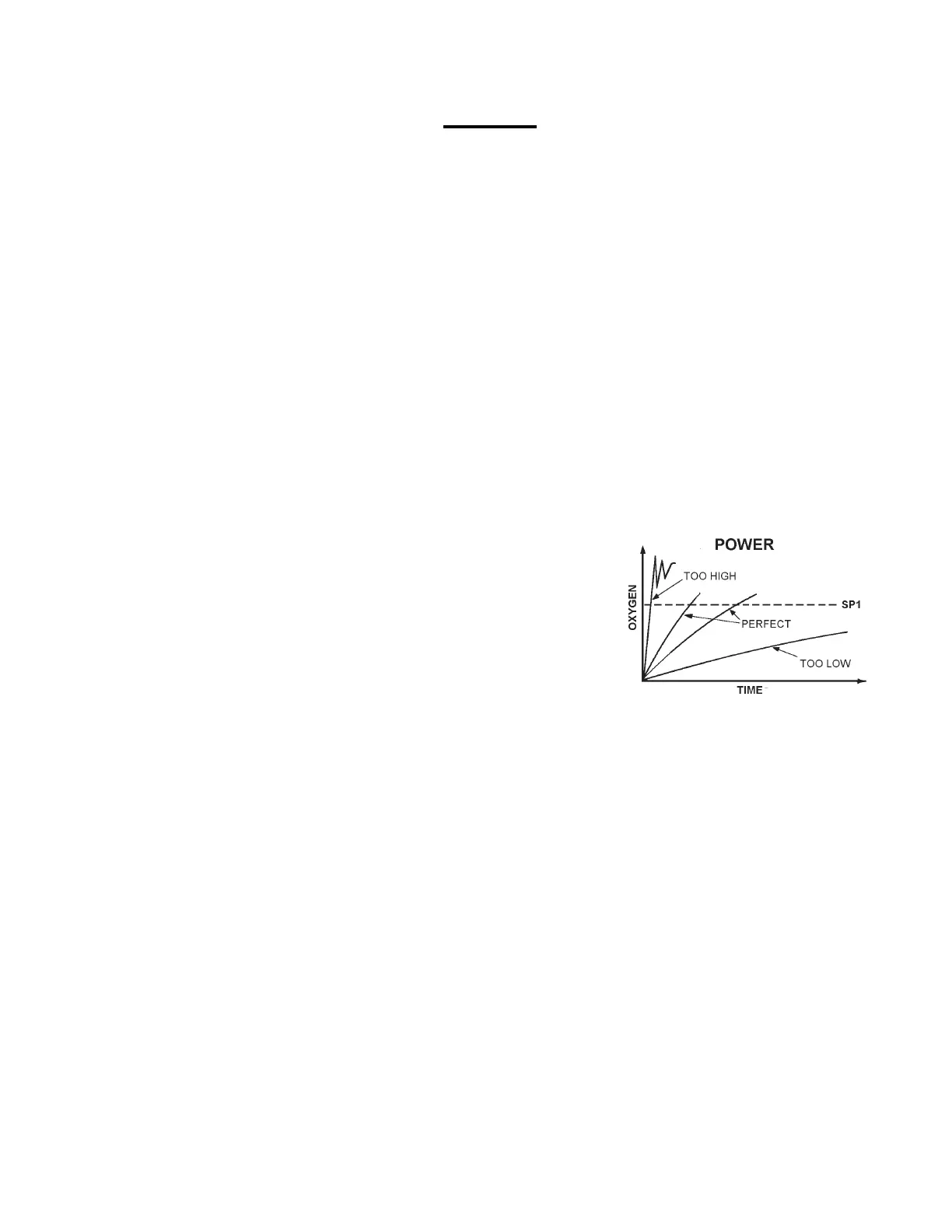
POWER
First adjust power. Power is
the only control parameter not set in
program mode. Once power is set,
other control parameters may be
tuned.
Power is a function of infusion
rate. The more gas infused per unit
time, the higher the power. Infusion
rate is adjustable up to 350 SCFH
(Standard Cubic Feet an Hour).
Infusion rate is a function of
gas supply delivery pressure. The
higher the pressure, the faster the
infusion rate. Adjust the amount of
pressure to the approximate de-
sired infusion rate and fine tune with
the needle valve on the front panel.
Gas supply delivery pressure is set
at the pressure regulator on gas
source. Infusion rate is dependent
on the pressure of the gas coming
from the compressed gas source.
Never exceed 40 PSIG.
Proox 360 power must roughly
match dynamic gas load of cham-
ber. Too little power and it takes
forever to reach set point. Too much
power and control is unstable.
The bigger the chamber, the
more power (gas) it takes. For
example, a small baby incubator
might take 2-5 SCFH , but a tissue
culture incubator might take 10-30
SCFH.
The leakier the chamber, the
more power (gas) it takes. For
example, an incubator with a tight
seal might take 10 SCFH, but one
with a loose seal might take 20
SCFH.
There are methods to calcu-
late power, but it's faster and easier
to adjust power empirically. Watch
the control process and adjust infu-
sion rate so Proox 360 is able to
deliberately push oxygen from am-
bient to past set point under normal
load conditions.
Most jobs can be tuned over a
relatively wide power range. Once
the other control parameters are
tuned, however, any change in the
power/load balance may require re-
tuning those parameters.
STEPS:
1. Set gas supply delivery pressure.
Range 0-40 PSIG. For best
results use 15-20 PSIG.
2. Watch the number in work mode
approach the set point. If too fast
and unstable, turn the needle
valve counterclockwise to lower
the infusion rate. If too slow, turn
the needle valve clockwise to
increase the infusion rate. Never
exceed 40 PSIG.
ON/OFF CONTROL
Crude basic control. Suitable
when precise oxygen levels are not
necessary.
Infusion stops when oxygen
reaches setpoint and resumes only
when oxygen drifts back past setpoint.
Output is either 100% or 0%. Oscil-
lations are natural.
The only tune adjustment is
the dead band width. Dead band
width is distance between on-to-off
point and off-to-on point above and
below setpoint. Defines where no
switching occurs, but oscillation
does occur.
The larger the dead band width,
the larger the oscillation, but the less
switching on and off. Maximize the
dead band width to minimize wear
and tear on equipment. Set for larg-
est acceptable oscillation.
The smaller the dead band
width, the less oscillation, but the
more wear and tear.
15
Proox model 360
version 1.0


 To Next Page
 Loading...