SENSORS
The sensor drives the controller.
If the sensor is not calibrated, it won't
be accurate. If the sensor is not
accurate, control won't be either.
Every sensor must be calibrated
both (1) initially when installed, new
or used, and (2) periodically over the
life of the sensor to compensate for
normal drift.
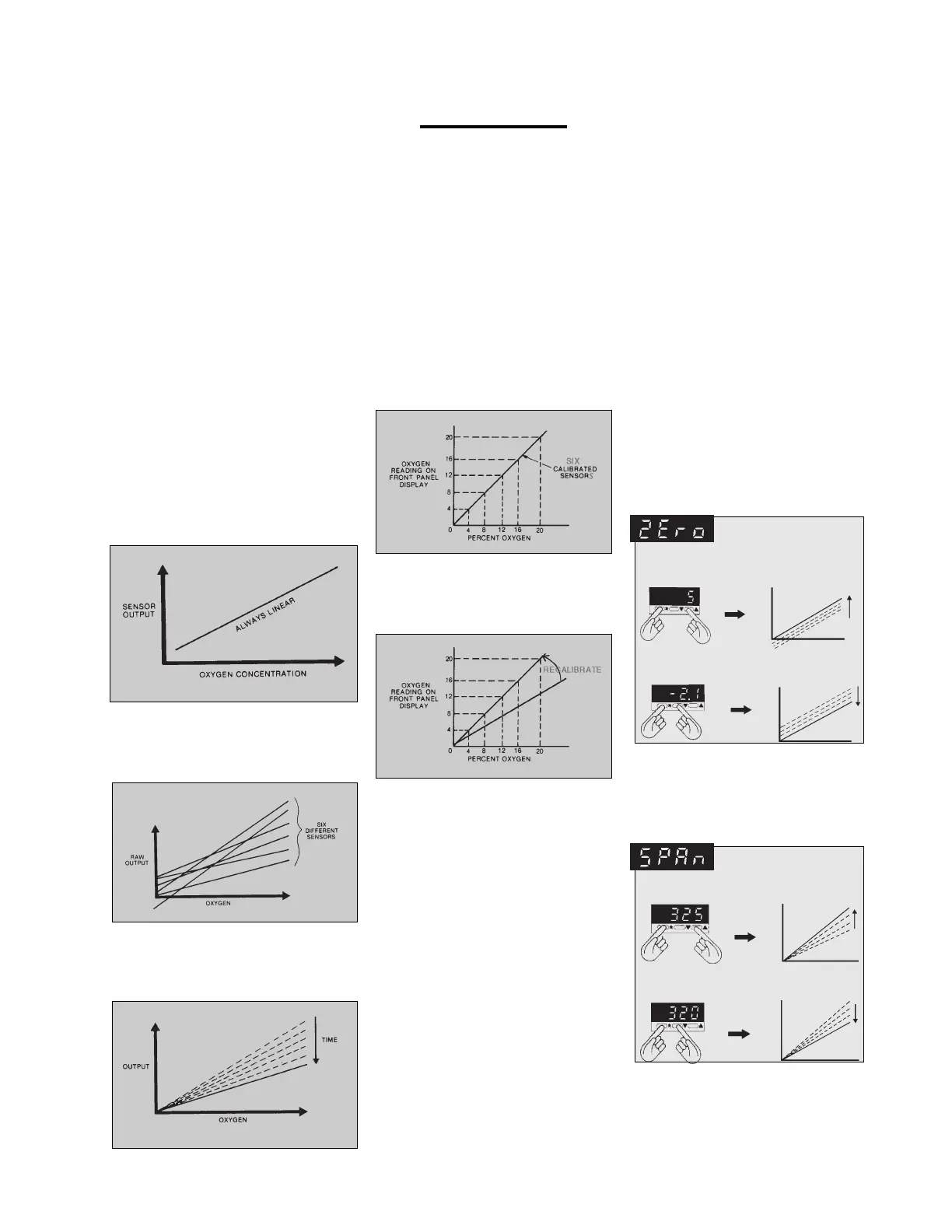
Sensors generate an electrical
signal (output) which is linear and
directly proportional with gas oxygen
concentration:
Trouble is, sensors are not iden-
tical. Although always linear and
directly proportional, raw output can
be quite different for each sensor:
Sensor output also changes over
time (drift), generally in a slow down-
ward direction. Sensors remain linear
but gradually lose power:
Calibration
Calibration is the key to control accuracy. Check calibration at least
once a week to have as much confidence as necessary in accuracy.
CALIBRATION
Calibration electronically cor-
rects for the difference among sen-
sors. Makes raw output line super-
impose on calibrated line. Then all
sensors read accurately:
Calibration also compensates
for drift. Monitor drift with periodic
calibration checks. Recalibrate
when necessary:
CALIBRATION
STANDARDS
Sensors are calibrated to stan-
dard gas mixtures with known oxy-
gen concentrations. Since sensor
output is linear, calibrating at two
known points makes all other points
accurate as well.
Ambient air (21%) is always
one point. It's a handy standard.
Immerse sensor in air by simply
externalizing it from chamber.
Control gas, either nitrogen
(0%) or oxygen (100%), is the other
point. Immerse sensor in control
gas by using calibration chamber
and bleed valve.
Of course, other standards can
be used as well. Or calibrate to third
party oxygen analyzers. Just be
confident in your standard.
CALIBRATION MENU
FUNCTIONS
"SPAn" and "ZEro" functions,
on level 3 of the menu, calibrate the
sensor. Both adjust sensor output
line without disrupting linearity, but
each works differently.
The "ZEro" function affects only
the Y-intercept of the line, not the
slope. It moves the line up and down
without changing the slope. Always
do the "ZEro" function first:
Increasing makes the y-intercept more
positive (moves the line up) -
Decreasing makes the y-intercept
more negative (moves the line down)
The "SPAn" function adjusts
the slope of the line, but does not
affect the Y-intercept (set by "ZEro"
function). Always do "SPAn" after
"ZEro":
Raising increases slope:
Lowering decreases slope:
REMEMBER: never adjust
"ZEro" function without adjusting
"SPAn" function afterwards. "ZEro"
affects "SPAn" setting, but "SPAn"
does not affect "ZEro" setting.
12
Proox model 360
version 1.0


 To Next Page