EasyManua.ls Logo

BioSpherix Proox 360 - User Manual

BioSpherix Proox 360
23 pages
Print Icon
To Next Page IconTo Next Page
Loading...
Proox Model 360
Manual
version 1.0 June 2005
This manual is intended to help our customers efficiently
setup and operate the equipment. We encourage not only all
installers, but also all users, to read this manual thoroughly.
Keep it handy and refer to it often. Save it for future
reference. If you have any problems or questions, please do
not hesitate to call. We are here to help.
Introduction
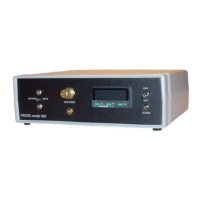
The Proox model 360 is a versatile and compact gas oxygen controller for people who
do oxygen sensitive work. Though designed to work with BioSpherix chambers the Proox
360 works in incubators, glove boxes, animal cages, refrigerators, plant growth chambers,
and many other semi-sealable chambers. Pratically any medium-large enclosure can be
fitted.
The unit works from
outside of the host cham-
ber by remotely sensing
and displacing air oxygen
inside the chamber with
another gas. Nitrogen or
an oxygen poor gas, is
used to lower the oxygen
level inside the host
chamber. Oxygen or an
oxygen enriched gas is used to raise the oxygen level
within the host chamber.
Nominal range is 0.1-99.9% oxygen. Advanced
feedback algorithms handle practically any oxygen gas
dynamic. Infusion rates are adjustable up to 350
SCFH. Installation is easy. Operation is simple. The
unit moves easily from one host chamber to another.
Please read and follow the safety and operations
instructions on the following pages. Be careful. Oxy-
gen can be dangerous. Any pressurized gas can be
dangerous. Know what you are doing and do it safely.
1
Proox model 360
version 1.0
!!
Anyone who has not thoroughly read and under-
stood this manual, must never attempt to operate
the equipment.
6678 Route 17
Redfield, New York 13437
315-387-3414
FAX 315-387-3415
TOLL FREE US/CAN 800-441-3414
www.biospherix.com
Question and Answer IconNeed help?

Do you have a question about the BioSpherix Proox 360 and is the answer not in the manual?

Summary

Proox Model 360 Manual Overview

Introduction to the Proox 360

Provides an overview of the Proox 360, its purpose, and intended users.

Essential Safety Warnings

Highlights critical safety precautions for operating the equipment.

Safety Instructions and Precautions

Electrical Safety Guidelines

Details electrical safety measures for connecting and operating the Proox 360.

Pressurized Gas Handling

Covers safe practices for using pressurized gases with the unit.

Environmental and Cleaning Safety

Outlines requirements for unit placement and cleaning procedures.

Proox 360 Components Identification

Proox 360 Unit and Accessories

Identifies the main Proox 360 unit and its included accessories.

Required User Supplied Parts

Gas Supply and Regulator Requirements

Lists necessary external components for gas supply setup, including regulators.

Gas Supply Setup Procedure

Connecting Gas Supply to the Proox 360

Details the steps for connecting the gas supply to the unit's back panel.

Front Panel Installation and Controls

Unit Placement and Gas Connection Check

Guides on positioning the unit and verifying gas connectivity.

Front Panel Features and Adjustments

Explains the calibration chamber connection, infusion rate valve, and switches.

Back Panel Installation and Connections

Connecting Power, Gas, and Sensor

Outlines the procedures for connecting the power supply, gas lines, and sensor cable.

Proox 360 Operation Modes

Front Panel Display and Navigation

Describes the interactive display and touchkeys for operation.

Work Mode and Program Mode

Explains the functions and navigation within Work and Program modes.

Program Mode Functions Menu

Menu Structure and Navigation Levels

Details the hierarchical structure of the program mode menu across four levels.

Configuration Options

Secondary Configuration Settings

Covers adjustable settings like alarm, security, and display options.

High and Low Oxygen Control Configuration

Explains how to configure the unit for either high or low oxygen control.

Sensor Calibration

Understanding Sensor Calibration

Explains the importance of calibration and the principles behind it.

Calibration Menu Functions: SPAn and Zero

Details the use of SPAn and Zero functions for sensor calibration.

Low Oxygen Calibration Procedure

Connecting and Using the Calibration Chamber

Guides on setting up and using the calibration chamber for gas immersion.

Setting the Zero and Span Calibration Points

Provides step-by-step instructions for calibrating the sensor to zero and span points.

High Oxygen Calibration Procedure

Calibrating for 100% Oxygen Levels

Details the process for calibrating the sensor to high oxygen levels.

Understanding Temperature Effects on Calibration

Explains how temperature can influence calibration accuracy.

Tuning for Optimal Control

Tuning Process and Power Adjustment

Covers the objectives of tuning and how to adjust power/infusion rate.

ON;OFF Control Tuning Parameters

Describes how to tune the basic ON/OFF control mode.

Advanced Control Tuning

Proportional and Manual Offset Tuning

Explains tuning proportional control and applying manual offsets.

Integral Control for Automatic Offset

Details how integral control automatically corrects for steady-state offsets.

Derivative Control Tuning

Derivative Control Principles and Application

Covers how derivative control suppresses overshoot and speeds response.

Tuning Derivative Approach and Sensitivity

Explains adjustments for derivative approach and sensitivity parameters.

Advanced Tuning Techniques

Derivative Approach Control Tuning

Fine-tuning derivative action's start point to manage overshoot.

Automatic Tuning Overview

Introduces the concept of automatic tuning for control parameters.

Single Setpoint Control Operation

Setting Low Oxygen Levels

Step-by-step guide to setting a low oxygen setpoint.

Setting High Oxygen Levels

Step-by-step guide to setting a high oxygen setpoint.

Alarm Setpoint Configuration

Configuring Alarm Deviation Type

Sets whether the alarm triggers on high or low deviation from setpoint.

Adjusting Alarm Setpoint and Bandwidth

Details how to set the alarm threshold and its activation range.

Maintenance and Sensor Lifespan

Weekly Calibration Checks and Re-calibration

Procedures for checking and performing re-calibration of the sensor.

Replacing a Malfunctioning Sensor

Instructions for purchasing and installing a new sensor.

Warranty Information

One-Year Limited Warranty Terms

Outlines the terms and conditions of the manufacturer's one-year warranty.

General Warranty Conditions and Exclusions

Details general warranty clauses, voiding conditions, and exclusions.

BioSpherix Proox 360 Specifications

General IconGeneral
ModelProox 360
Oxygen Control Range0.1 - 99.9%
Carbon Dioxide Control Range0.1% to 20%
Humidity Control RangeUp to 95% RH
SensorsO2 sensor, CO2 sensor, temperature sensor, humidity sensor
Power Requirements100-240VAC, 50/60Hz
DimensionsVaries depending on configuration
WeightVaries depending on configuration