On/off tuning has no provision
for fluctuating loads. Blindly responds
only to on-to-off point and off-to-on
point. Change in load may change
oscillation amplitude and/or period.
STEPS:
1. For on/off control, enter program
mode, navigate to "CYC.t"
function on level 1. Set "on.of".
Have to go down to "0" to get to
"on.oF"
2. Then set dead band width. Index
down to "bAnd" function and set
distance between on-to-off point
and off-to-on point.
PROPORTIONAL CON-
TROL
Proportional control eliminates
oscillation. It controls steady-state
by weakening power as oxygen level
approaches setpoint. When power
(gas infused per unit time) exactly
matches load (gas leaking out per
unit time), oxygen stabilizes.
Unlike ON/OFF control where
power is either 100% or 0%, propor-
tional control can adjust power any-
where between 100% and 0%. Power
is adjusted by timing gas pulses.
"Proportional" means gas pulses get
proportionately smaller as the dis-
tance between oxygen level and
setpoint (SP1) gets smaller.
Pulses are timed by setting a
cycle time and varied by percentage
of the cycle time. Maximum pulses
are 100% of cycle time. Minimum
pulses are 0% of cycle time. Propor-
tioned pulses are in between.
Timed pulse proportioning oc-
curs only over a narrow band of oxy-
gen levels centered around set point.
Control gas is infused full blast (100%
output) with no timing until it reaches
this band. Then it cycles. The
deeper it goes into the proportional
band, the shorter the pulses. Band
size determines how quick pulses
shorten and power thus weakens.
Somewhere between 100%
and 0% of the cycle time there's a
pulse time that holds steady state.
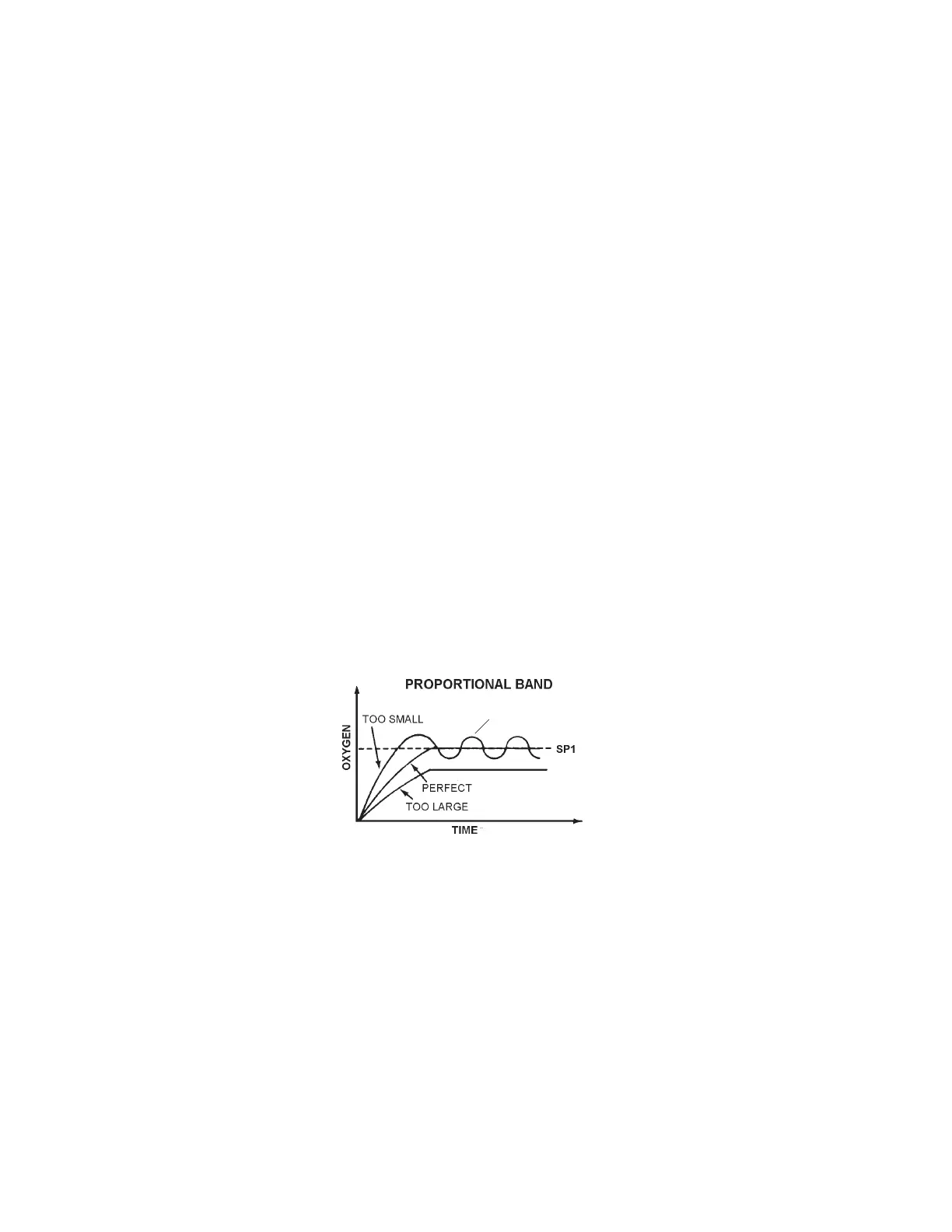
However, if proportional band is too
small, it may not be easy to find.
Small changes in oxygen will cause
huge changes in output, similar to
ON/OFF control. Oxygen will oscil-
late and never reach steady state.
On the other hand, if propor-
tional band is too wide, proportioning
inhibits approach to setpoint. Power
starts decreasing way to soon.
Proportional band should be
big enough so there's no gross over-
shoot everytime proportioning kicks
in, but not so big that there's need-
less pulsing long before oxygen gets
even close to setpoint.
Cycle time should be as long
as possible to minimize wear and
tear on equipment, but not so long
that it becomes unresponsive.
If no other control parameters
are set, proportional band centers
around setpoint SP1. All additional
parameters accentuate proportional
control. Without proportional control
( prop. band and cycle time), no other
parameters are active. Some affect
the position of the band, but not the
size. Some affect the size, but not
the position. None affect the cycle
time.
STEPS:
1. To tune proportional control, enter
program mode, navigate to
"CYC.t" function on level 1. Set
cycle time, anywhere from 0.1 -
81 seconds.
2. Then index down to "bAnd"
function and set proportional
band. Gas power is reduced, by
time proportioning action, across
this band centered around SP1.
3. Exit program mode to work mode
and watch control process. Note
whether process overshoots and
oscillates, or undershoots from
cycling long before reaching
setpoint.
4. Enter program mode, and
navigate to "bAnd" function
again. If process overshot and
oscillated, increase band size. If
process undershot and took long
to reach setpoint, decrease band
size.
5. Repeat steps 3-4 till steady state
is achieved, whether steady state
is at setpoint or not.
MANUAL OFFSET
Proportional band is basically
a "blind" control parameter. When
set alone, it positions itself arbitrarilly,
centered around the setpoint.
Chances are steady-state will not be
at setpoint.
If proportional control steady-
state is not at setpoint, the offset
must be eliminated to move steady-
state to setpoint.
Manual Offset moves propor-
tional band by a fixed distance so
that steady-state is at setpoint. If
steady-state is +0.3% oxygen above
setpoint, then an offset of -0.3 will
move proportional band down so
pulse is perfectly proportioned to
match load at setpoint.
Manual offset works good when
controlling against a fixed load. Once
set, it makes proportional control
nearly perfect. No overshoot either.
STEPS:
1. Watch control process in work
mode till steady state is reached.
Note the variance from setpoint.
2. Enter program mode, navigate to
"oFSt" function on level 1, and
set number that offsets variance.
NOTE: "int.t" function on level 1
must be set to "oFF" to manually
adjust offset, otherwise "oFSt"
function is not active but read-
only.
INTEGRAL CONTROL
AUTOMATIC OFFSET
RESET
Proportional control jobs with
fluctuating loads, require automatic
offset to keep steady state at
setpoint.
Integral control parameter au-
tomatically and continuously moni-
tors divergences between setpoint
and steady state, and acts to correct
offset by repositioning proportional
band. Changes the area between set
point line and oxygen level line, and
shifts proportional band in proper
direction to minimize area. As load
changes, steady state follows
setpoint if integral is tuned properly.
Integral control overshoots on
initial start up and after significant
interruptions. Far away from setpoint
it senses big offset, so it shoots
proportional band as far as possible
in corrective direction. Only after
passing setpoint does integral pick
up the need to bring proportional
band back to near setpoint.
Integral control parameter is
time. Resets offset as frequently as
you specify. If integral time is too
short, it recalculates too many times
before oxygen moves much and
moves proportional band too far too
fast. Result is oscillation. Eventu-
Oscillation
16
Proox model 360
version 1.0


 To Next Page
 Loading...