Chapter 2: Hardware installaon | 15
B760MZ-E PRO | B760MX-E PRO | B760MH-E PRO | B760MP-E PRO
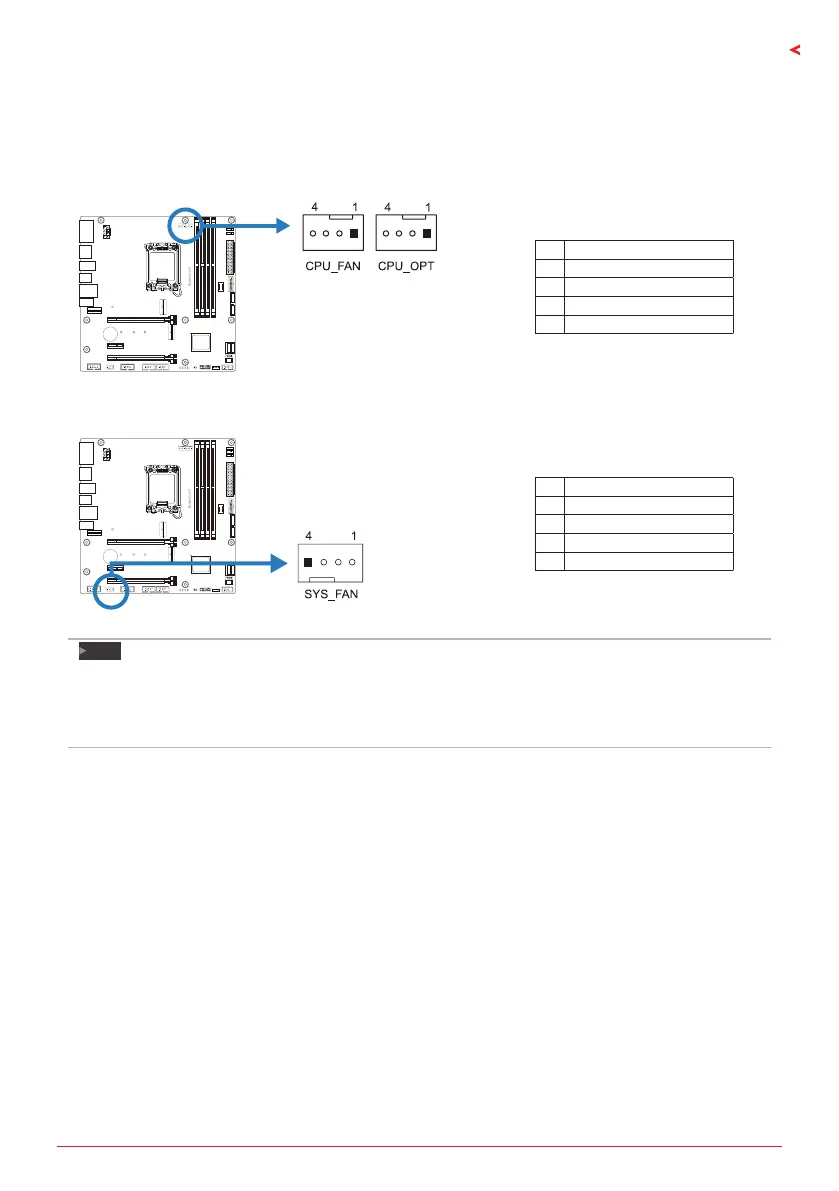
2.3 Connect Cooling Fans
These fan headers support cooling-fans built in the computer. The fan cable and connector
may be dierent according to the fan manufacturer.
CPU_FAN/ CPU_OPT: CPU Fan Header
Pin Assignment
1 Ground
2 +12V
3 FAN RPM rate sense
4 AI Fan Control
SYS_FAN: System Fan Header
Pin Assignment
1 Ground
2 +12V
3 FAN RPM rate sense
4 AI Fan Control
Note
»
»
CPU_FAN, CPU_OPT, SYS_FAN support 4-pin and 3-pin head connectors. When connecng with
wires onto connectors, please note that the red wire is the posive and should be connected to
pin#2, and the black wire is Ground and should be connected to pin#1(GND).
»
»
CPU Fan Header (CPU_OPT): Support water cooling fan and CPU fan.







 To Next Page