14 | Chapter 2: Hardware Installaon
Install an Expansion Card
You can install your expansion card by following steps:
• Read the related expansion card’s instrucon document before install the expansion
card into the computer.
• Remove your computer’s chassis cover, screws and slot bracket from the computer.
• Place a card in the expansion slot and press down on the card unl it is completely
seated in the slot.
• Secure the card’s metal bracket to the chassis back panel with a screw.
• Replace your computer’s chassis cover.
• Power on the computer, if necessary, change BIOS sengs for the expansion card.
• Install related driver for the expansion card.
2.6 Jumper & Switch Setting
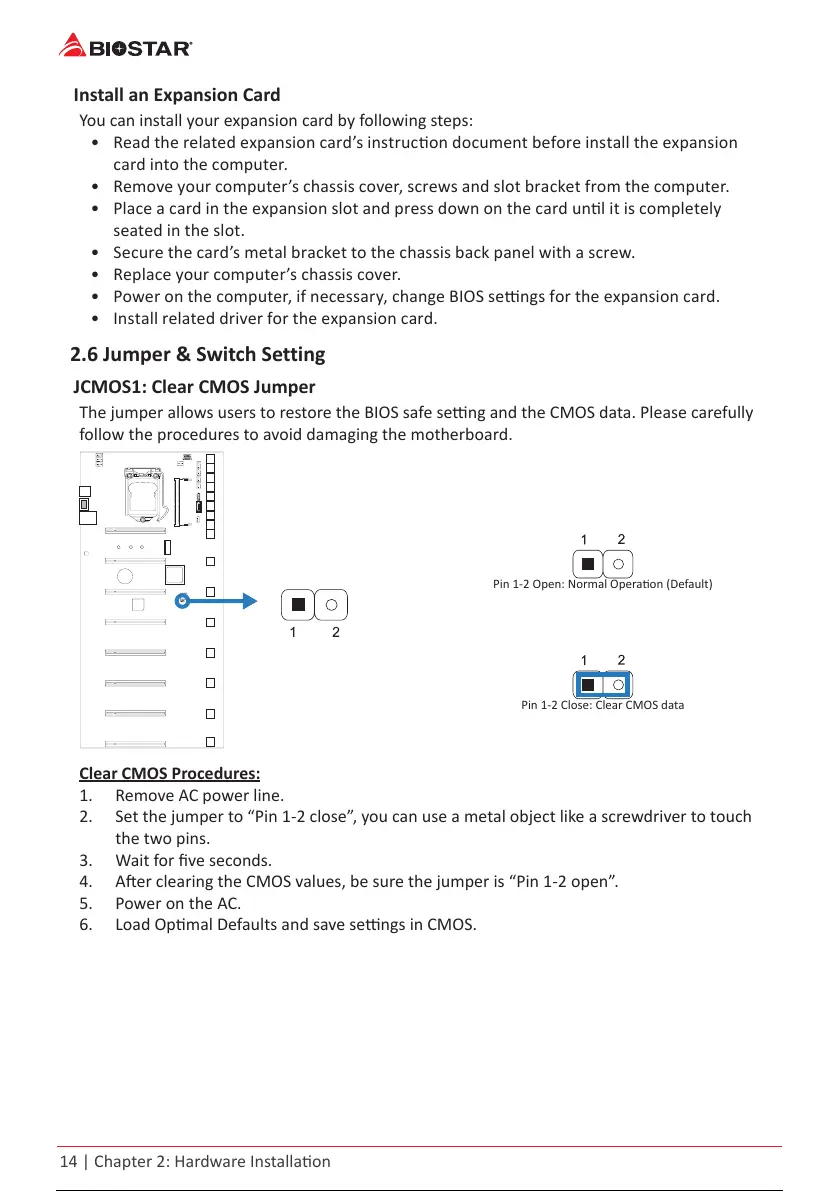
JCMOS1: Clear CMOS Jumper
The jumper allows users to restore the BIOS safe seng and the CMOS data. Please carefully
follow the procedures to avoid damaging the motherboard.
Pin 1-2 Open: Normal Operaon (Default)
Pin 1-2 Close: Clear CMOS data
Clear CMOS Procedures:
1. Remove AC power line.
2. Set the jumper to “Pin 1-2 close”, you can use a metal object like a screwdriver to touch
the two pins.
3. Wait for ve seconds.
4. Aer clearing the CMOS values, be sure the jumper is “Pin 1-2 open”.
5. Power on the AC.
6. Load Opmal Defaults and save sengs in CMOS.
15 / 36 14 / 34 15 / 36 14 / 34 15 / 36



 To Next Page