Chapter 2: Hardware Installaon | 9
TB360-BTC D+
2.2 Install a Heatsink
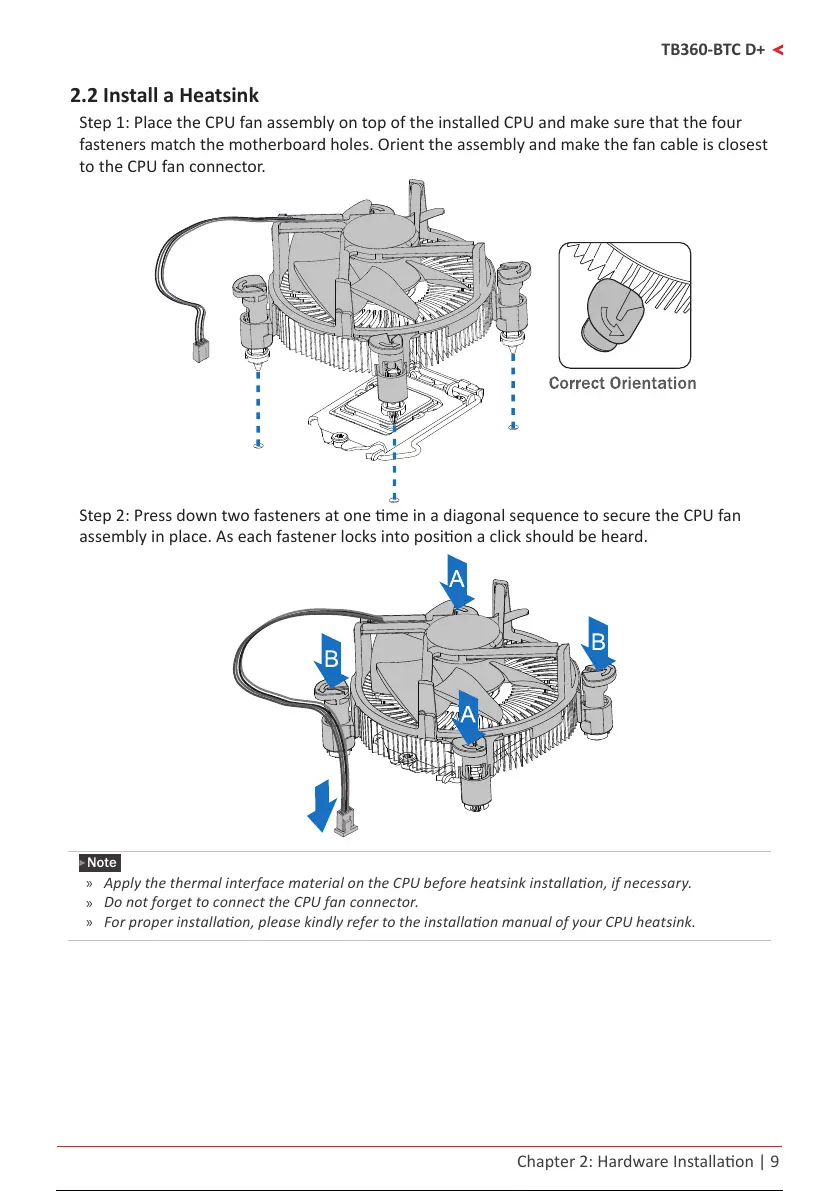
Step 1: Place the CPU fan assembly on top of the installed CPU and make sure that the four
fasteners match the motherboard holes. Orient the assembly and make the fan cable is closest
to the CPU fan connector.
Step 2: Press down two fasteners at one me in a diagonal sequence to secure the CPU fan
assembly in place. As each fastener locks into posion a click should be heard.
Note
»
ApplythethermalinterfacematerialontheCPUbeforeheatsinkinstallaon,ifnecessary.
»
DonotforgettoconnecttheCPUfanconnector.
»
Forproperinstallaon,pleasekindlyrefertotheinstallaonmanualofyourCPUheatsink.
10 / 36 9 / 34 10 / 36 9 / 34 10 / 36



 To Next Page