36
ESC R n
[Name] Select an international character set
[Format] ASCII ESC R n
Hex 1B 52 n
Decimal 27 82 n
[Range] 0 ≤n ≤10
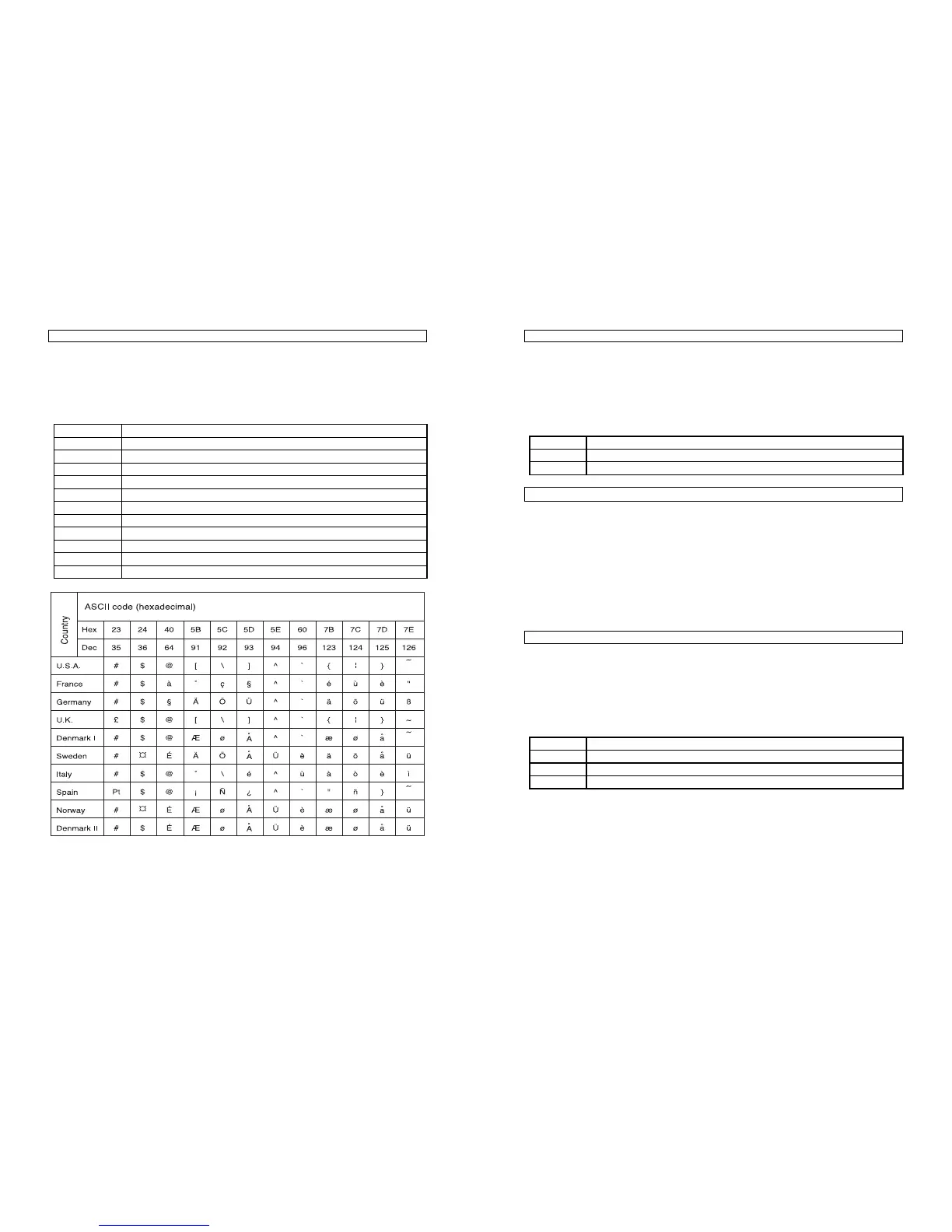
[Description] Selects an international character set n from the following table:
n
Character set
0 U.S.A.
1 France
2 Germany
3 U.K
4 Denmark Ⅰ
5 Sweden
6 Italy
7 Spain
8 Japan
9 Norway
10 Denmark Ⅱ
37
ESC V n
[Name] Turn 90° clockwise rotation mode on/off
[Format] ASCII ESC V n
Hex 1B 56 n
Decimal 27 86 n
[Range] 0 ≤n ≤1, 48 ≤n ≤49
[Description] Turns 90° clockwise rotation mode on off.
N is used follows:
n
Function
0,48 Turn off 90°clockwise rotation mode
1,49 Turns on 90°clockwise rotation mode
ESC 䦢 nL nH
[Name] Set relative print position
[Format] ASCII ESC 䦢 nL nH
Hex 1B 5C nL nH
Decimal 27 92 nL nH
[Range] 0 ≤nL ≤255
0 ≤nL ≤255
[Description] Sets the print starting based on the current position by using the
horizontal or vertical motion unit.
● This command sets the distance from the current position to
[(nL + nH X 256)X(horizontal or vertical motion unit)].
ESC a n
[Name] Select justification
[Format] ASCII ESC a n
Hex 1B 61 n
Decimal 27 97 n
[Range] 0 ≤n ≤2, 48 ≤n ≤50
[Description] Aligns all the data in one line to the specified position.
N selects the type of justification as follows:
n
Justification
0,48 Left justification
1,49 Centering
2,50 Right justification


 To Next Page