11
1. Press .
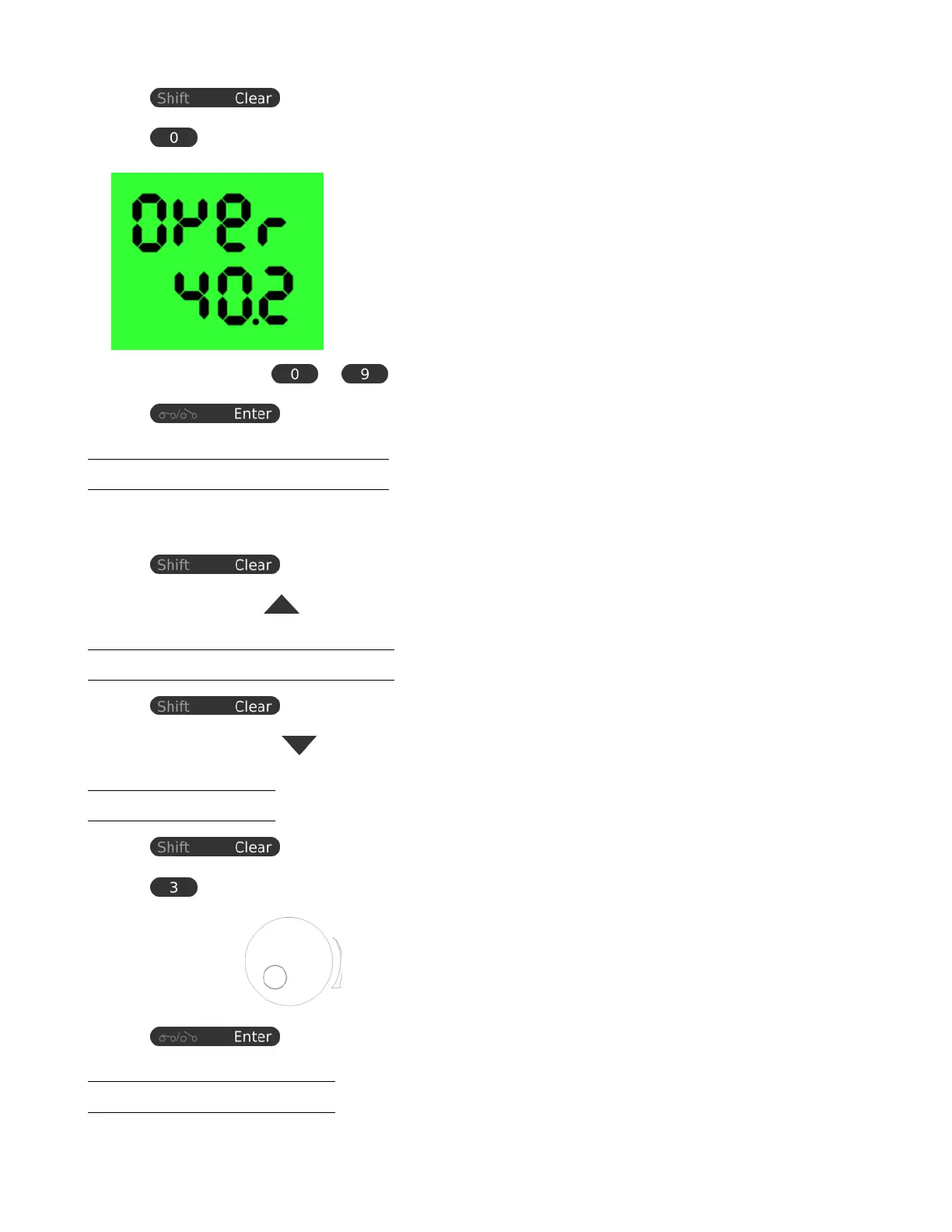
2. Press on the numeric keypad within 3 seconds to enter upper voltage limit adjustment menu. The rst line
says “Over” and the second if the voltage limit setting.
.
3. Use the numeric keypad
to to input upper voltage limit.
4. Press to conrm.
4.7 Enable Output at Power Up
This feature limits the upper level setting of output voltage to prevent inadvertent setting of high voltage, which may
damage your application. The value of this upper voltage range limit will be retained until further reset.
1. Press .
2. Press the up arrow key within 3 seconds to enable output on power up.
4.8 Disable Output at Power Up
1. Press .
2. Press the down arrow key
within 3 seconds to disable output on power up.
4.9 LCD Brightness
1. Press .
2. Press on numeric keypad within 3 seconds to enter brightness menu.
3. Use the rotary knob to raise or lower brightness from 0 to 9.
4. Press to conrm.
4.10 Enable/Disable SCPI
www.GlobalTestSupply.com
Find Quality Products Online at: sales@GlobalTestSupply.com









 To Next Page