15
PC Software Control and Installation
The PC software provides remote communication, data logging, front panel emulation, and timed programming capabilities
using the USB or RS-485 interfaces. The software supports Windows 7, 8, 8.1, 10.
Note: Do not connect both USB and RS-485 simultaneously.
7.1 USB Driver Installation
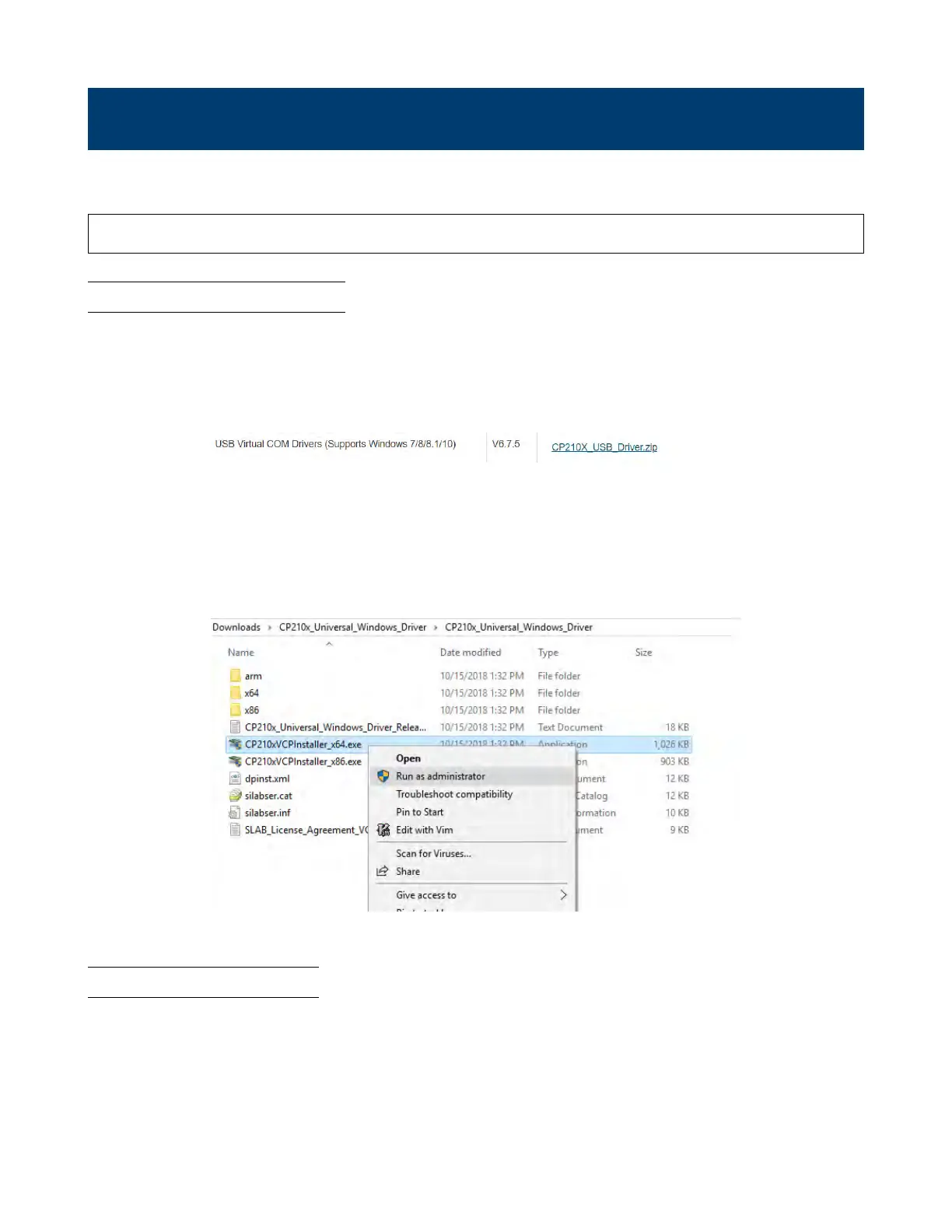
Figure 7.1 Download Link
1. Click “CP210X_USB_Driver.zip” to begin the download
2. Whem complete, right click on the .zip folder and click “Extract All…”
3. Depending on your system right-click and run the 32-bit or 64-bit installer as administrator to begin installation, see
Figure 7.2.
Figure 7.2 Install as the Administrator
7.2 Software Installation
www.GlobalTestSupply.com
Find Quality Products Online at: sales@GlobalTestSupply.com









 To Next Page