Chapter 5: Operation: On-Screen Display
57
5.2.3 Configure system: Maximum computers
This setting corresponds to the number of computers (CPUs) connected to the
ServSwitch system. It comes in handy when you are cascading, or are only using
some of the CPU ports on a single Switch: When the Switch knows how many CPUs
there are, it can handle switching and scanning more intelligently.
Actually, the Switch will usually autodetect this value, but if for whatever reason
you have no CPUs attached the first time you boot the Switch, it will use its factory
default values instead (“4” for 2-port units, the number of CPU ports on the box
for other units).
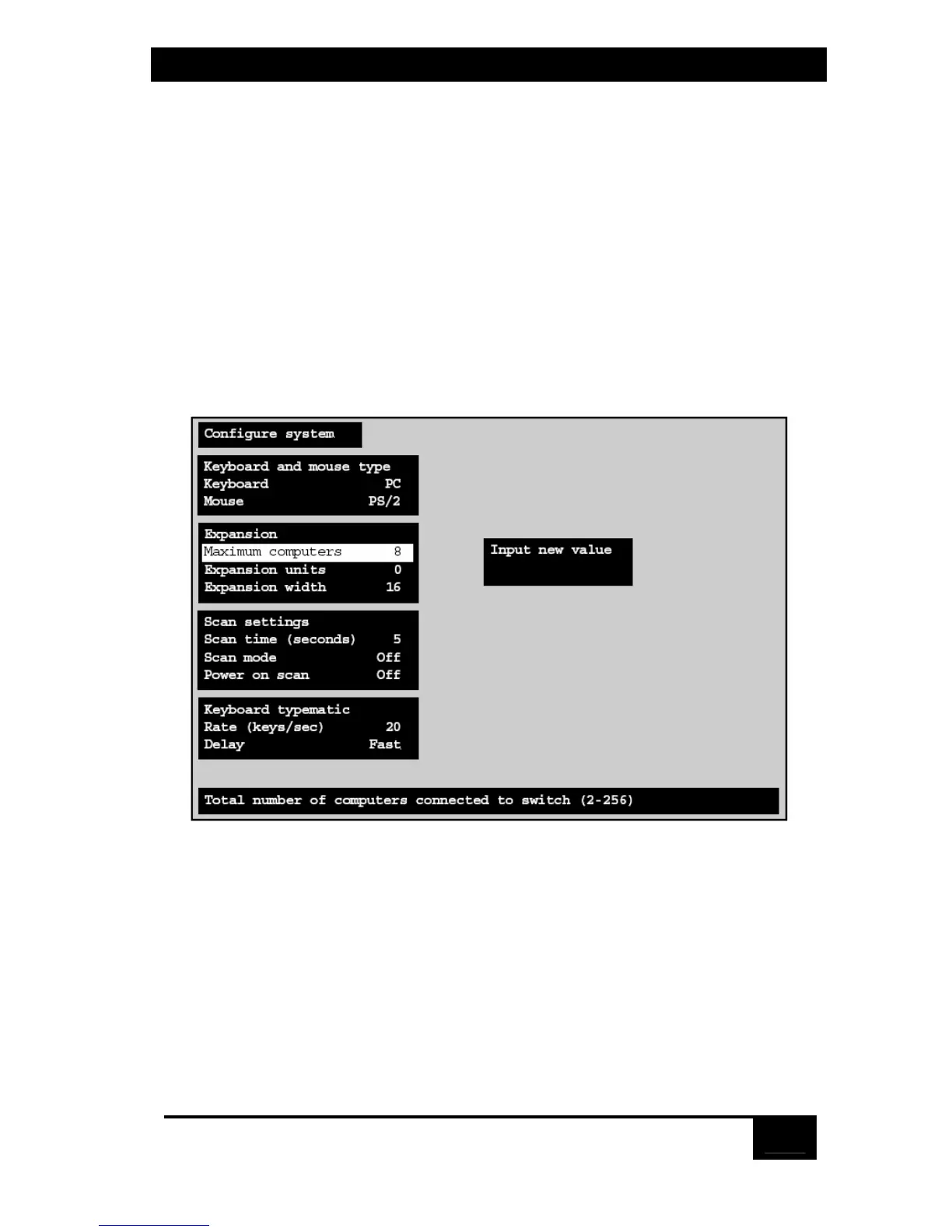
To change this setting, press [Enter] while “Maximum computers” is
highlighted. An “Input new value” box appears, as shown in Figure 5-4 below.
Figure 5-4. Changing the maximum number of computers.
Use the shared keyboard’s number keys to input a new value from 2 to 256 and hit
[Enter]. The input box disappears and the new setting appears in the “Maximum
computers” field.



 To Next Page
 Loading...