Technical Manual
2-6
EtherNet/IP Module
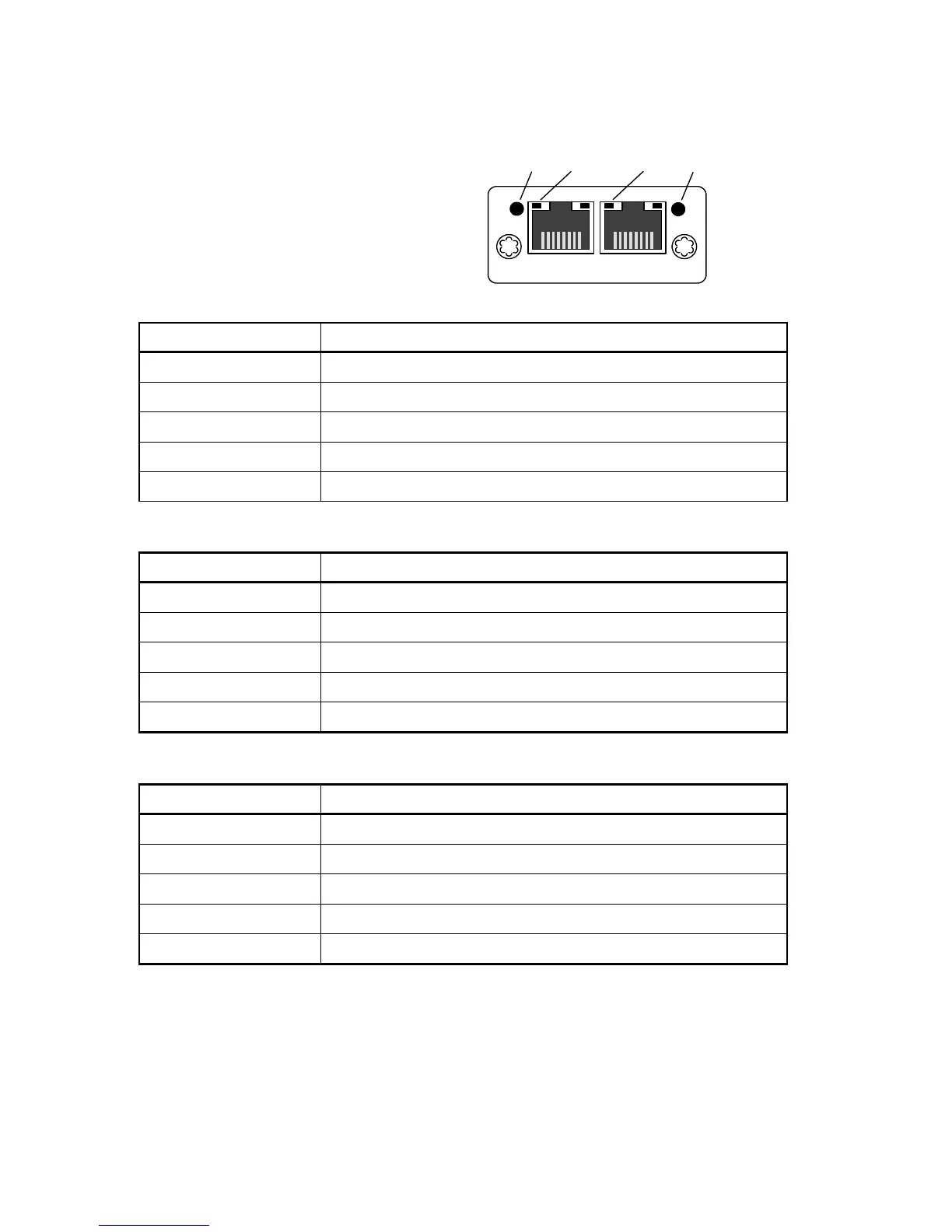
ControlNet module front view
(1) Network Status LED.
(2) Module Status LED.
(3) Link/Activity Port 1.
(4) Link/Activity Port 2.
Network Status LED
LED State Indication
Off No power or no IP address
Green Online, one or more connections established (CIP class 1 or 3)
Green, flashing Online, no connections established
Red Duplicate IP address, fatal error
Red, flashing One or more connections timed out (CIP class 1 or 3)
Module Status LED
State Indication
Off No power
Green Controlled by a Scanner in run state
Flashing Green (1 Hz) Not configured or Scanner in idle state
Red Major fault (EXCEPTION state, fatal error etc.)
Flashing Red (1 Hz) Recoverable fault(s)
Link/Activity LED 3/4
State Indication
Off No link, no activity
Green Link (100 Mbit/s) established
Green, flickering Activity (100 Mbit/s)
Yellow Link (10 Mbit/s) established
Yellow, flickering Activity (10 Mbit/s)


 To Next Page