Fieldbus Manual
6-2
EtherNet/IP
Use the EDS file provided when installing the G5 in a system. EDS file name is
005A0000002E0100.eds. After installing the EDS file in the development system of the
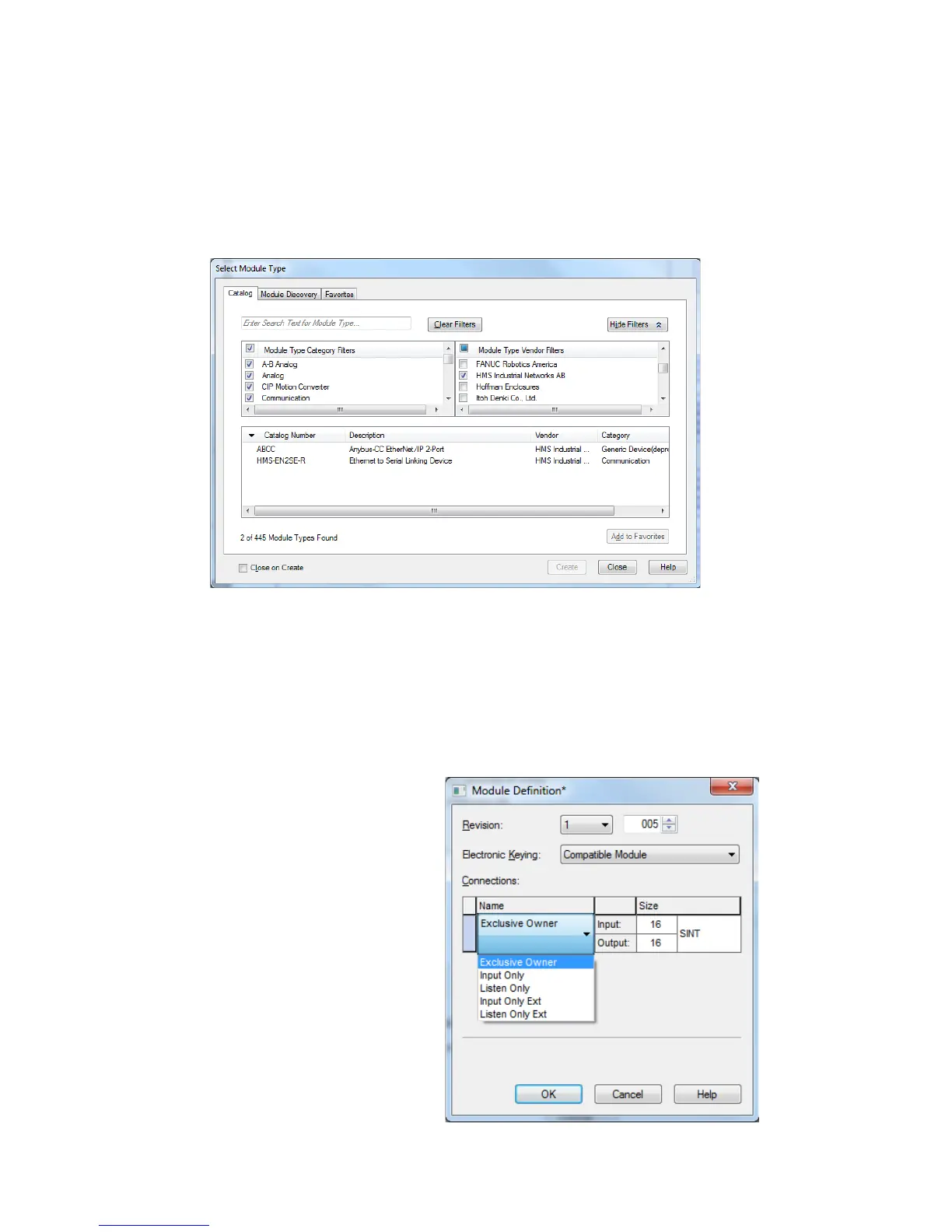
PLC, create a G5 in the PLC system. In the Select Module Type pop-up window
select HMS Industrial Networks AB in the Vendor filter and choose the ABCC module
(Anybus-CC EtherNet/IP 2-Port).
Select Module Type pop-up window
In the Module Properties window and general Tab set module name, ip-address etc.
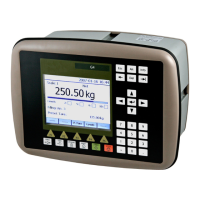
and the click Change button in the Module Definition section. In the pop-up window
Module Definition choose Exclusive Owner unless another master is used as exclusive
owner, if so select Input Only (Ext) or Listen Only (Ext). Set the data sizes to Input =
106 bytes and Output = 8 bytes. If other than Exclusive Owner is selected Output will
be 0 bytes. Only the exclusive owner will transmit data to the instrument.


 To Next Page