Operation
18
Cooking Computer
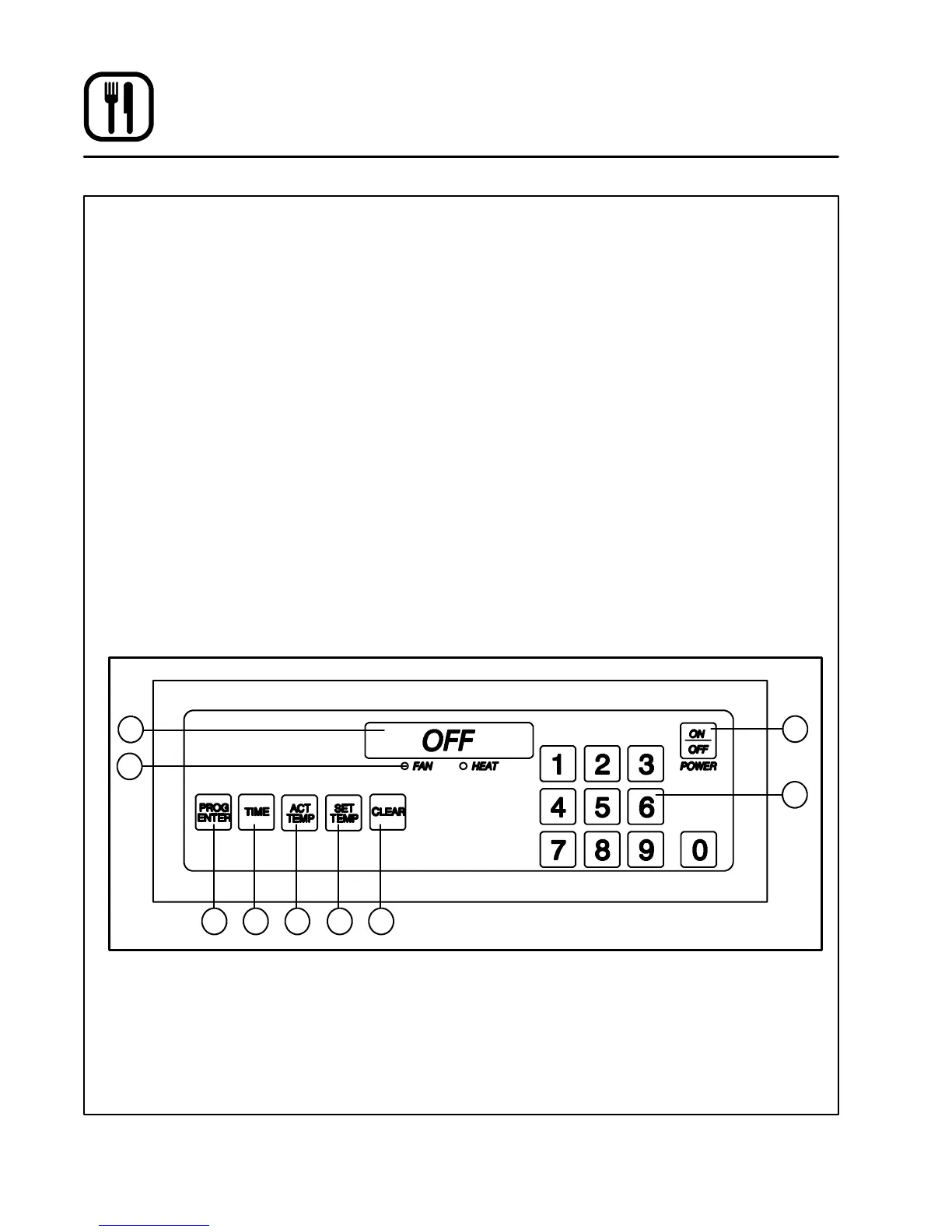
CONTROL DESCRIPTION
1. DIGITAL DISPLAY --- displays the time, tem-
perature and controller related information.
2. OVEN ON/OFF --- controls power t o the oven.
3. NUMERIC KEYS --- used to enter numbers in
the programming mode.
4. CLEAR KEY --- clears the display if an error is
made in the programming mode.
5. SET TEMP KEY --- press to view or program
the temperature setpoint.
6. ACT TEMP KEY --- press to view the current
oven temperature.
7. TI M E KE Y --- pr e s s t o vie w or p ro g ra m t h e
cook time.
8. PROG/ENTER KEY --- press to enter and exit
the programming mode and lock in pro-
grammed settings.
9. STATUS LAMPS --- when lit indicate the fan or
burners are operating.
PROGRAMMING
Programming the Cook Time:
1. Press the PROGRAM/ENTER key (8).
2. Press the TIME key (7). The display reads SET
D
TIME-?.
3. Use the NUMERIC keys (3) to enter the de-
sired cook time. If an error is made, press the
CLEAR key (4) and re-enter the number.
4. Press the PROGRAM/ENTER key (8) to store
the new cook time in the computer’s memory.
Programming the Tem perature:
1. Press the PROGRAM/ENTER key (8).
2. Press the SET TE M P key (5). The display
reads SET
D
TEMP-?.
3. Use the NUMERIC keys (3) to enter the de-
sired temperature set point. If an error is
made, press the CLEAR key (4) and re-enter
the number.
4. Press the PROGRAM/ENTER key (8) to store
the new temperature setpoint in the comput-
er’s memory.
1
2
3
45678
9
Figure 14





 To Next Page