EasyManua.ls Logo

Blomberg BGRP34520CSS - How to Use the Gas Oven; Gas Oven Control Knobs Explanation; Switching On the Gas Oven Burner; Oven Cooking Function: Bake

Blomberg BGRP34520CSS
48 pages
Print Icon
To Next Page IconTo Next Page
To Previous Page IconTo Previous Page
Loading...
How
to
use
the
gas
oven
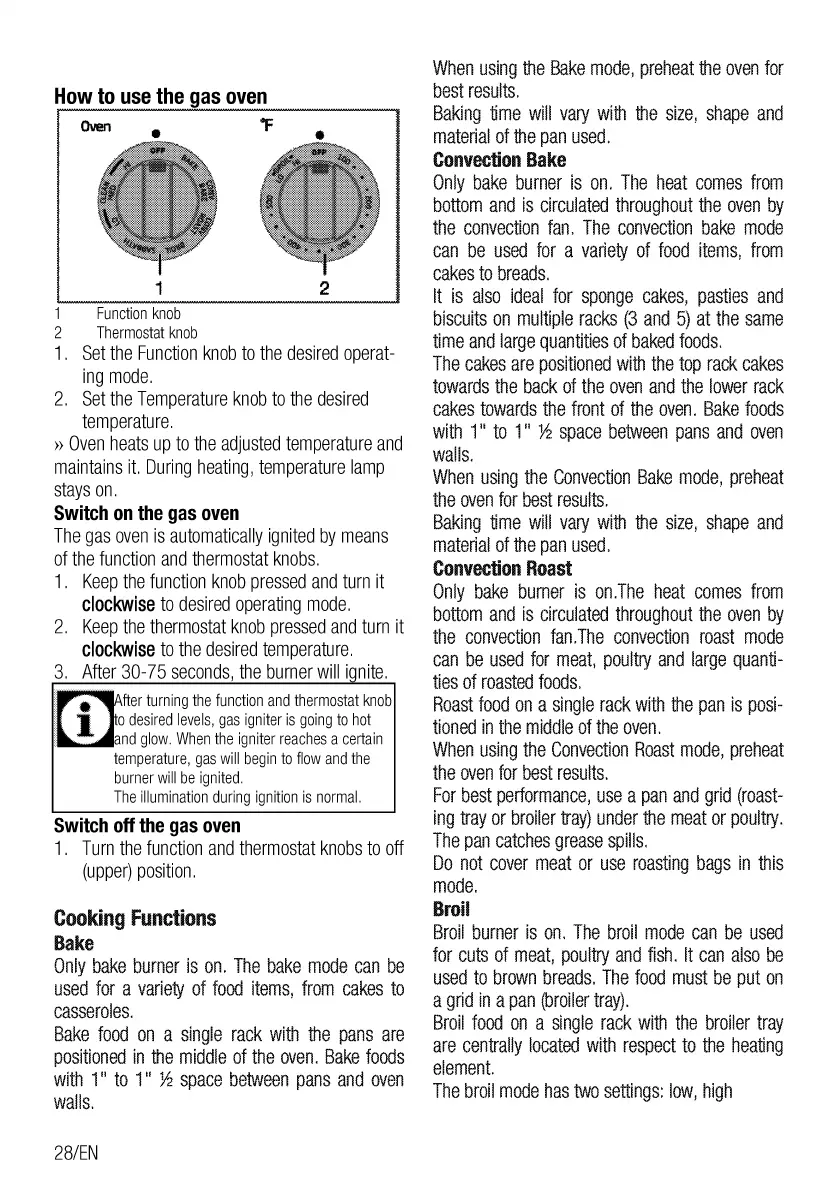
1 2
1
Function
knob
2
Thermostat
knob
1.
Set
the
Function
knob
to
the
desired
operat-
ing
mode.
2.
Set
the
Temperature
knob
to
the
desired
temperature.
»
Oven
heats
up
to
the
adjusted
temperature
and
maintains
it.
During
heating,
temperature
lamp
stays
on.
Switch
on
the
gas
oven
The
gas
oven
is
automatically
ignited
by
means
of
the
function
and
thermostat
knobs.
1 .
Keep
the
function
knob
pressed
and
turn
it
clockwise
to
desired
operating
mode.
2.
Keep
the
thermostat
knob
pressed
and
turn
it
clockwise
to
the
desired
temperature.
3.
After
30-75
seconds,
the
burner
will
i
nite.
fter
turning
the
function
and
thermostat
knob
o
desired
levels,
gas
igniter
is
going
to
hot
1
-.__.
•.
and
glow.
When
the
igniter
reaches
a
certain
temperature,
gas
will
begin
to
flow
and
the
burner
will
be
ignited.
The
illumination
during
ignition
is
normal.
Switch
off
the
gas
oven
1.
Turn
the
function
and
thermostat
knobs
to
off
(upper)
position.
Cooking
Functions
Bake
Only
bake
burner
is
on.
The
bake
mode
can
be
used
for
a
variety
of
food
items,
from
cakes
to
casseroles.
Bake
food
on
a
single
rack
with
the
pans
are
positioned
in
the
middle
of
the
oven.
Bake
foods
with
1"
to
1"
>1!
space
between
pans
and
oven
walls.
28/EN
When
using
the
Bake
mode,
preheat
the
oven
for
best
results.
Baking
time
will
vary
with
the
size,
shape
and
material
of
the
pan
used.
Convection
Bake
Only
bake
burner
is
on.
The
heat
comes
from
bottom
and
is
circulated
throughout
the
oven
by
the
convection
fan.
The
convection
bake
mode
can
be
used
for
a
variety
of
food
items,
from
cakes
to
breads.
It
is
also
ideal
for
sponge
cakes,
pasties
and
biscuits
on
multiple
racks
(3
and
5)
at
the
same
time
and
large
quantities
of
baked
foods.
The
cakes
are
positioned
with
the
top
rack
cakes
towards
the
back
of
the
oven
and
the
lower
rack
cakes
towards
the
front
of
the
oven.
Bake
foods
with
1"
to
1"
>1!
space
between
pans
and
oven
walls.
When
using
the
Convection
Bake
mode,
preheat
the
oven
for
best
results.
Baking
time
will
vary
with
the
size,
shape
and
material
of
the
pan
used.
Convection
Roast
Only
bake
burner
is
on.The
heat
comes
from
bottom
and
is
circulated
throughout
the
oven
by
the
convection
fan.The
convection
roast
mode
can
be
used
for
meat,
poultry
and
large
quanti-
ties
of
roasted
foods.
Roast
food
on
a
single
rack
with
the
pan
is
posi-
tioned
in
the
middle
of
the
oven.
When
using
the
Convection
Roast
mode,
preheat
the
oven
for
best
results.
For
best
performance,
use
a
pan
and
grid
(roast-
ing
tray
or
broiler
tray)
under
the
meat
or
poultry.
The
pan
catches
grease
spills.
Do
not
cover
meat
or
use
roasting
bags
in
this
mode.
Broil
Broil
burner
is
on.
The
broil
mode
can
be
used
for
cuts
of
meat,
poultry
and
fish.
It
can
also
be
used
to
brown
breads.
The
food
must
be
put
on
a
grid
in
a
pan
(broiler
tray).
Broil
food
on
a
single
rack
with
the
broiler
tray
are
centrally
located
with
respect
to
the
heating
element.
The
broil
mode
has
two
settings:
low,
high

Related product manuals