EasyManua.ls Logo

BlueParrott B550-XT How Do

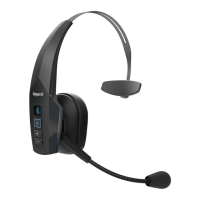
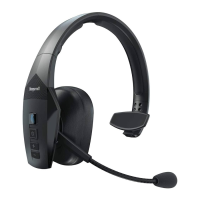
BlueParrott B550-XT
3 pages
To Next Page IconTo Next Page
Page #1 background imageLoading...
Page #1 background image
BlueParrott B550-XT
How do I recalibrate my BlueParrott B550-XT headset?
Firmware version 1.28
To recalibrate your headset, follow these steps:
a. Make sure you have successfully updated your headset to v. 1.28 and
disconnected it from the computer.
b. Power on the headset.
c. Power off the headset for a minimum of 45 seconds.
Note: no lights will flash during this power off, but you may hear the
power off voice prompt. This 45 second period is required to prepare
the headset for recalibration.
d. Power on the headset.
e. Place the headset on a flat surface on its side.
f. A quick, double, simultaneous press of both the BlueParrott Button™
and the Volume Up button begins the recalibration process. Keep your
fingers and hands away from the speaker and T-bar opposite from the
speaker.
g. After a few seconds, the Multifunction Button (MFB) may flash oddly
timed patterns of red and/or blue, or possibly purple. When
recalibration is complete, the MFB will flash blue 10 times and then
return to normal. If recalibration fails, the MFB will flash red 10 times.
If recalibration does fail, power off and repeat the steps starting at
step b.

08/05/2022 03:07
https://www.blueparrott.com/supportpages/blueparrott-b550-xt/204165/faq/9286198a-
2abc-4801-a610-d696f5d826d9
Page 1 of 3

Other manuals for BlueParrott B550-XT

Question and Answer IconNeed help?

Do you have a question about the BlueParrott B550-XT and is the answer not in the manual?

BlueParrott B550-XT Specifications

General IconGeneral
Headset typeMonaural
Product typeHeadset
Product colorBlack
Wearing styleHead-band
LED indicatorsPower
Country of originChina
Recommended usageOffice/Call center
Protection featuresDust resistant, Water resistant
International Protection (IP) codeIP54
Standby time400 h
Battery capacity380 mAh
Battery operatedYes
Battery recharge time3.5 h
Continuous audio playback time24 h
Driver unit36 mm
Ear couplingCircumaural
Headphone frequency150 - 6800 Hz
Maximum input power50 mW
Microphone typeBoom
Microphone sensitivity-47 dB
Wireless range100 m
Bluetooth version5.0+EDR
Bluetooth profilesA2DP, HFP, PBAP
Connectivity technologyWireless
Cables includedUSB
Operating temperature (T-T)-10 - 60 °C
MaterialABS, Foam, Leatherette, Nylon, Polycarbonate (PC), Polyoxymethylene (POM), Rubber, Silicone, Stainless steel, Thermoplastic polyurethane (TPU)
Master (outer) case width600 mm
Master (outer) case height370 mm
Master (outer) case length500 mm
Master (outer) case weight14450 g
Harmonized System (HS) code85183000
Quantity per master (outer) case10 pc(s)
Package depth75 mm
Package width172 mm
Package height175 mm
Package weight390 g
Weight and Dimensions IconWeight and Dimensions
Depth190.5 mm
Width178 mm
Height63.5 mm
Weight165 g

Related product manuals