15
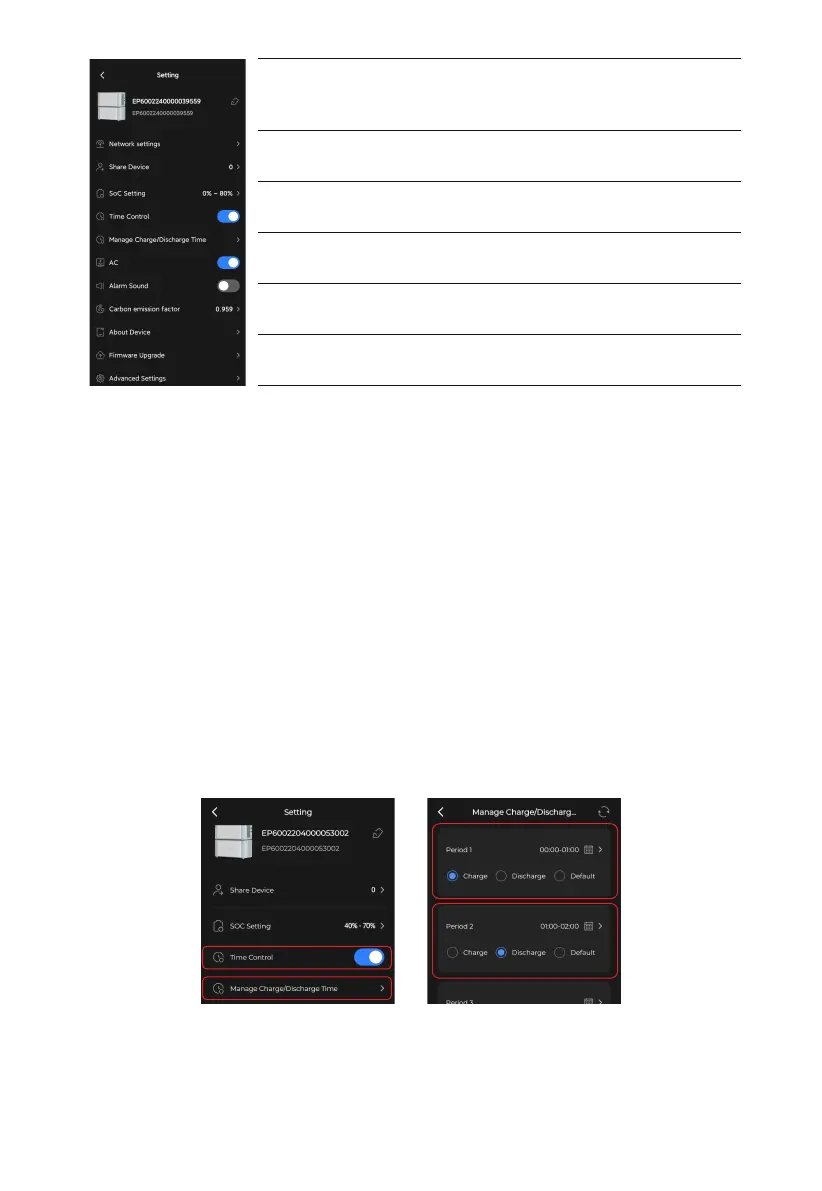
Network settings
To configure the WiFi network. Only available when you
connect to the EP600 ESS via Bluetooth.
Time Control
Alarm Sound
Carbon emission factor
About Device
To enable the Manage Charge/Discharge Time function
To sound a fault/alarm.
To calculate your reduced carbon emission.
The information about EP600 and other related devices
Share Device
Share EP600 ESS with others (Wi-Fi connection requied).
•
AC
The main switch of the EP600 ESS. Keep it on if you want the EP600 ESS to provide AC
output. If it's off, the system has no input or output and will automatically shut down.
Note: If you're updating the firmware, connecting cables, or not using the system, it's
recommended that you turn the AC switch off.
•
Manage Charge/Discharge Time
You can set 6 time periods in order, with the earliest as the first and the latest as the last.
1.Turn on the Time Control, and tap Manage Charge/Discharge Time.
2.Select OK in the Attention pop-up.
3.Set a schedule with Charge, Discharge and Default. The Default means the system
doesn't charge or discharge.
Note: Make sure there is no overlap or confusion between different periods.
If you want to charge the system from the grid, you also need to enable the Grid Charge
Enable on the Advanced Settings page. Similarly, to feed excess energy to the grid, turn
on the Feed to Grid.



 To Next Page