•
Firmware Upgrade
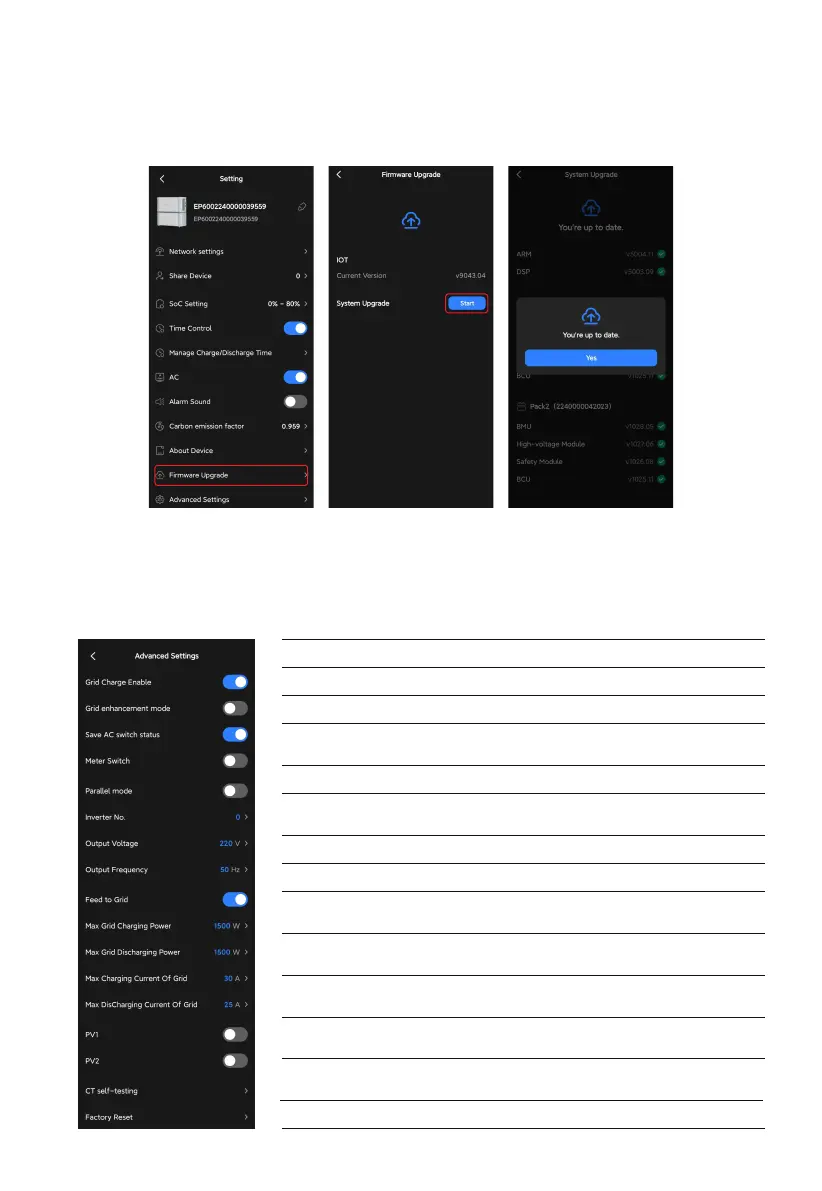
Go to the Firmware Upgrade page and tap Start to upgrade. Once the upgrade is
completed, it'll prompt that You're up to date.
Note: This feature is only available when you connect to the EP600 ESS via Bluetooth.
17
•
Advanced Settings
Go to the Settings page, and tap Advanced Settings to check and change more settings.
Grid Charge Enable
Grid Enhancement Mode
Save AC Switch Status
Meter Switch
Feed to Grid
Multi-inverter Mode
Output Voltage
Output Frequency
Max Grid
Charging Power
Max Charging
Current Of Grid
Max Grid
Discharging Power
Max Discharging
Current To Grid
CT Self-testing
Factory Reset
To enable the EP600 ESS to charge from the grid.
To provide a stable and continuous grid charging.
To save the AC switch status and restore it on restart.
To record the information of generator and PV
inverter, like current, voltage and power.
To enable the EP600 ESS to feed into the grid.
To enable the EP600 to be connected and
operated in parallel.
The output voltage of the EP600 ESS.
The output frequency of the EP600 ESS.
The maximum charging power from the grid.
The maximum charging current from the grid.
The maximum discharging power from the
EP600 EES to the grid.
The maximum discharging current from the
EP600 EES to the grid.
To check whether the CT is properly connected.
Note to turn AC on.
To factory reset all the settings.



 To Next Page