36 BA-077/1EN M6X.20XX
4 - Working with PRO-CENTER
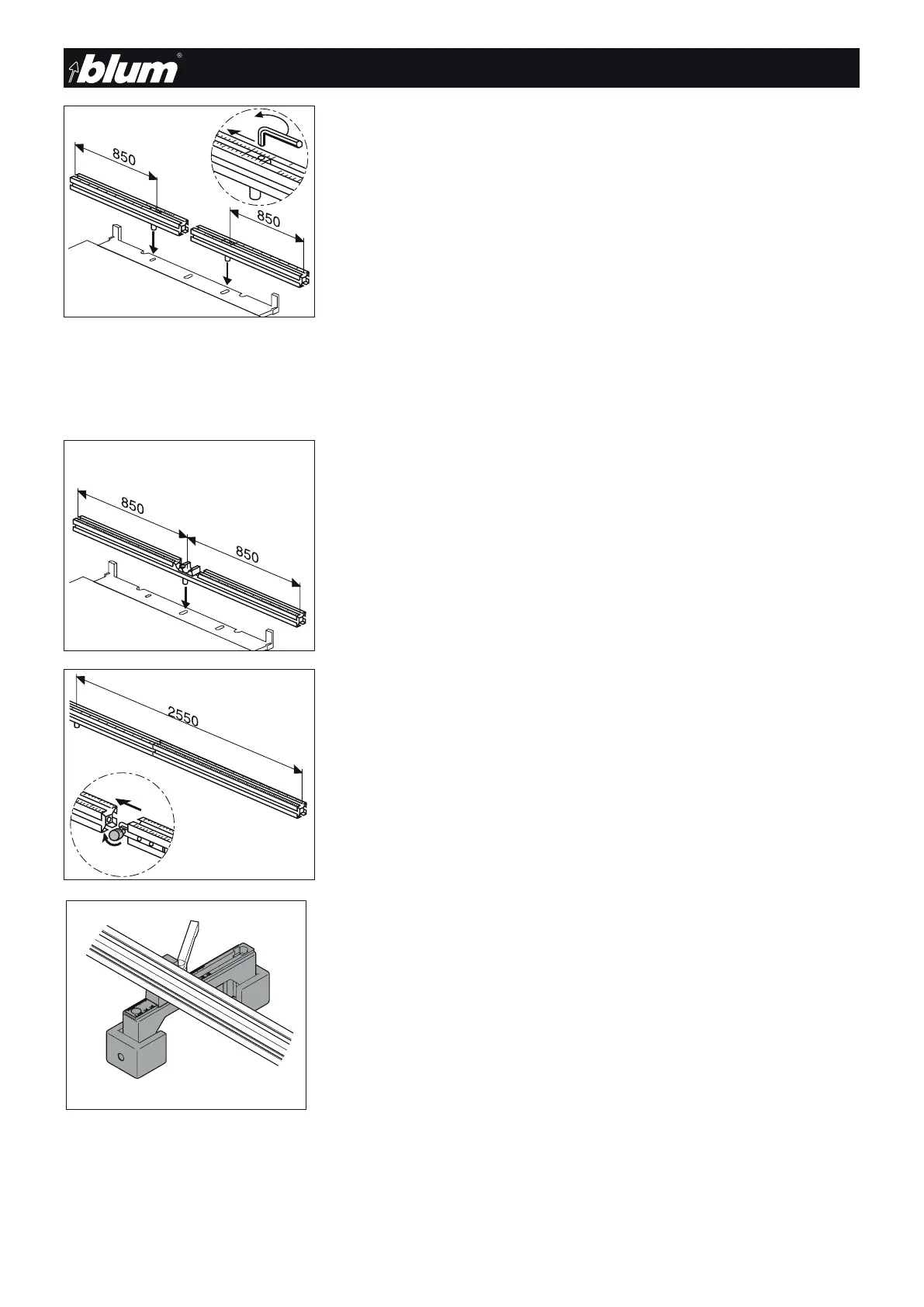
4.4.4) LR ruler: MZL.2080 system drilling ruler
• two-piece
• Calibration per side is 850 mm
• The 0 position reference point starts from the outer spindle of the SYV drill head
• 0 point setting
To set the first drilling, e.g. to 8 mm, the 0 point must be set to 8 mm. The stop set-
tings do not need to be changed.
Adjustment
• Loosen the clamping screw with a hex key and set the part to the desired dimension
• Retighten clamping knob
4.4.5) H ruler: MZL.2060 horizontal ruler
• The calibration is symmetrical starting from the 0 point going to 850 mm
• Recesses for the horizontal drill bits
• This ruler must be inserted for horizontal drilling
Note
The MZR.1200 centre stop can only be used for this ruler.
4.4.6) V ruler: MZL.2090 extension ruler
• Connecting extensions on the basic ruler from the 0 point to 2550 mm.
Assembly:
• Slide extension ruler onto the ruler on the machine
• Clamp with the clamping knob
Important
Support the extension ruler using ruler supports.
4.4.7) Ruler supports: MZV.2100 for extension ruler
• Attach the ruler supports to the table at the outside third of the extension ruler. Place
a 40 mm high block of wood underneath. (countersunk chipboard screws 6x50)
Important
Make sure that the calibration on the ruler support corresponds to the
one on the work table of the PRO-CENTER 2000. Pay attention to the
adjustment area of the work table.
• Before setting the work table, loosen the clamping lever on the ruler support. Then
retighten.
!
!
!


 To Next Page