20
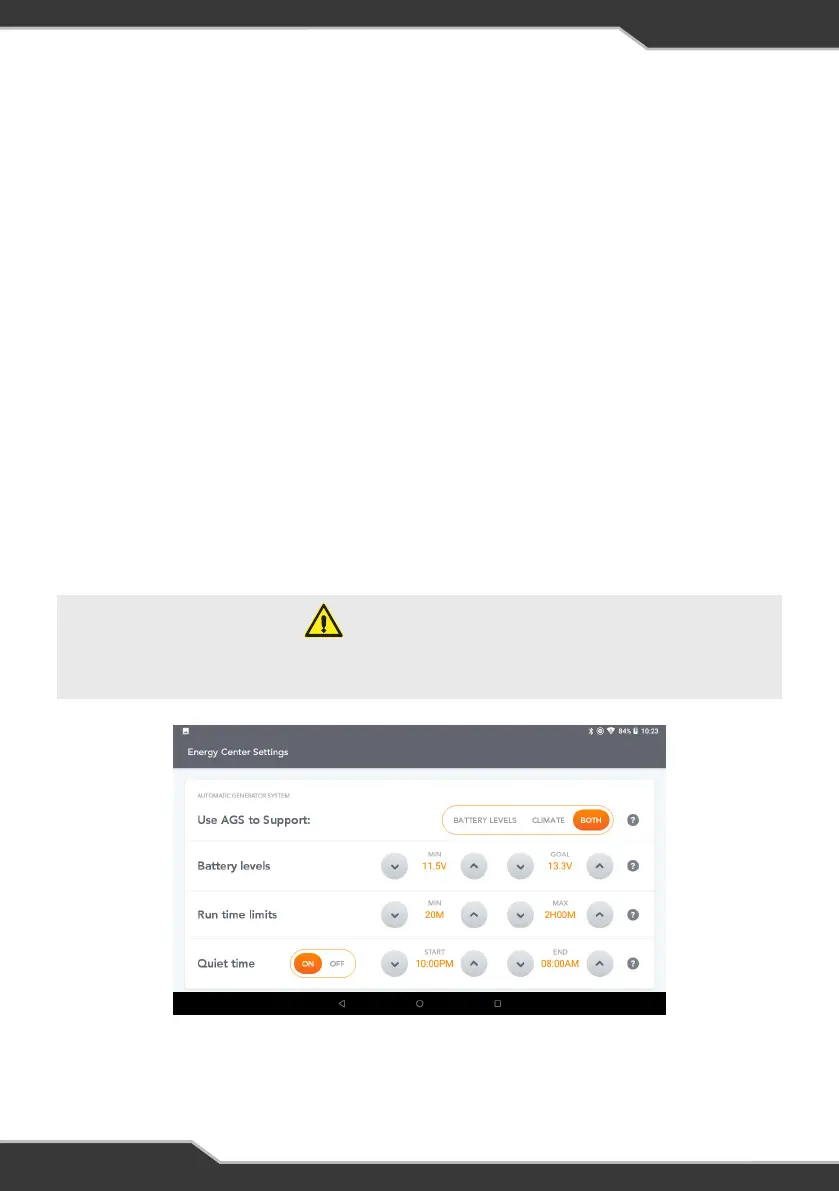
Figure 17: AGS Energy Center Settings
Energy Settings
Click on Energy Settings to set the parameters to control AGS usage.
USE AGS TO SUPPORT
Choose if AGS is to support battery levels, climate or both.
BATTERY LEVELS
Nominate the battery voltage (min) level which automatically starts battery charging
from the generator. Battery charging stops when the goal voltage is reached.
AGS monitors both system voltage and coach battery voltage and uses the greater of
the two voltages to determine whether to turn the generator on or off.
RUN TIME LIMITS
Set the minimum time that the generator will continue to run after the goal battery
voltage and/or temperature is achieved. The maximum time is the total run time that
the generator will operate to achieve goal battery voltage and/or temperature. If
targets are not achieved and the generator run time exceeds the maximum run time
limit set in the Energy Settings, the generator will automatically turn off.
QUIET TIME
Quiet time allows you to choose the hours when the generator will always be turned off,
even if AGS has been enabled.
WARNING
If using Quiet time, please ensure that time is correct on the RVMasterController.
For more help on setting the time, refer to FAQs and Troubleshooting.



 To Next Page