25
I’ve left my RV on for a few days; now the screen on my RVMasterController is blank
and I can’t use the RVMaster App?
The RVMasterController will go to sleep if it has been left on for more than 48 hours
and not been used in that time.
Touching the screen will not wake up the RVMasterController. To wake up the
RVMasterController and use the RVMaster App again:
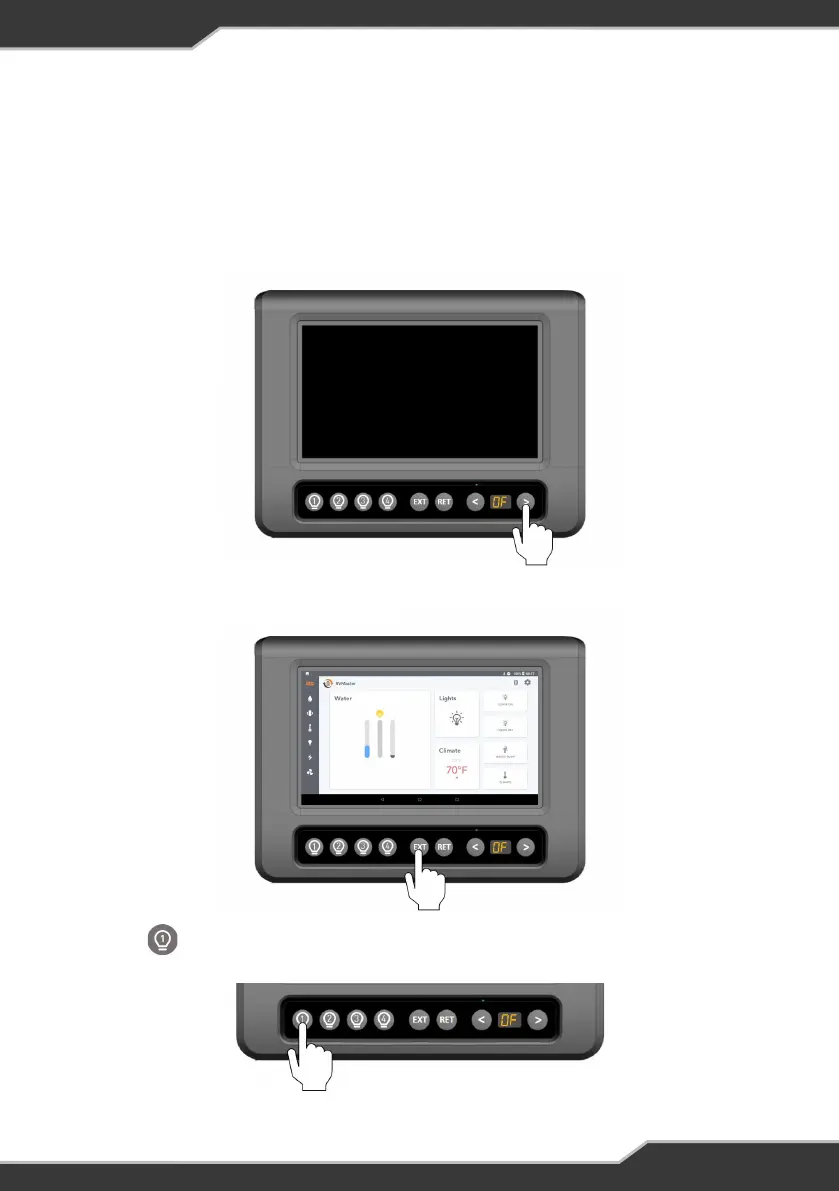
1. Using the < or > button on the RVMasterController, navigate to the ‘OF’ function
(Figure 24).
Figure 24: Navigate to the ‘OF’ function
Figure 25: Press EXT to wake the display
Figure 26: Press 1 to use the RVMaster
2. Press EXT to wake the display on the RVMasterController (Figure 25).
This will put the RVMaster in standby mode and turn off the lights.
3. Press to take the RVMaster out of standby mode and begin using the
RVMaster App (Figure 26).



 To Next Page