If necessary, independent drive-off, such as by
stepping on the accelerator pedal or by pressing
the rocker switch.
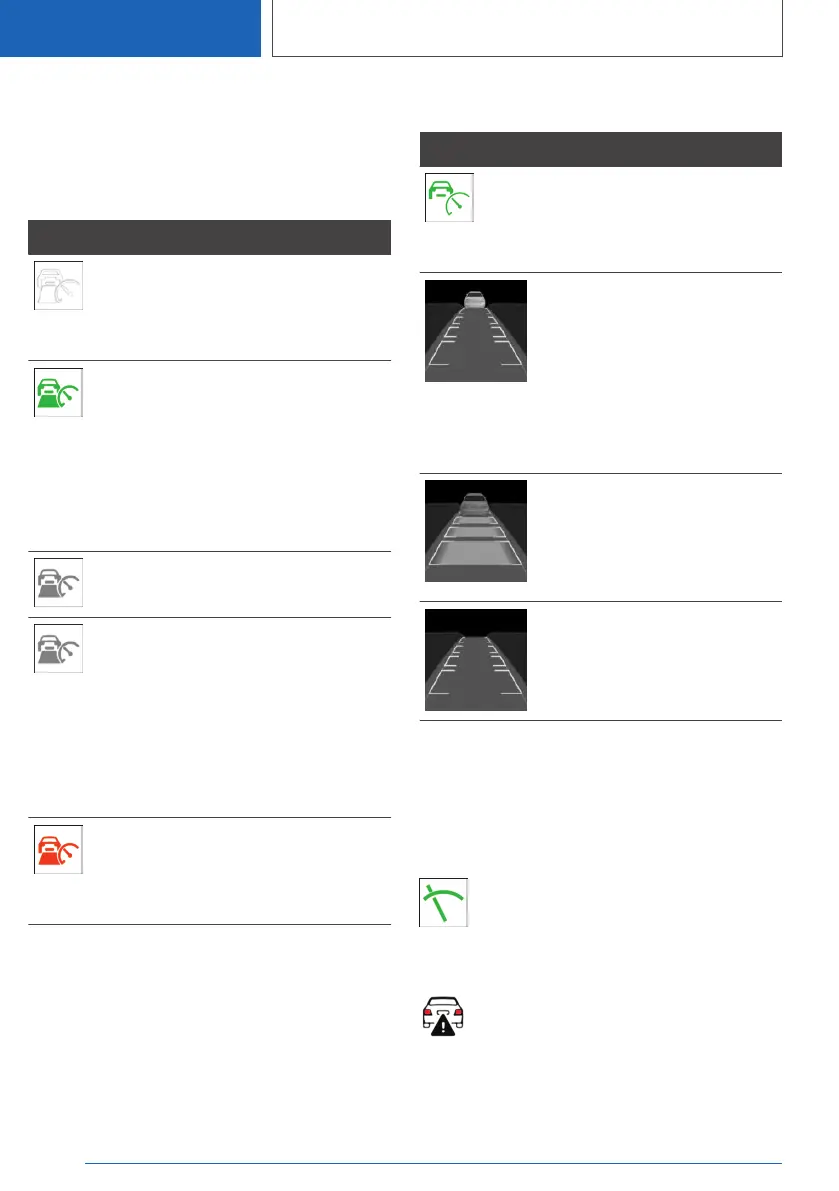
Indicator/warning lights
Icon Description
Vehicle symbol white:
No distance control display, as
the accelerator pedal is being
pressed.
Green icon:
A vehicle has been detected
ahead of you.
The vehicle symbol goes out if
no vehicle in front is detected.
Vehicle symbol flashes green:
Vehicle in front drove off.
Gray icon:
System interrupted.
Symbol flashes gray:
The conditions are not adequate
for the system to work.
The system was deactivated but
applies the brakes until you ac‐
tively resume control by press‐
ing on the brake pedal or accel‐
erator pedal.
Vehicle symbol flashes red and a
signal sounds:
Brake and make an evasive ma‐
neuver, if necessary.
Alternative displays
Icon Description
Indicator light green: system is
active.
No indicator light: system is
switched off.
Vehicle symbol flashes:
The conditions are not adequate
for the system to work.
The system was deactivated but
applies the brakes until you ac‐
tively resume control by press‐
ing on the brake pedal or accel‐
erator pedal.
The vehicle symbol and dis‐
tance bars flash red and an
acoustic signal sounds:
Brake and make an evasive ma‐
neuver, if necessary.
System interrupted.
Displays in the Head-up Display
Desired speed
Some system information can also be displayed
in the Head-up Display.
The icon is displayed when the set de‐
sired speed is reached.
Distance information
The icon is displayed when the distance
from the vehicle traveling ahead is too
short.
The distance information is active in the follow‐
ing situations:
Seite 226
CONTROLS
Driver assistance systems
226
Online Edition for Part no. 01405A2C7F8 - II/21





 To Next Page