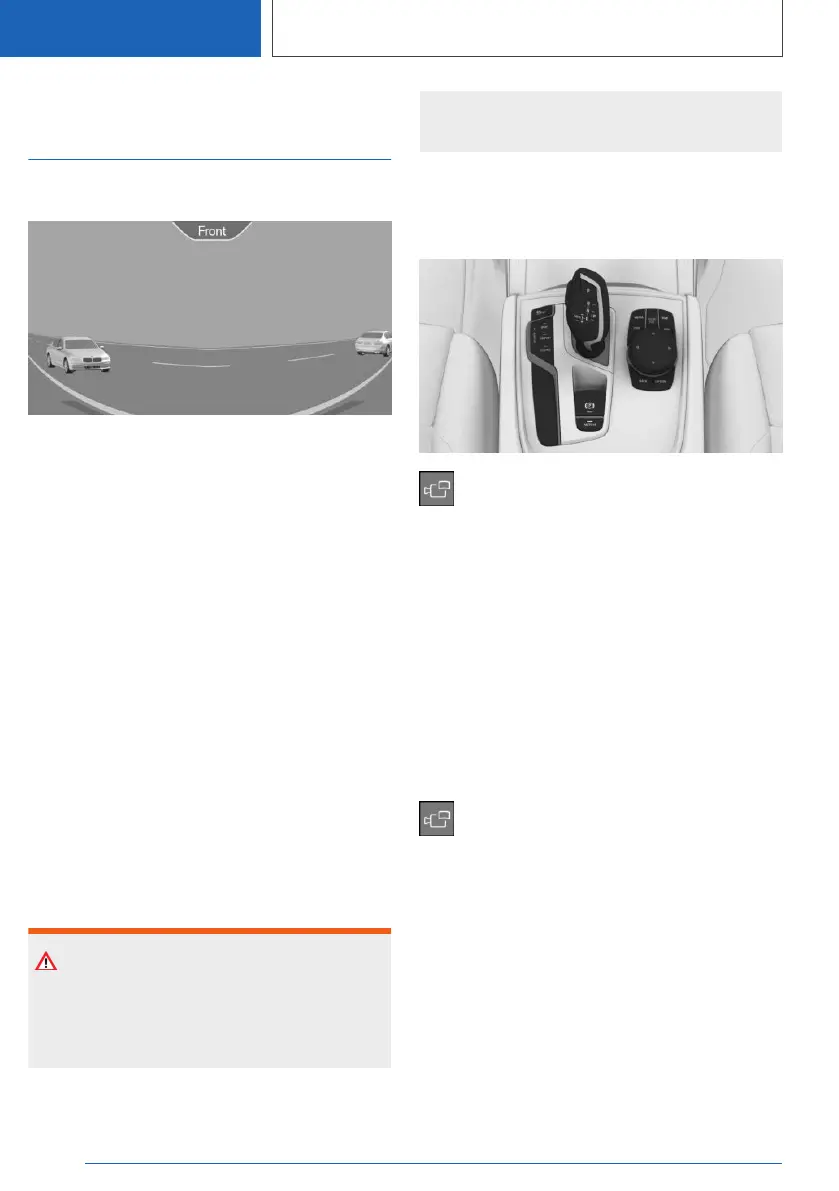
With Parking Assistant
Plus: Panorama View
Concept
The system provides an early look at cross traffic
at blind driveways and intersections.
General information
Road users concealed by obstacles to the left
and right of the vehicle can only be detected rel‐
atively late from the driver's seat. The cameras in
the front and rear capture the sideways traffic
area to improve the view.
Yellow lines in the screen display mark the front
and rear end of the vehicle.
The camera image shows different levels of dis‐
tortion in some areas and is thus not suitable for
distance estimations.
Depending on the equipment version, the func‐
tion can only be used when driving forward.
Additional information:
Surround View, refer to page 253.
Safety information
Warning
The system cannot serve as a substitute for the
driver’s personal judgment in assessing the
traffic situation. There is a risk of accident. Ad‐
just driving style to traffic conditions. Watch
traffic and vehicle surroundings closely and ac‐
tively intervene where appropriate.
Overview
Button in the vehicle
Panorama View
Sensors
The system is controlled by the following sen‐
sors:
▷ Front camera.
▷ Depending on the equipment: rearview cam‐
era.
Additional information:
Sensors of the vehicle, refer to page 35.
Display on the Control Display
Press the button when the engine is run‐
ning.
Depending on the driving direction, the image of
the respective camera is displayed:
▷ "Front": front camera image.
▷ "Rear": rear camera image.
Depending on the vehicle equipment, cross traf‐
fic warning can additionally warn of approaching
vehicles using radar sensors.
Additional information:
Cross traffic warning, refer to page 264.
Seite 258
CONTROLS
Driver assistance systems
258
Online Edition for Part no. 01405A2C7F8 - II/21







 To Next Page