Displays�and�Controls�2018
2.�Operating�Elements
5
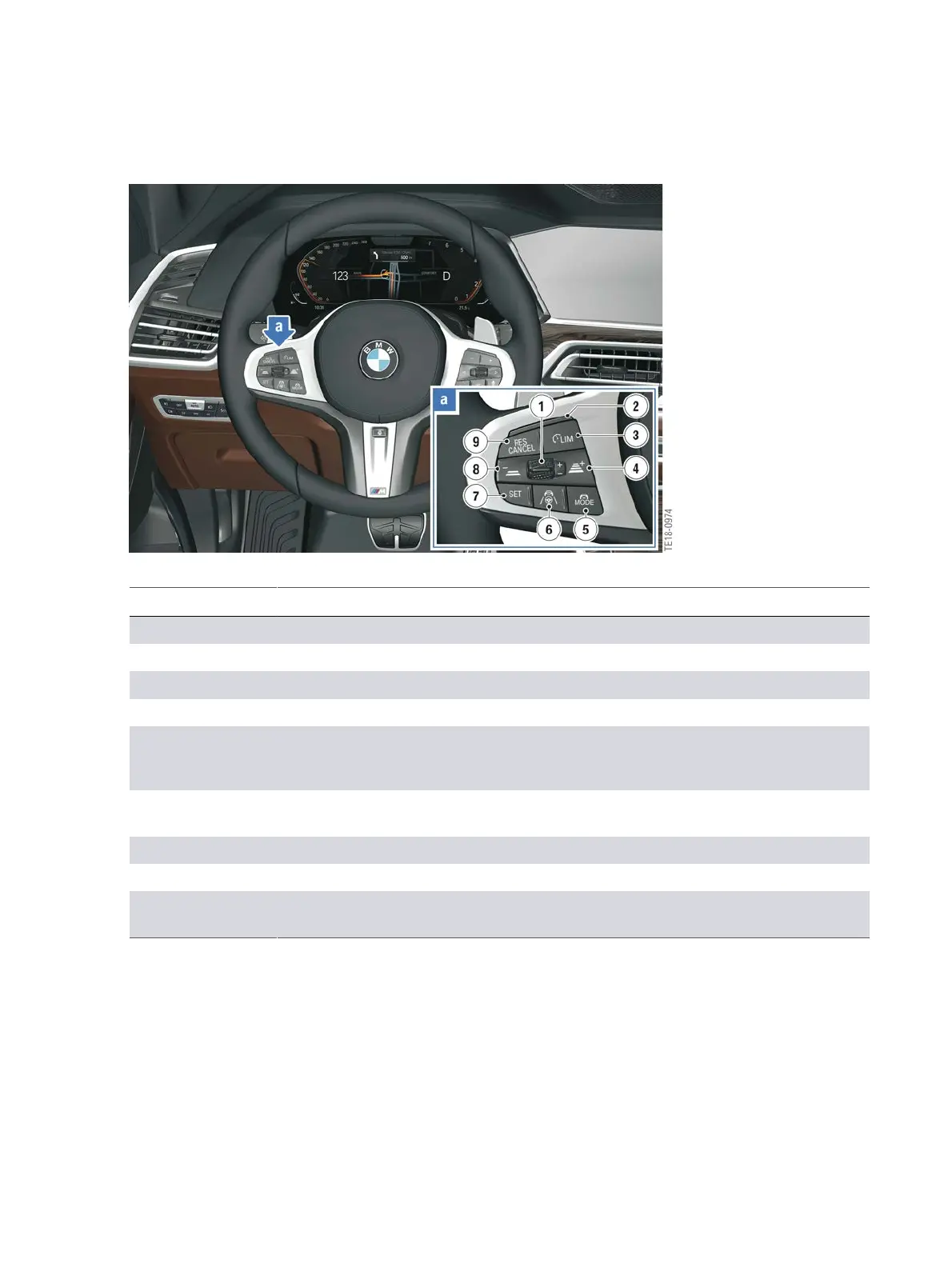
Buttons�for�assistance�systems�on�multifunction�steering�wheel
Index Explanation
1 Rocker�switch�for�changing�the�set�speed
2 LED�display
3 Speed�limit�ON/OFF
4 Increase�distance�to�the�vehicle�ahead
5 Button�for�selecting�the�assistance�system
Possible�selection:�Only�ACC�Stop&Go�or�ACC�Stop&Go
with�Steering�Assistant
6 Button�for�activating�or�deactivating�the�assistance�system
selected�via�the�mode�button�(Assist�button)
7 Cruise�Control:�Save�speed
8 Reduce�distance�to�vehicle�ahead
9 Button�for�calling�up�a�saved�set�speed/temporarily
switching�off�the�cruise�control
Information�about�the�operation�of�the�assistance�systems�via�the�multifunction�steering�wheel�can
be�found�in�the�product�information�G05�Driver�Assistance�Systems�and�G15�Driver�Assistance
Systems.



 To Next Page