2
13
General operation
• Press the CD/* button
repeatedly until the desired
operating mode is enabled.
» The operating modes are
enabled in the following
order:
– Radio (
b 19).
–CD player (
b 27).
– AUX: external device, e.g.
MP3 player.
– INTERCOM: operating rea-
diness for an intercom, no
radio mode.
The display on changing
into the CD operating
mode depends on the state of
the CD player (
b 27).c
From the CD and AUX
operating modes, pres-
sing the FM or AM button swit-
ches directly into the radio
mode. The INTERCOM opera-
ting mode can only be
disabled by pressing the
CD/* button.c
Volume
Setting the volume
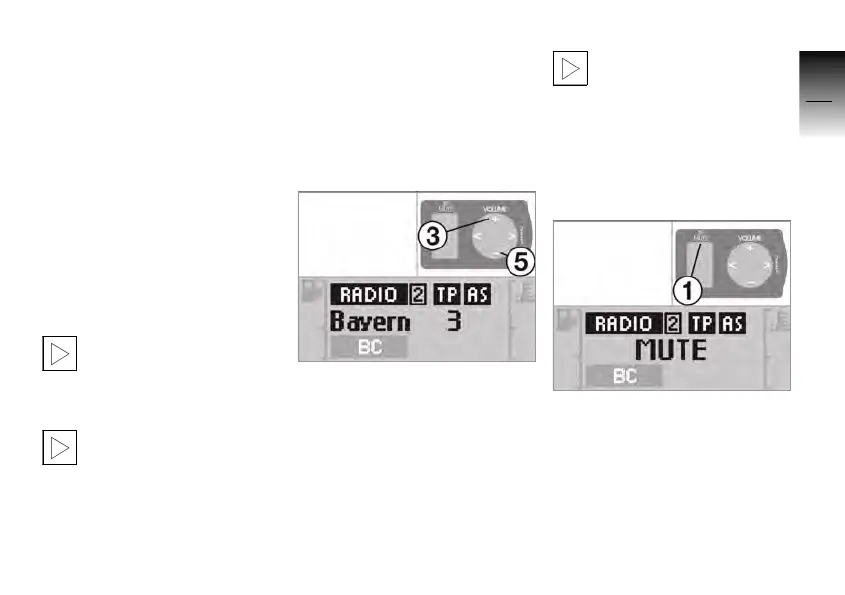
• Press button 3.
» The playback becomes lou-
der.
• Press button 5.
» The playback becomes
quieter.
If pressing buttons 3 or 5
leads to a display of
SPEAKER, the loudspeakers
are switched off (
b 15).c
Mute function
The mute function lowers the
volume by 20 dB.
• Press button 1.
» The volume is lowered.
»
MUTE appears briefly in the
display.
• Press button 1.
» The volume reduction is
cancelled.
10K26_RADIO_g1.book Seite 13 Dienstag, 15. Juni 2004 10:34 10



 To Next Page