3
19
Radio
Switching on the radio
• Switch on the audio system
(
b 12).
• Enable the radio operating
mode (
b 13).
Wavebands
FM waveband
• Press the FM button.
» Every time you press the
button, you switch between
FM and FM autostore
(FM-AS).
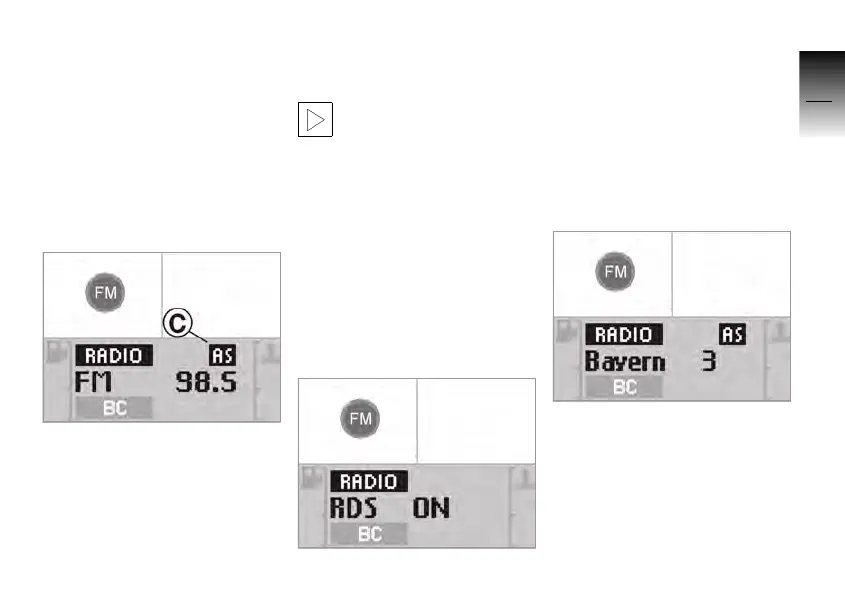
• In the FM-AS waveband, the
symbol
AS C is displayed.
The FM-AS waveband is
used for automatic stati-
on storage. The station sto-
rage can only be used manual-
ly in the FM waveband.c
Radio Data System (RDS)
Some stations in the FM
waveband broadcast additio-
nal information, including sta-
tion names.
To enable the RDS:
• Press the FM button until the
display changes.
»
RDS ON: RDS function
enabled.
»
RDS OFF: RDS function
disabled.
• Press the FM button to
enable or disable RDS.
» With RDS switched on, the
received RDS station is dis-
played with the station
name.
10K26_RADIO_g1.book Seite 19 Dienstag, 15. Juni 2004 10:34 10



 To Next Page