4
29
CD player
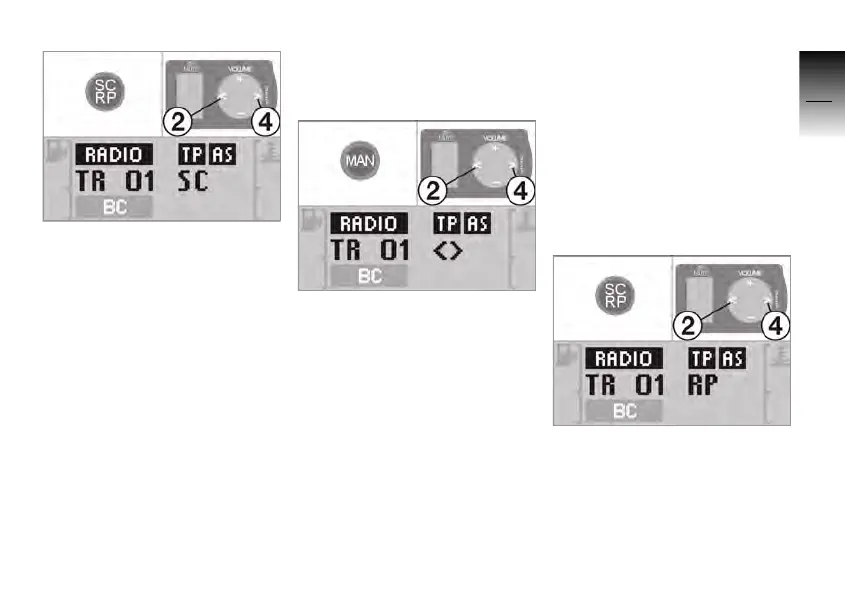
• Press the SC/RP button.
» The track that is playing
appears in the display with
the supplement
SC.
• Press the SC/RP button,
buttons 2 or 4 to select the
track that is playing.
The CD scan is terminated
after running through three
times or when a button on the
operating unit is pressed.
Fast forward and
rewind
• Press the MAN button.
» The current track appears
in the display with the
supplement
<>.
• Press button 2 or 4.
» As long as the button is
pressed, the track is forwar-
ded or reversed at an increa-
sed speed.
» The current track appears in
the display with the supple-
ment
>> for fast forward or
with
<< for rewind.
Random track order
The tracks on the CD are
played in random order
(RP = Random Play).
• Press and hold the SC/RP
button until the display chan-
ges.
» The current track appears in
the display with the supple-
ment
RP.
10K26_RADIO_g1.book Seite 29 Dienstag, 15. Juni 2004 10:34 10



 To Next Page