Radio
3
22
» SEEK and the current fre-
quency appear in the dis-
play.
» The search sensitivity
I A is
displayed.
» The current frequency is
lowered or raised to the next
receivable station.
» The received station is dis-
played with its frequency.
• Press button 2 or 4.
» The next receivable station is
found.
If the frequency band has been
run through completely wit-
hout a receivable station being
found, the search sensitivity is
increased to
II and the station
search is restarted.
If no receivable station is found
after the second search run of
the frequency band with high
search sensitivity,
NO STATION
appears briefly in the display.
The radio then returns to the
last frequency that was tuned.
After any other button on the
operating unit is pressed, the
automatic station search is
cancelled.
Pressing buttons 2 or 4
twice during the station-
search function with sensitivity
stage I increases this to
stage II.c
Scanning the frequency
band
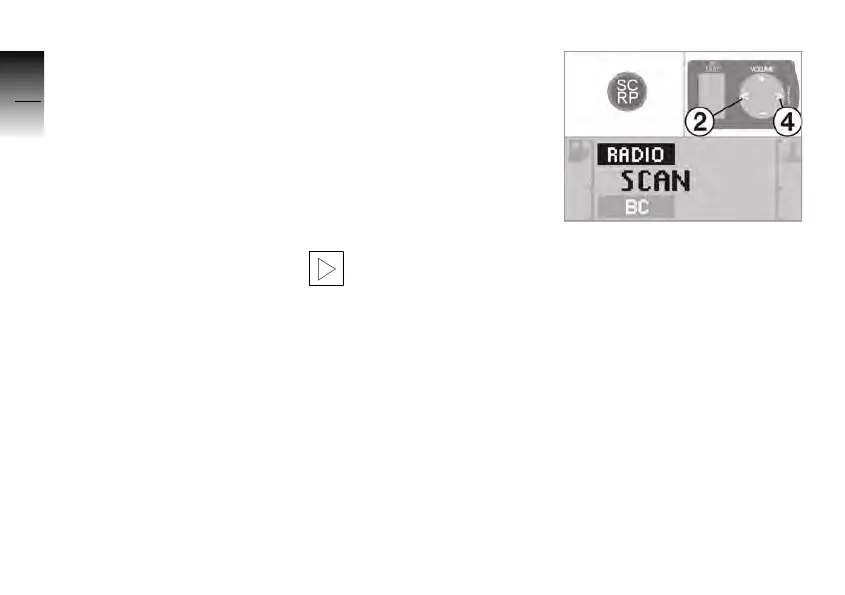
This function corresponds to
the automatic station search.
Each station found is played
for approx. 10 seconds before
the search continues auto-
matically to the next station.
• Press the SC/RP button.
» Until a receivable station is
found,
SCAN is shown in the
display.
» Every station that is found is
played for 10 seconds.
» The station name or
SCAN
with the frequency found
appears in the display.
• Press the SC/RP button,
buttons 2 or 4 to select the
station that is playing.
10K26_RADIO_g1.book Seite 22 Dienstag, 15. Juni 2004 10:34 10



 To Next Page