5. EEPROM/KM/Sync Code (OBD)
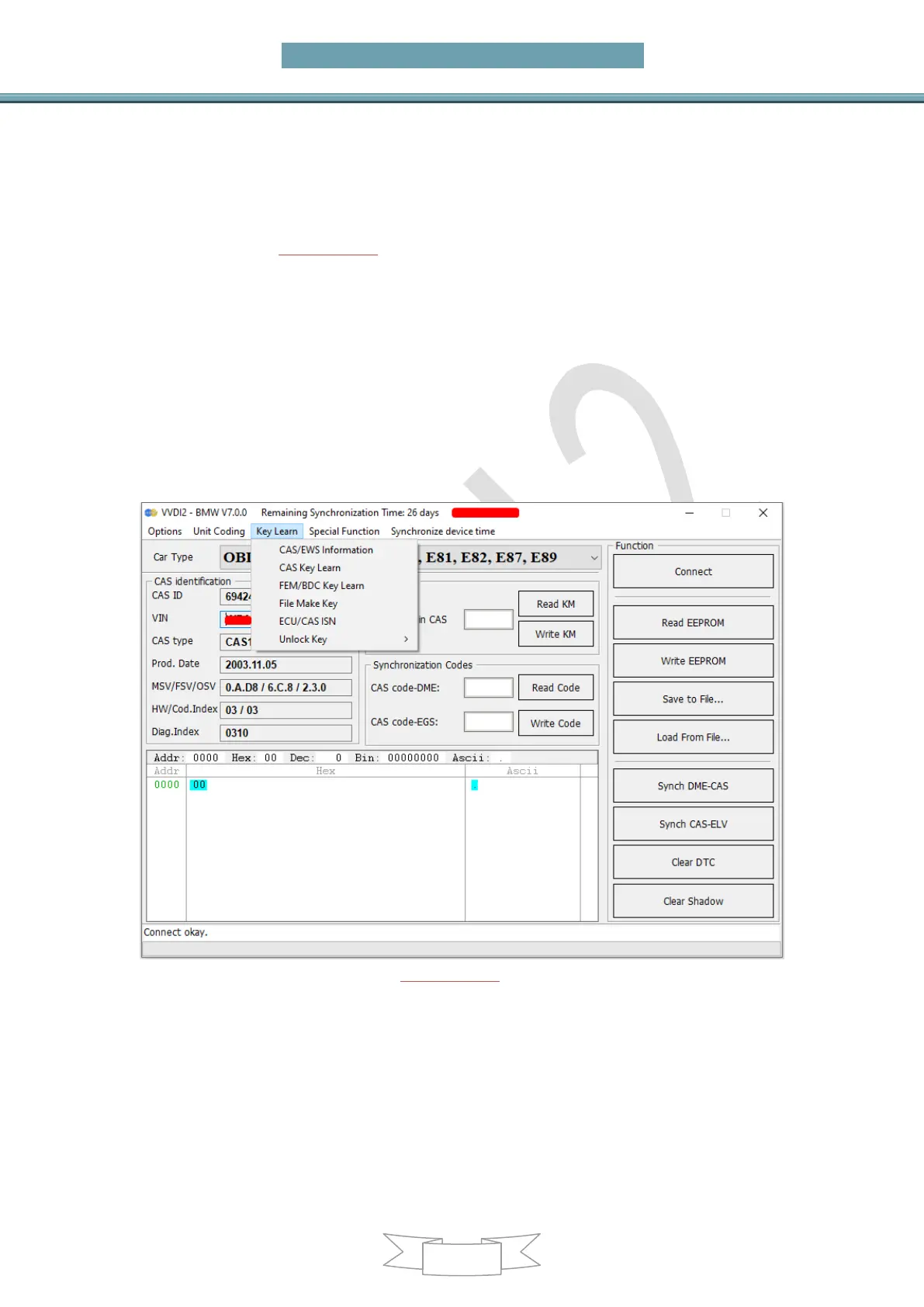
Main menu interface->>>Key Learn->>>CAS/EWS information
OBD main window (PICTURE 5.1), support following functions:
Auto Detect: Detect communication protocol automatically, support KWP-E6X…,
CAN bus 100Kbps, and CAN bus 500Kbps. Other functions need choose manually
OBDII KWP – E6X, E7X, E9X, E81, E82, E87, E89: Usually used in old cars with
CAS1, CAS2 and some CAS3
KWP – CAN bus 100Kbps: This type will be use when VVDI2 connect to CAS with
CAS PLUG or without gateway
KWP – CAN bus 500Kbps: This type will be use when connect to car with CAS3 or
CAS3+
BMW EWS KLine: When connect EWS with CAS PLUG, choose this type
BMW F-Series: This type can connect to CAS4 in BWM F-Series
(PICTURE 5.1)
Connect: Connect to CAS system. Attention: EWS don’t support this (see special
Attention 1). After connect to CAS, there will display detail information in CAS
identification. Auto Detect only support connect operate, you must choose a specific
type before you do other operations.
CAS identification:
CAS ID: CAS identification number
CAS type: CAS type is very important, the type shown here is detected by


 To Next Page