cannot be the same as the key inserted into the ignition switch. After disabled, the key
at this position will not be able to start the car, and add key at this position will not
start the car either. This function can be completed without unlock CAS4/CAS4+
6.3. Special Attention in OBD operation
(Important!!!)
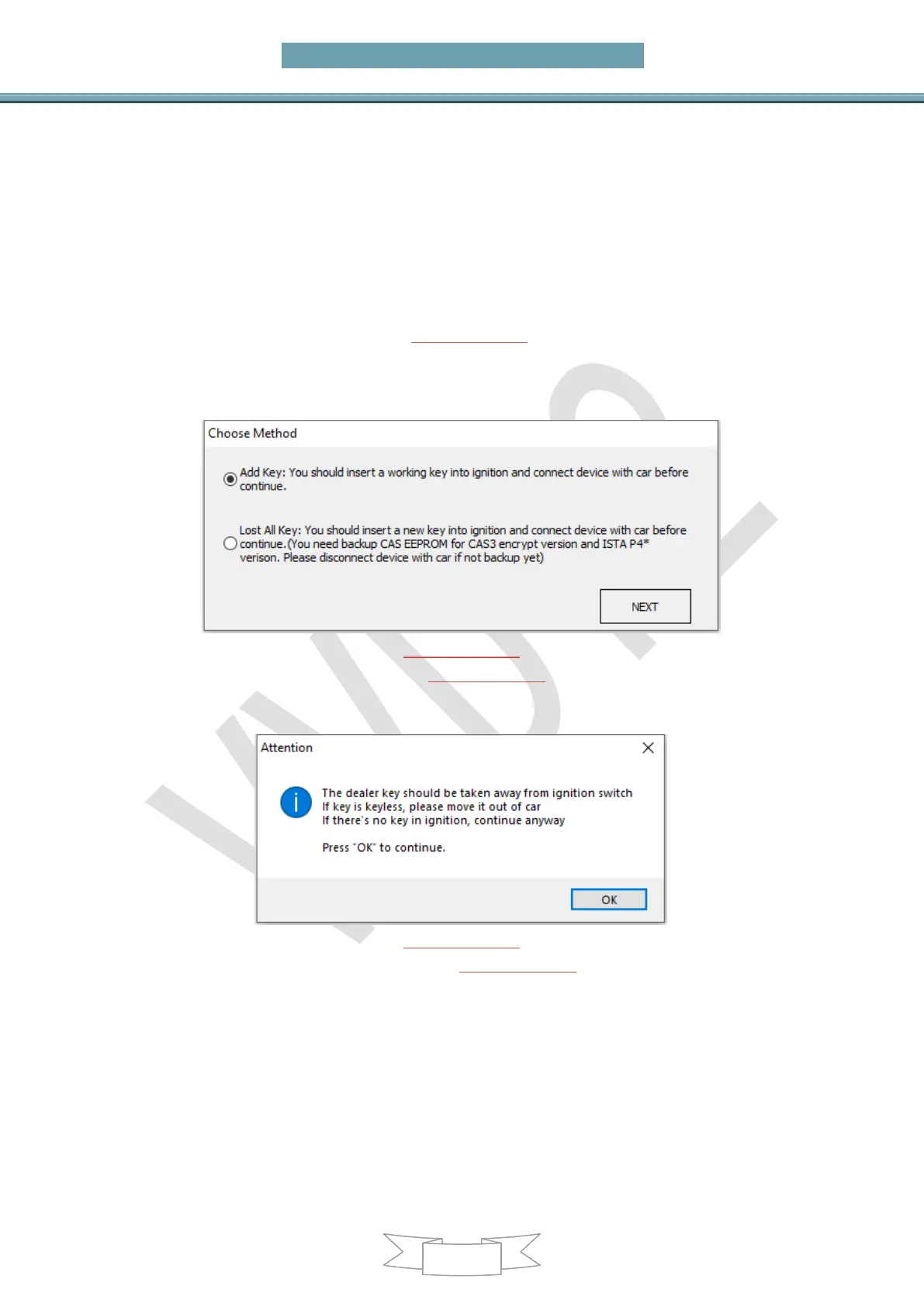
Under Get Key Info get window (PICTURE 6.3-1): For CAS3+ encrypt version, must
select add key or all key lost correctly. Otherwise, the key generated later may not
start the car. For other CAS version, this 2 method is same, they don’t have
difference between all key lost and add key
(PICTURE 6.3-1)
Under OBD operation get window (PICTURE 6.3-2): If there’s key in ignition switch,
take away. If the key is keyless key, move it out of car. If there’s no key in ignition
when prompts appear, just press OK to continue
(PICTURE 6.3-2)
Under prepare dealer key get window (PICTURE 6.3-3): Once you get this window,
BMW TOOL detect this CAS is CAS3+ encrypt version. If you sure CAS is encrypt
version, but there’s no this window while prepare dealer key, the prepare key may not
work. Please choose “File Make Key” prepare key


 To Next Page