11. CAS Repair(EEPROM OBDII)
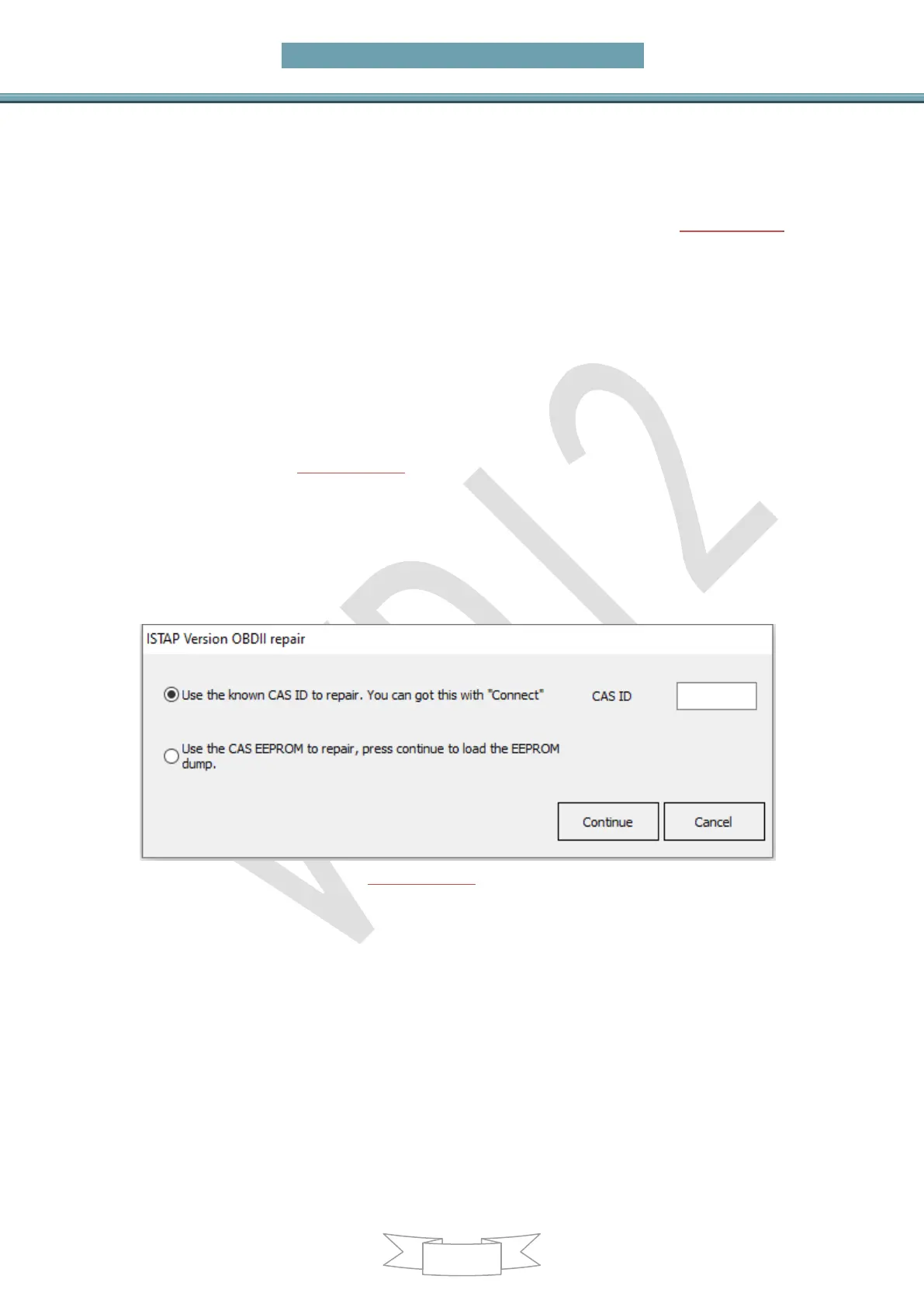
Main menu interface->>>Special functions->>>File repair KM (PICTURE 11.1)
11.1. CAS1(0K50E) OBDII Repair
For suddenly condition causeCAS1 enter service mode while read CAS1 EEPROM
via OBDII or CAS PLUG, you can select this type to repair
11.2. CAS3+ISTA-P4* OBDII Repair
For suddenly condition cause CAS enter service mode while update ISTA-P4*,select
this type to repair(PICTURE 11.1)
You need know CAS ID before continue. You can input the known CAS ID or load
EEPROM for automatic search CAS ID
Use the known CAS ID to repair: Before update CAS flash you have record CAS ID
can use this way
Use the CAS EEPROM to repair: If can’t read CAS ID,you need to use this method to
repair, connect the VVDI2 to the car with the OBD cable before clicking OK
(PICTURE 11.1)
Attention: If the above method cannot repair CAS, you can use the VVDI BMW tool to
disassemble and read the EP and FLASH of CAS to repair. For detailed steps, please
refer to Chapter 11 CAS Repair in the BMW Tool Instruction Manual


 To Next Page