18
3.3.2 Protocols settings page
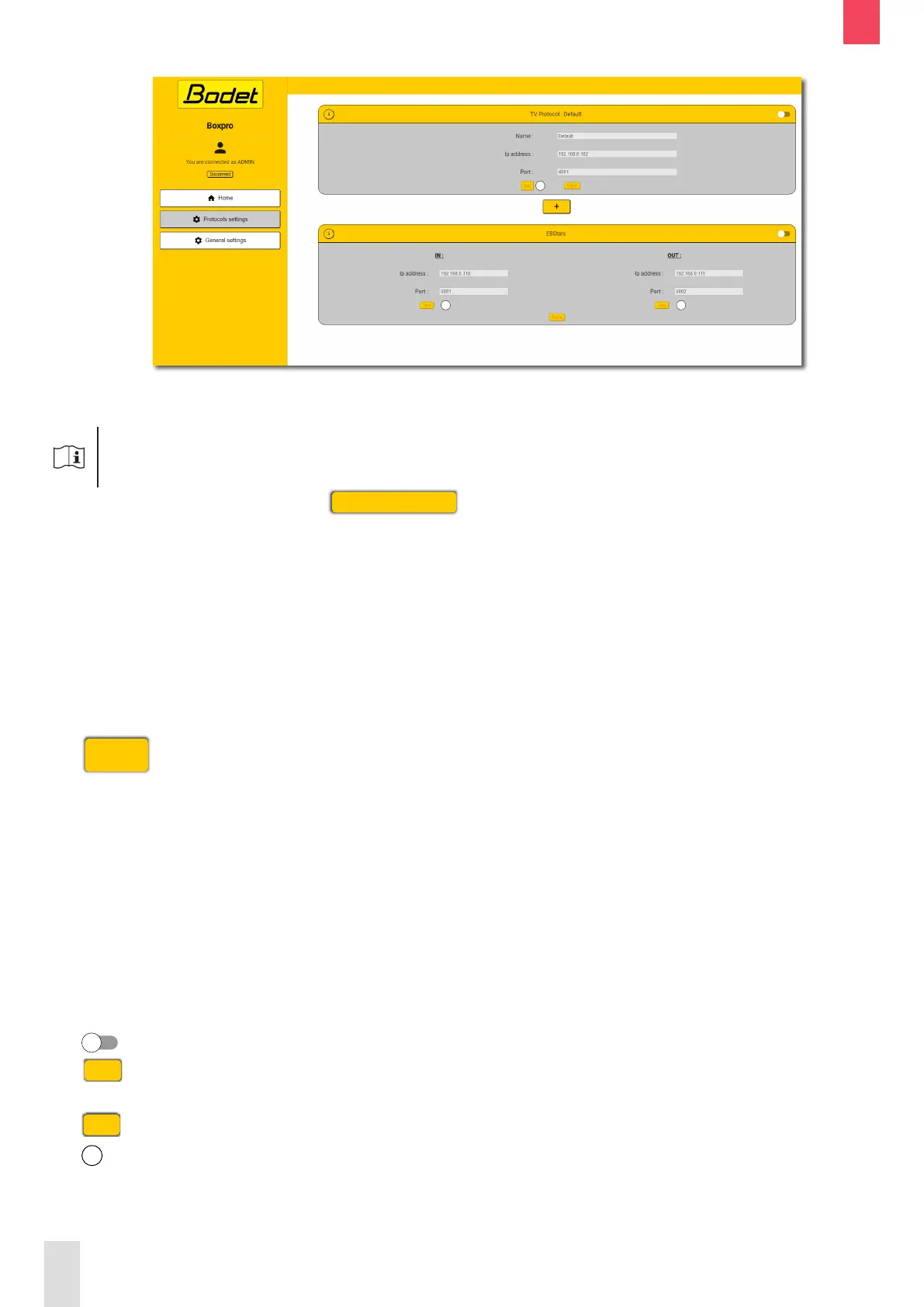
The protocols settings page allows activating or deactivating the protocols as well as lling in the
information required to communicate with the receiving equipment of each protocol.
It is required to log in as administrator to be able to modify the conguration.
To log in as administrator, click on
Connect as ADMIN
and enter the administrator password:
BodetSport49.
Below is the description of the information displayed as well as the information to be entered to set up
the communication with the receiving equipment of each protocol.
- TV protocol :
• Name: name of the TV protocol (useful if the TV protocol is duplicated for other equipment)
• IP address: IP address of the control PC (if connected directly to the BOXPRO) or IP address of
the Moxa interface.
• Port: number of the port opened on the control PC (if connected directly to the BOXPRO) or port
number of the Moxa interface.
The
+
button allows to duplicate and set up the TV protocol to another equipment.
- EBStats:
IN OUT
• IP address: IP address of the EBStats
PC (information transmitted from the
SCOREPAD keyboard to the EBStats
PC).
• Port: number of port opened on the
EBStats PC (information transmitted
from the SCOREPAD keyboard to the
EBStats PC).
• IP address: IP address of the EBStats PC
(information transmitted from EBStats PC
to the SCOREPAD keyboard).
• Port: number of port opened on the EBStats
PC (information transmitted from the
EBStats PC to the SCOREPAD keyboard).
The buttons are used to activate or deactivate the protocols.
The
Test
buttons are used to check the communication with the receiving equipment (PC or Moxa
interface depending on the installation).
The
Save
buttons are used to save the conguration.
The
i
buttons provide access to help diagrams relating to the hardware installation.
Also see chapter 6. Installation examples.
EN


 To Next Page