22
5. Equipment information
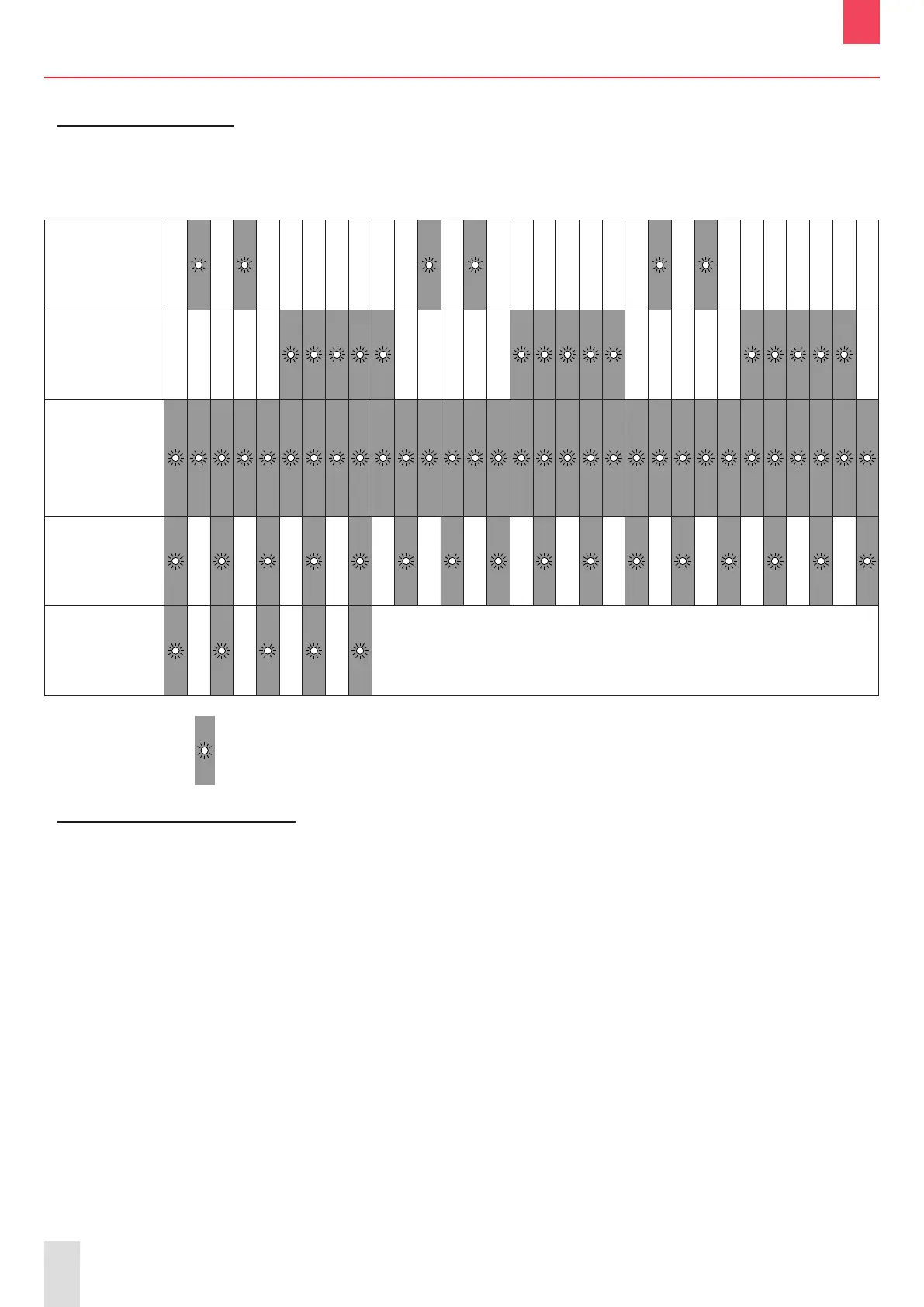
5.1 LED behaviour
BOXPRO
interface
status
Time (seconds)
0 0.1 0.2 0.3 0.4 0.5 0.6 0.7 0.8 0.9 1 1.1 1.2 1.3 1.4 1.5 1.6 1.7 1.8 1.9 2 2.1 2.2 2.3 2.4 2.5 2.6 2.7 2.8 2.9 3
BOXPRO
interface
switched on
Connection
attempt to the
SCOREPAD
keyboard
BOXPRO
interface
connected
to the
SCOREPAD
and operating
Update
in progress
Transfer of the
settings
le to the USB
key
Back to previous status
LED switched on:
5.2 Default configuration
The BOXPRO default settings are the following:
- Network settings:
• IP address: 192.168.0.200
• Subnet mask: 255.255.0.0
- TV protocol (1 protocol):
• Name: Default
• Status: Inactive
• IP address: 192.168.0.102
• Port number: 4001
- EBStats protocol:
• Status: Inactive
• IN:
IP address: 192.168.0.110
Port number: 5001
• OUT:
IP address: 192.168.0.111
Port number: 5002
EN


 To Next Page