19
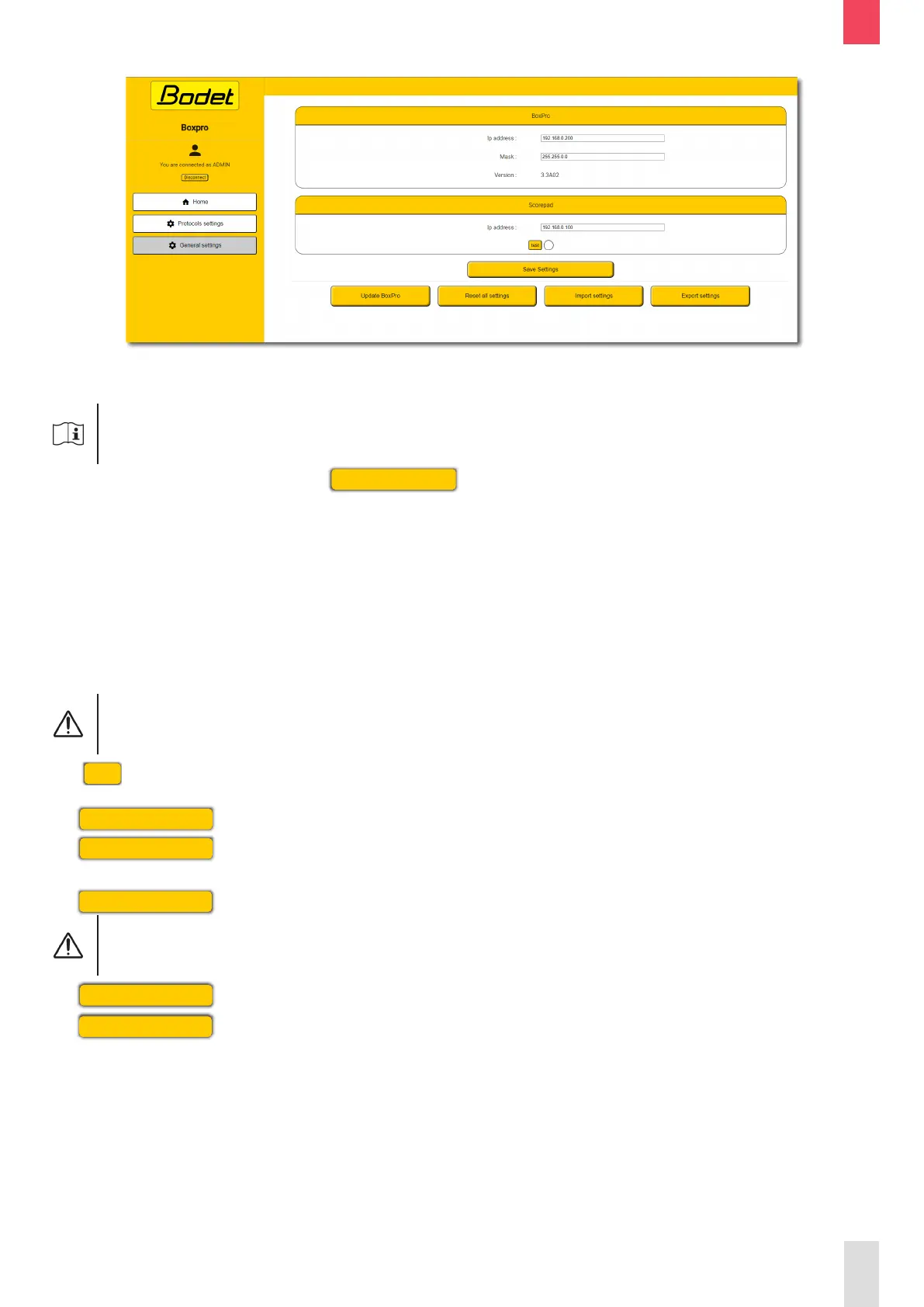
3.3.3 General settings page
The General settings page allows to access the BOXPRO conguration as well as to proceed with its
update.
It is required to log in as administrator to be able to modify the conguration.
To log in as administrator, click on
Connect as ADMIN
and enter the administrator password:
BodetSport49.
Below is a description of the information displayed:
- BOXPRO:
• IP address: IP address of the BOXPRO.
• Mask: BOXPRO subnet mask.
• Version: current rmware version of the BOXPRO.
- SCOREPAD:
• IP address: IP address of the SCOREPAD keyboard.
To communicate with each other, the SCOREPAD keyboard and the BOXPRO
must be on the same network.
The
Test
button is used to check the communication with the SCOREPAD keyboard.
The
Save settings
button is used to save the conguration.
The
Update BoxPro
button is used to proceed with the product’s update.
Refer to chapter 4.2 Update procedure.
The
Reset all settings
button is used to go back to the BOXPRO default conguration.
The protocols conguration will be lost and the BOXPRO will go back to its
factory settings.
The
Import settings
button is used to import a conguration into the BOXPRO.
The
Export settings
button is used to export the current conguration of the BOXPRO.
The conguration le is generated in json format.
EN



 To Next Page