6
3. General view of the Scorepad
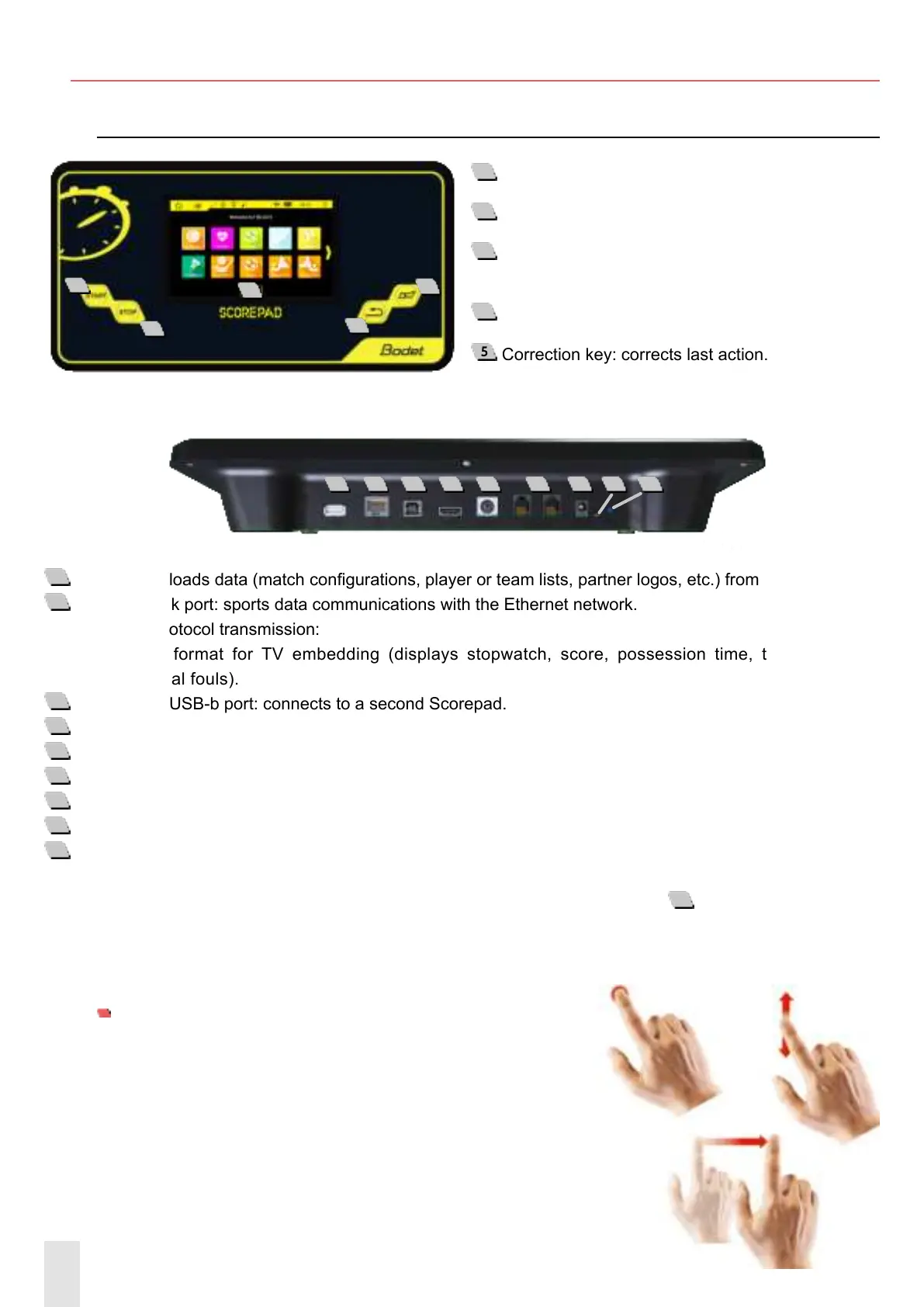
Overview of the Scorepad
1
Start key: starts the stopwatch.
2
Stop key: stops the stopwatch.
3
LCD touch screen: congures all sports display
settings.
4
Buzzer key: immediately starts or stops buzzer.
5
Correction key: corrects last action.
1
USB-a port: loads data (match congurations, player or team lists, partner logos, etc.) from a USB drive.
2
RJ45 network port: sports data communications with the Ethernet network.
Sports protocol transmission:
- Simple format for TV embedding (displays stopwatch, score, possession time, total fouls and
individual fouls).
3
USB-b port: USB-b port: connects to a second Scorepad.
4
HDMI port: connects to a TV-type display device.
5
Mini DIN port with lock: BODET sports data bus to connect to a Bodet scoreboard.
6
2 RJ12 ports: connect to additional consoles (referee whistle, possession console, Start/Stop hand switch, etc.).
7
Jack socket: power supply and battery charger.
8
1 green LED: indicates mains power ON.
9
1 RESET button: turn o the keyboard.
In case of a frozen screen (unresponsive touch screen) press the RESET button
9
. In case of malfunction,
try to restart the Scorepad (refer to chapter 4: Star-up) or try to turn it o by pressing the RESET button
(refer to chapter 3. Overview of the Scorepad).
7’’ LCD TOUCH SCREEN: CAPACITIVE MULTI-TOUCH
It only takes a few simple gestures (touch, drag and sweep)
to use the Scorepad touch screen:
1 32 4 5 6 7 8 9
1
2
3
4
5


 To Next Page