14
7. Using the TeamEditor application
1- Connect a USB ash drive to the Scorepad keyboard.
2- Click on
in the banner on the top of the Scorepad home screen.
3- Select Export TeamEditor and wait while the app is loaded on the USB ash drive.
4- Once the loading has been completed, click on OK and remove the USB ash drive.
5- Connect the USB ash drive to a PC and open the directory of the USB ash drive.
6- Open the TeamEditor folder and click on the HTML TeamEditor_.html le.
Note : use a web browser sur as Google Chrome or Mozilla Firefox or Opéra.
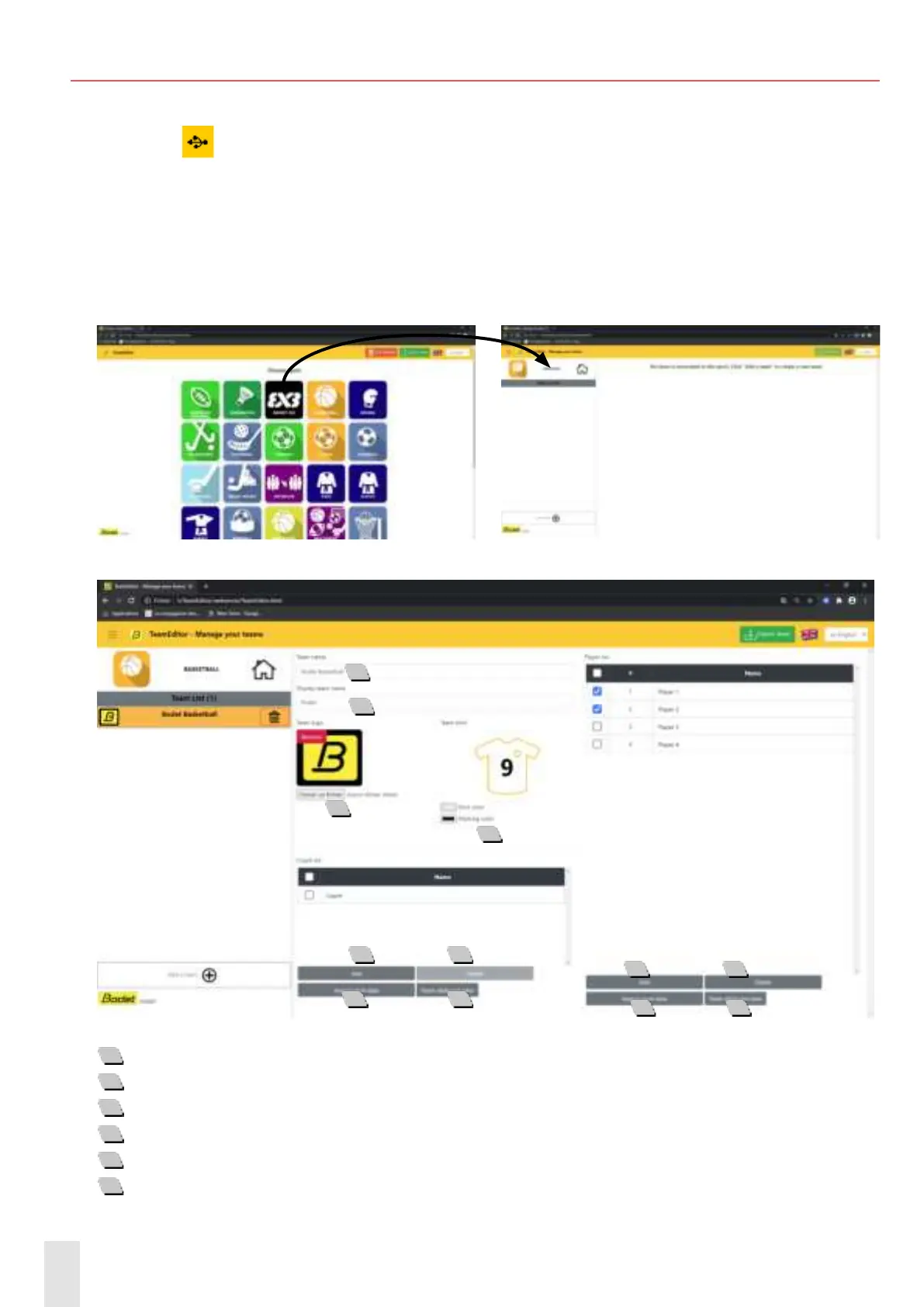
7- Choose a sport on the home screen (example below with Basketball) :
8- Click on Add a team:
1
Type in the team’s name.
2
Type in the team’s name that will be displayed on the scoreboard.
3
Import a team logo.
4
Choose the team color.
5
Add one or several players or coach(es).
6
Delete one or several players or coach(es).
1
2
3
4
5 6
5 6
7
7
8
8


 To Next Page