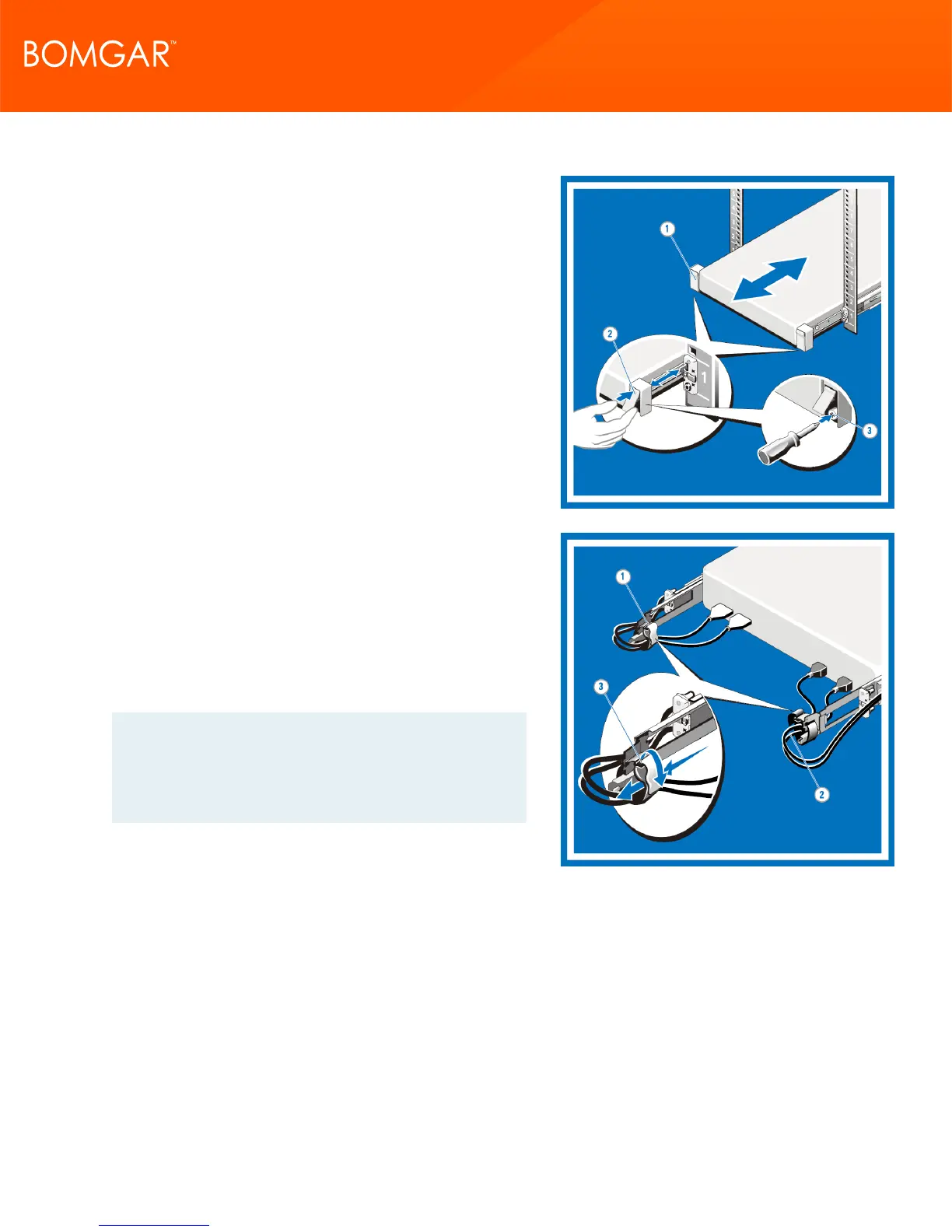
6. Engaging and Releasing the Slam Latch
Facing the front, locate the slam latch on either side of the system
(1).
The latches engage automatically as the system is pushed into the
rack and are released by pulling up on the latches (2).
To secure the system for shipment in the rack or for other unstable
environments, locate the hard-mount screw under each latch and
tighten each screw with a #2 Phillips screwdriver (3).
7. Routing the Cables
Locate the outer CMA brackets on the interior sides of both rack
flanges (1).
Bundle the cables gently, pulling them clear of the system
connectors to the left and right sides (2).
Thread the hook and loop straps through the tooled slots on the
outer CMA brackets on each side of the system to secure the cable
bundles (3).
Note: For your convenience, your appliance includes an
optional Cable Management accessory kit which can further
improve cable routing at the rear of the appliance. Refer to the
detailed instructions included with the kit if you would like to
install this accessory.
CONTACT BOMGAR info@bomgar.com | 866.205.3650 (US) | +44 (0) 1628 480 210 (UK/EMEA) BOMGAR.COM 13
© 2017 Bomgar Corporation. All rights reserved worldwide. BOMGAR and the BOMGAR logo are trademarks of Bomgar Corporation; other trademarks shown are the property of their respective owners. TC: 1/11/2018
REMOTE SUPPORT APPLIANCE INSTALLATION



 To Next Page