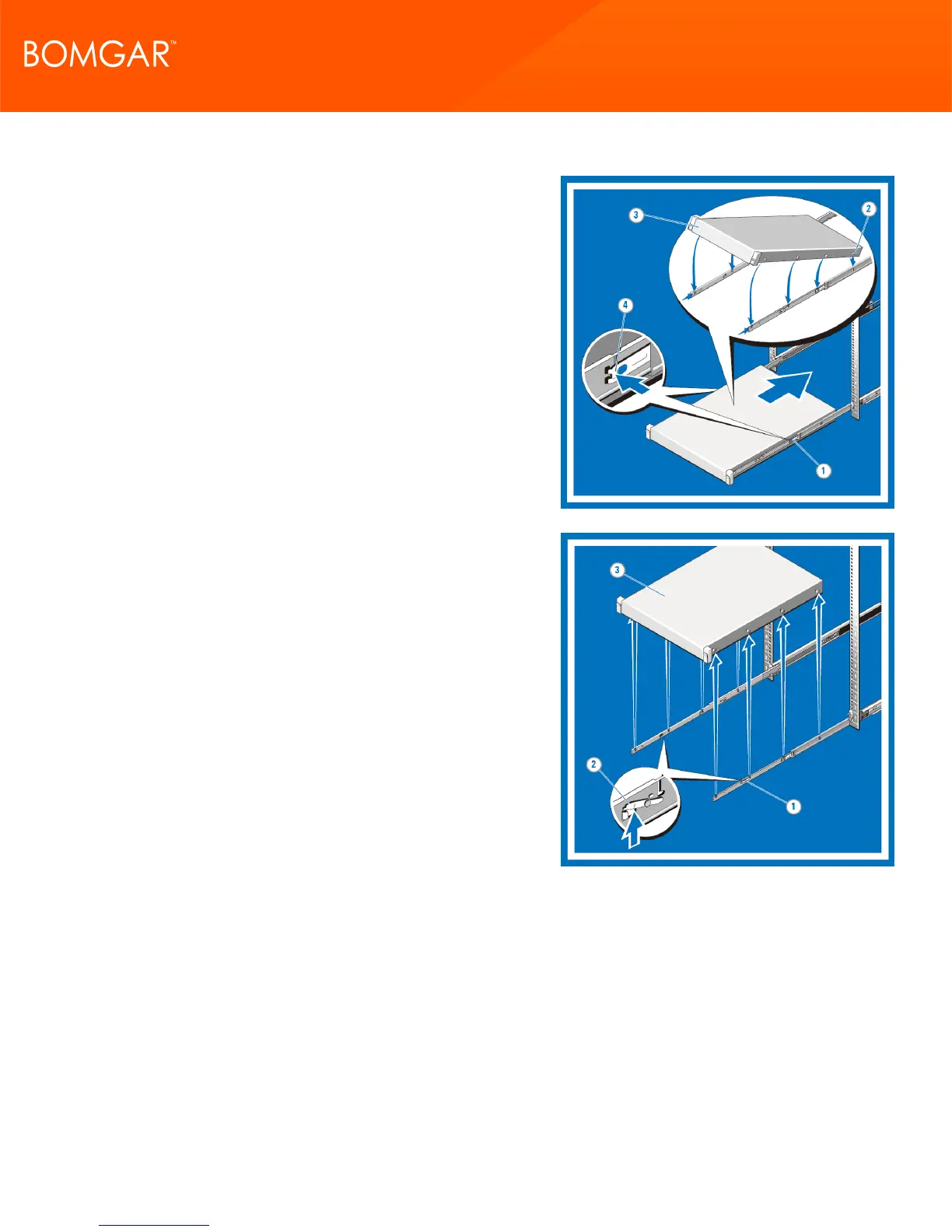
4. Installing the System in a Rack
Pull the inner slide rails out of the rack until they lock into place (1).
Locate the rear rail standoff on each side of the system and lower
them into the rear J-slots on the slide assemblies (2).
Rotate the system downward until all the rail standoffs are seated in
the J-slots (3).
Push the system inward until the lock levers click into place. Press
the slide-release lock buttons on both rails and slide the system
into the rack (4).
5. Removing the System from the Rack
Locate the lock levers on the sides of the inner rails (1).
Unlock each lever by rotating it up to its release position (2).
Grasp the sides of the system firmly and pull it forward until the rail
standoffs are at the front of the J-slots. Lift the system up and away
from the rack and place it on a level surface (3).
CONTACT BOMGAR info@bomgar.com | 866.205.3650 (US) | +44 (0) 1628 480 210 (UK/EMEA) BOMGAR.COM 12
© 2017 Bomgar Corporation. All rights reserved worldwide. BOMGAR and the BOMGAR logo are trademarks of Bomgar Corporation; other trademarks shown are the property of their respective owners. TC: 1/11/2018
REMOTE SUPPORT APPLIANCE INSTALLATION



 To Next Page