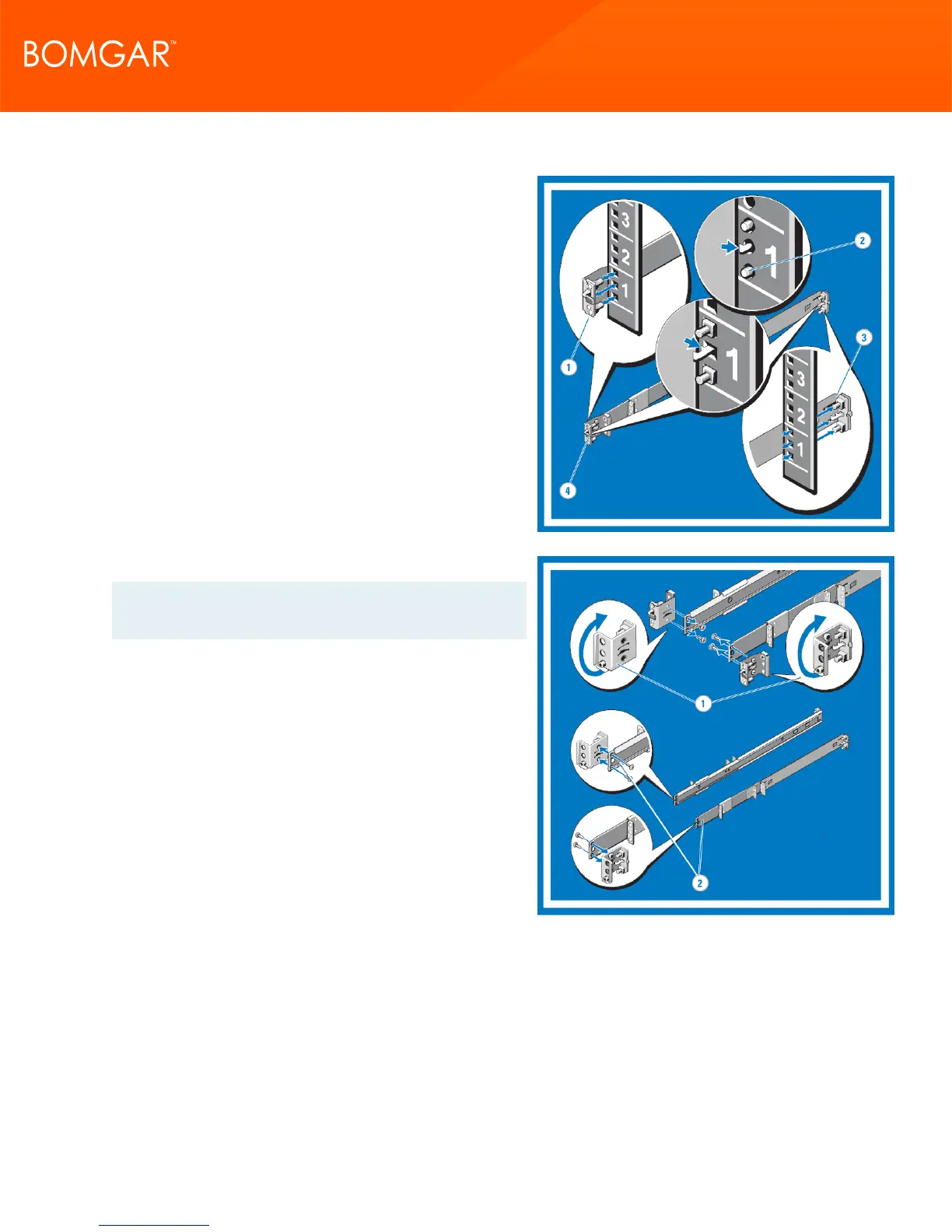
2. Installing and Removing Tool-less Static Rails ( Four-Post)
Position the left and right rail end pieces labeled FRONT
facing inward and orient each end piece to seat in the
round or square holes on the front side of the vertical rack
flanges.
Align each end piece to seat the pegs in the bottom hole and
the top hole of the first U.
Engage the back end of the rail until it fully seats on the vertical
rack flange. Repeat these steps to position and seat the front
end piece on the vertical flange.
To remove the rails, pull on the latch release button on the end
piece midpoint and unseat each rail.
3. Configuring Flush-Mount Static Rails (Two- or Four-Post)
Note: The rails as they are shipped must be converted to
tooled rails to install in a flush-mounted rack.
Lay both rails flat with both end pieces facing up. Remove the
two screws on the front end pieces and rotate each piece 180
degrees.
Reattach both end pieces with the two pairs of screws.
CONTACT BOMGAR info@bomgar.com | 866.205.3650 (US) | +44 (0) 1628 480 210 (UK/EMEA) BOMGAR.COM 7
© 2017 Bomgar Corporation. All rights reserved worldwide. BOMGAR and the BOMGAR logo are trademarks of Bomgar Corporation; other trademarks shown are the property of their respective owners. TC: 1/11/2018
REMOTE SUPPORT APPLIANCE INSTALLATION



 To Next Page