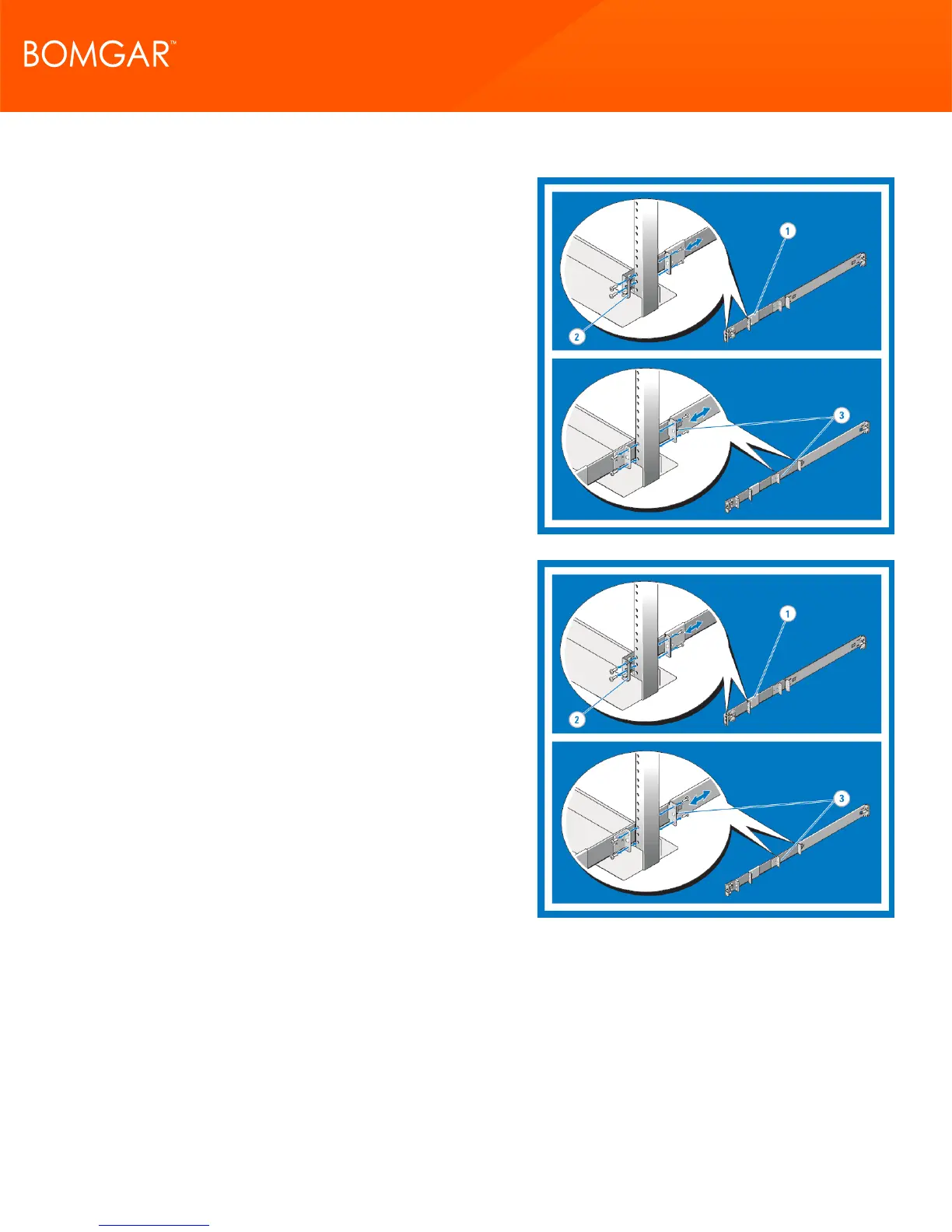
4. Installing Flush-Mount or Center-Mount Static Rails (Two-Post)
Attach right and left mounting rails to the front mounting flanges
with two pairs of screws.
Slide each flush-mount adjustable bracket forward against the
two-post rack. Secure each side to the mounting flange with two
pairs of screws.
For a center-mount installation, push the adjustable rear
mounting brackets toward the back of the right and left
mounting rails. Attach the fixed center mount brackets to the
front mounting flanges with two pairs of screws. Slide both the
adjustable rear-mounting brackets forward against the two-post
rack. Secure each side to the mounting flange with two screws.
5. Configuring Four-Post Threaded Static Rails
To configure the rear end pieces of your rails for a tooled
installation, perform the following steps:
Press the rail release button on each rail to disengage the rear
segments.
With the end pieces positioned outward, align and rejoin the
midsections and slide the rear segments into place until the
release button engages.
CONTACT BOMGAR info@bomgar.com | 866.205.3650 (US) | +44 (0) 1628 480 210 (UK/EMEA) BOMGAR.COM 8
© 2017 Bomgar Corporation. All rights reserved worldwide. BOMGAR and the BOMGAR logo are trademarks of Bomgar Corporation; other trademarks shown are the property of their respective owners. TC: 1/11/2018
REMOTE SUPPORT APPLIANCE INSTALLATION



 To Next Page