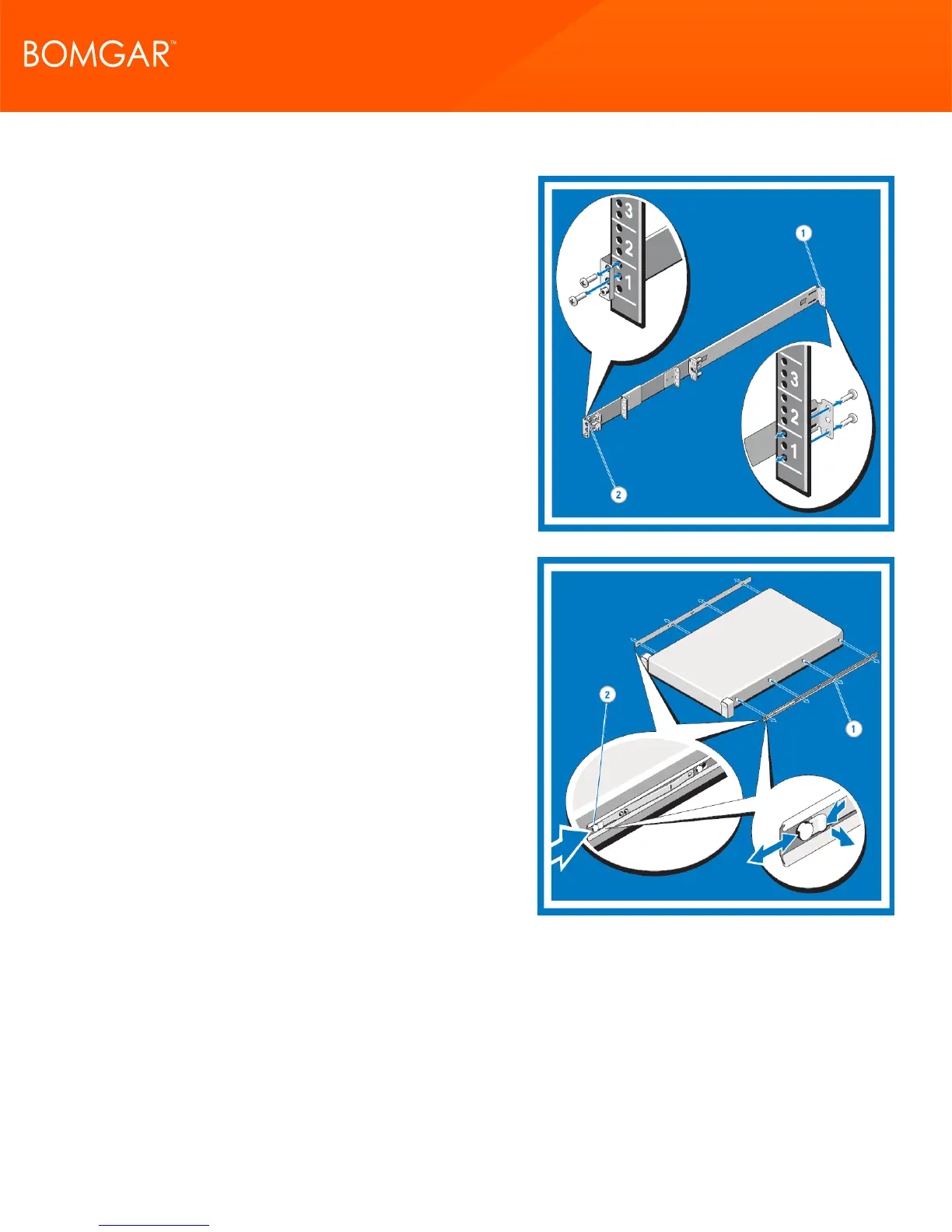
6. Installing and Removing Four-Post Threaded Static Rails
Attach the right and left mounting rails to the front mounting
flanges with two pairs of screws.
Repeat the preceding step for the rear mounting flanges.
7. Installing and Removing Chassis Rail Members
Place the system on a level surface and align the keyhole slots
on the chassis rail members with the pins on the system.
Slide the chassis rail members toward the back of the system
until they lock into place. To remove the chassis rail members,
lift the lock spring until it clears the head of the pin.
Slide the chassis rail member towards the front of the system
until the pins slip through the keyhole slots.
CONTACT BOMGAR info@bomgar.com | 866.205.3650 (US) | +44 (0) 1628 480 210 (UK/EMEA) BOMGAR.COM 9
© 2017 Bomgar Corporation. All rights reserved worldwide. BOMGAR and the BOMGAR logo are trademarks of Bomgar Corporation; other trademarks shown are the property of their respective owners. TC: 1/11/2018
REMOTE SUPPORT APPLIANCE INSTALLATION



 To Next Page